web
You’re offline. This is a read only version of the page.
close
Skip to main content

Announcements

No record found.

News and Announcements icon
Community site session details

Community site session details

Session Id :
Business Central forum

Error message when transitioning from trial instance

(0) ShareShare
ReportReport
Posted on by

I have a client who is trying to transition from a trial instance.  After he accepts the terms and conditions the next screen he gets is an error message of which a picture is attached. He cannot go any further. When he restarts the instance he gets the same error message and is in an endless loop.
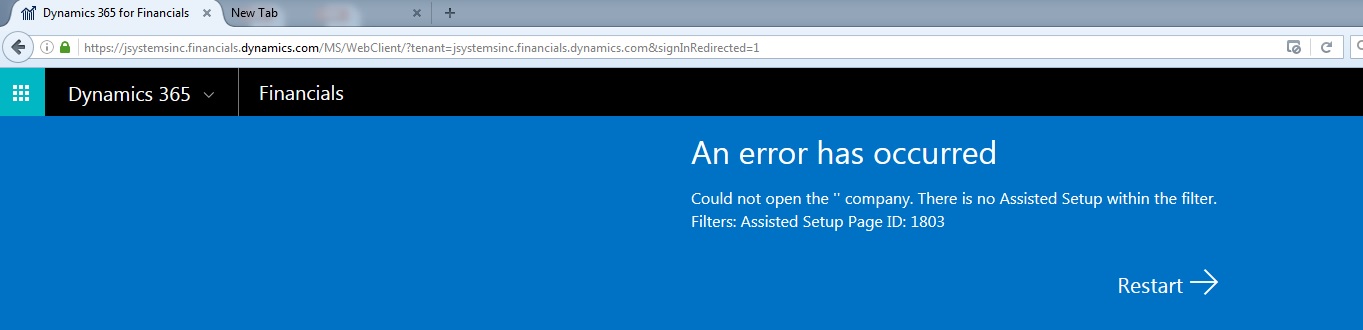
Error-Message.jpg

Categories:
I have the same question (0)
  • Chris Bulson Profile Picture
    Microsoft Employee on at

    Do they see the same error if they attempt to navigate directly to the site?

    jsystemsinc.financials.dynamics.com/.../WebClient

    Thanks,

    Chris

  • Community Member Profile Picture
    on at

    Chris, my client unfortunately ends up at the same place with the same error. 

  • Chris Bulson Profile Picture
    Microsoft Employee on at

    Hello Mark,

    Thanks for the info - I'm going to have to look into this on the back-end.  I'll update this post when I have more information.

    Thanks,

    Chris

  • Community Member Profile Picture
    on at

    Thank you Chris.

  • Community Member Profile Picture
    on at

    Try opening a browser in private-browsing/incognito mode. That usually fixes it for me.

  • Community Member Profile Picture
    on at

    My client tried opening Dynamics 365 in In Private Browsing and received the following error.


    Dynamics-365-Error.png


  • Verified answer
    Chris Bulson Profile Picture
    Microsoft Employee on at

    Please try the following steps:

    Navigate to jsystemsinc.financials.dynamics.com/.../Default.aspx

    Navigate to the "Companies" page via search

    Uncheck "Enabled Assisted Company Setup" for the company the customer is trying to get into

    Have the user sign out and back in normally

    Please let me know if you run into any problems with the above steps.  The root cause of this issue is being investigated for permanent fix and this is just a work-around.

    Thanks,

    Chris

  • Community Member Profile Picture
    on at

    Thank you Chris. I've sent those instructions to Kyle and will let you know what he finds out.

  • Community Member Profile Picture
    on at

    Chris,

    That worked! Thank you for your help and diligence to find an answer.

    Mark

Under review

Thank you for your reply! To ensure a great experience for everyone, your content is awaiting approval by our Community Managers. Please check back later.

Helpful resources

Quick Links

November Spotlight Star - Khushbu Rajvi

Congratulations to a top community star!

Forum Structure Changes Coming on 11/8!

In our never-ending quest to help the Dynamics 365 Community members get answers faster …

Dynamics 365 Community Platform update – Oct 28

Welcome to the next edition of the Community Platform Update. This is a status …

Leaderboard > Business Central

Last 30 days Overall leaderboard

Featured topics

Product updates

Dynamics 365 release plans
