web
You’re offline. This is a read only version of the page.
close
Skip to main content

Announcements

No record found.

News and Announcements icon
Community site session details

Community site session details

Session Id :
Finance | Project Operations, Human Resources, ...
Answered

Aged Balances form showing Customers with no open transactions

(0) ShareShare
ReportReport
Posted on by 140

Hi, we are in the testing stage of our production environment.  In our previous test environment, the Aged Balances form showed only Customers with open transactions.  In the production environment, it is showing All Customers including those with no open transactions.  I am not sure how the form is normally setup to filter out those Customers, but I do see that they are showing them with Oldest Debt dates of 12/31/2154 (?)

pastedimage1615323882971v1.png

I have the same question (0)
  • Verified answer
    MATTGUO Profile Picture
    22,349 Moderator on at

    Hi,

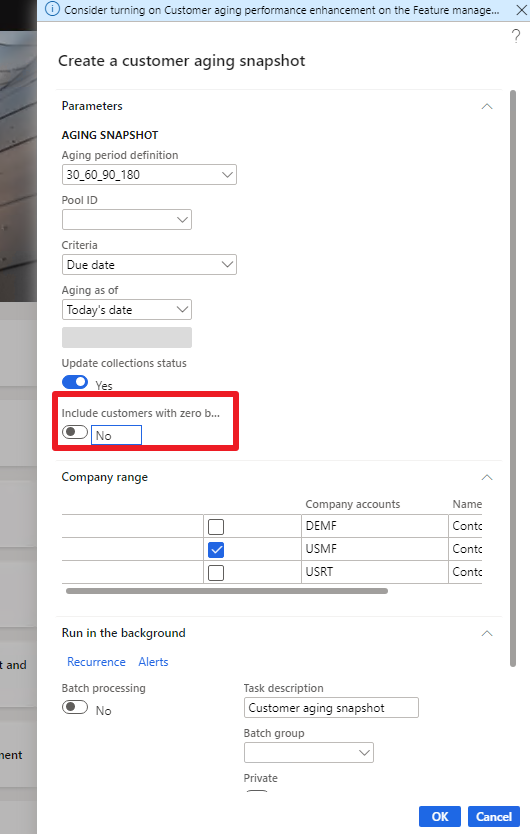
    For the open transactions, that can be controlled by the parameter when running the customer aging snapshot.
    pastedimage1615345968568v1.png

    For the Oldest Debt, please re-run the customer aging snapshot, it should be corrected.

  • David Penna Profile Picture
    140 on at
    [quote user="MATTGUO"]

    Hi,

    For the open transactions, that can be controlled by the parameter when running the customer aging snapshot.

    pastedimage1615345968568v1.png

    For the Oldest Debt, please re-run the customer aging snapshot, it should be corrected.

    [/quote]

    MATTGUO Thanks so much, I had no idea that the Customers shown in the Aged Balances form was CONTROLLED by the Customer Aging Snapshot.  I guess because it's called Age Customer Balances in the Modules list, I assumed it only updated the aging figures in the form, not specified which Customers were shown.  Although I assume not including Customers with $0.00 balances will not update the aging status of those with open credit and debit transactions that net to $0.00, it's a very minimal problem.

    As for the 12/31/2154 Oldest Debt dates, running the Customer Aging Snapshot without including Customers with $0.00 balances didn't show those Customers... not sure if that is really a correction.  Running it again WITH $0.00 balance Customers resulted in the same 12/31/2154 dates... so it seems to be a limitation of the system to use that date for Customers without open transactions.

  • David Penna Profile Picture
    140 on at

    Related question -- anyone know how to change the DEFAULT value of the "Include customers with zero balance" slider?  Ours defaults to Yes, we'd like it to default to No.

    pastedimage1620052667006v1.png

Under review

Thank you for your reply! To ensure a great experience for everyone, your content is awaiting approval by our Community Managers. Please check back later.

Helpful resources

Quick Links

Introducing the 2026 Season 1 community Super Users

Congratulations to our 2026 Super Stars!

Meet the Microsoft Dynamics 365 Contact Center Champions

We are thrilled to have these Champions in our Community!

Congratulations to the March Top 10 Community Leaders

These are the community rock stars!

Leaderboard > Finance | Project Operations, Human Resources, AX, GP, SL

#1
Giorgio Bonacorsi Profile Picture

Giorgio Bonacorsi 659

#2
André Arnaud de Calavon Profile Picture

André Arnaud de Cal... 465 Super User 2026 Season 1

#3
Syed Haris Shah Profile Picture

Syed Haris Shah 304 Super User 2026 Season 1

Last 30 days Overall leaderboard

Product updates

Dynamics 365 release plans
