web
You’re offline. This is a read only version of the page.
close
Skip to main content

Notifications

Announcements

No record found.

Community site session details

Community site session details

Session Id :
Microsoft Dynamics CRM (Archived)

How do I change the Price List field to no be mandatory filled on

(0) ShareShare
ReportReport
Posted on by

Hi all

I am fairly new to Dynamics CRM so apologies for what may be a very simple solution.

I am trying to remove the red asterix (field must be filled in) from an Order form we use.

I have gone into Settings, Customization, Customize the System.

Then selected the Order form from Entites

I can see the Price List field and next to it is a Red lock and the Red asterix.
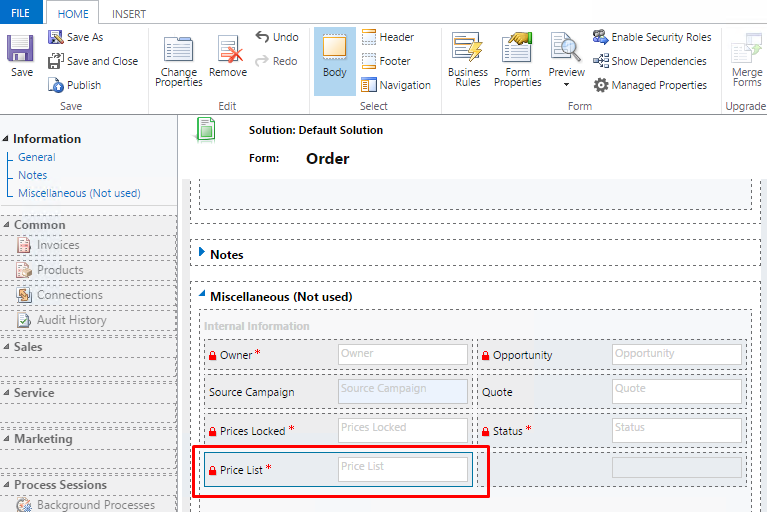
OrderForm.png

I double click on the field but I don't see any option to say that the field doesn't need to be filled in.
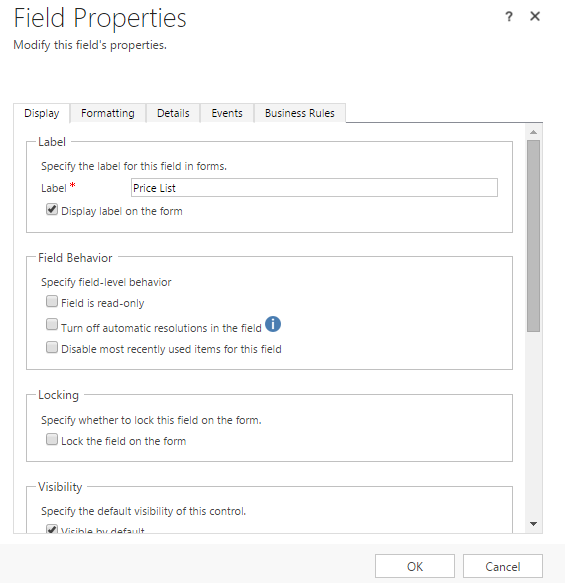
OrderForm2.png

Can anyone point me in the right direction.

Thanks in advance

Steve

*This post is locked for comments

I have the same question (0)
  • Verified answer
    ManirajKV Profile Picture
    1,477 on at

    Hi ,

    you can go to the Order entity and click forms and choose the field you want to change and then change the field requirement.

    or click the form - > double click the field -> click details tab - > click EDIT , it will open the field. then you can do the field level settings

    hope it helps, please mark my answer as verified.

  • Verified answer
    Community Member Profile Picture
    on at

    Hii.

    Try to open : Customization - > Customize the system

    The choose the entity where the field belong

    Random4.jpg

    Then click field : open the field (look at the picture above) -> then double click the field which you want to remove its red asterix.

    Random4.jpg

    On the field requirement, you have to set the field requirement to "Optional". 
    Save close and publich.

    Hope its help  ^_^

  • Suggested answer
    Jagannath Profile Picture
    545 on at

    Hi SVH,

    Go To Setting->Customization->Customize the System->click on that.

    Go to your "Order" Entity->Fields->Go to your respective field.->Field requirement ->make it optional.

    Don't forget to publish it.

    Refresh your Browser.

    Then you are done.

  • Aileen Gusni Profile Picture
    44,524 on at

    Hi Steve

    You can try to go to the customization and then change the requirement option to optional.

    But one thing to remember is this field is something you need to add new product line items.

    So definitely you still need this field if you want to add the product in the opportunity or quote or order.

    Hope this helps.

    THanks.

  • Community Member Profile Picture
    on at

    Thanks very much.. This worked.

Under review

Thank you for your reply! To ensure a great experience for everyone, your content is awaiting approval by our Community Managers. Please check back later.

Helpful resources

Quick Links

Responsible AI policies

As AI tools become more common, we’re introducing a Responsible AI Use…

Neeraj Kumar – Community Spotlight

We are honored to recognize Neeraj Kumar as our Community Spotlight honoree for…

Leaderboard > 🔒一 Microsoft Dynamics CRM (Archived)

#1
SA-08121319-0 Profile Picture

SA-08121319-0 4

#1
Calum MacFarlane Profile Picture

Calum MacFarlane 4

#3
Alex Fun Wei Jie Profile Picture

Alex Fun Wei Jie 2

Last 30 days Overall leaderboard

Featured topics

Product updates

Dynamics 365 release plans



