web
You’re offline. This is a read only version of the page.
close
Skip to main content

Notifications

Announcements

No record found.

Community site session details

Community site session details

Session Id :
Microsoft Dynamics CRM (Archived)

Plugin error "Could not load file or assembly Microsoft.SqlServer.DTSRuntimeWrap"

(0) ShareShare
ReportReport
Posted on by

Hi, all.

I am using Dynamics CRM 2016 on-premises and MS Sql Server 2014 on 64-bit operation system Windows Server 2012r2 on different machines.
I want to run ssis package from dynamics crm plugin dll.
The plugin code has references
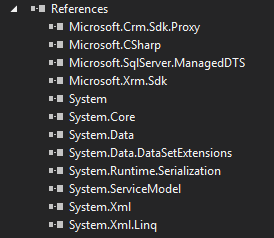
I successfully registered the plugin as on-disk assembly and the step. I put Microsoft.SqlServer.ManagedDTS.dll into *crm*\Server\bin\   and *crm*\Server\bin\assembly\ 

I also registered it in GAC.

But when the plugin step is running - I am getting the error:

Could not load file or assembly 'Microsoft.SqlServer.DTSRuntimeWrap, Version=12.0.0.0, Culture=neutral, PublicKeyToken=89845dcd8080cc91' or one of its dependencies. The system cannot find the file specified


The 64-bit version of Microsoft.SqlServer.DTSRuntimeWrap.dll exists in *crm*\Server\bin\   and *crm*\Server\bin\assembly\
Why it cannot see the dll?
What am I doing wrong?

Thank you.
With regards, Yuriy.

*This post is locked for comments

I have the same question (0)
  • Verified answer
    a33ik Profile Picture
    84,331 Most Valuable Professional on at

    Hello Yuriy,

    Question - have you registered your plugin in isolation mode or not? If you registered it in isolation - try to register it without isolation.

    Suggestion - GAC, File System are not best friends when you develop plugins/custom workflow activities for CRM. Have you tried to use ILmerge to include referenced assemblies into one package? I use it and it works perfectly. Try it - nicknow.net/dynamics-crm-ilmerge-dll-plugin

  • Vikram.kshatri Profile Picture
    35 on at

    Hello,

    I am facing the same issue even used ILMerge. It throws canot load assembly error in Plugin though it works perfect in custom workflow. I have used ILMerge in both but when I call IserviceProvider.Invoke then get this error.

    Thanks,

    Vikram

Under review

Thank you for your reply! To ensure a great experience for everyone, your content is awaiting approval by our Community Managers. Please check back later.

Helpful resources

Quick Links

Responsible AI policies

As AI tools become more common, we’re introducing a Responsible AI Use…

Neeraj Kumar – Community Spotlight

We are honored to recognize Neeraj Kumar as our Community Spotlight honoree for…

Leaderboard > 🔒一 Microsoft Dynamics CRM (Archived)

#1
SA-08121319-0 Profile Picture

SA-08121319-0 4

#1
Calum MacFarlane Profile Picture

Calum MacFarlane 4

#3
Alex Fun Wei Jie Profile Picture

Alex Fun Wei Jie 2

Last 30 days Overall leaderboard

Featured topics

Product updates

Dynamics 365 release plans
