web
You’re offline. This is a read only version of the page.
close
Skip to main content

Announcements

No record found.

News and Announcements icon
Community site session details

Community site session details

Session Id :
Microsoft Dynamics AX (Archived)

"There can only be one vendor transaction per invoice" when posting Receipts Journal

(0) ShareShare
ReportReport
Posted on by

Hello AX Brains Trust!

We are trying to post a Receipts Journal but getting the above error. The strange thing is, we have been successfully posting this same journal for months. (it is practically a template detail wise!) I have referred back to previous posts and I cannot find anything different in this journal, however, it still refuses to post. Please help!
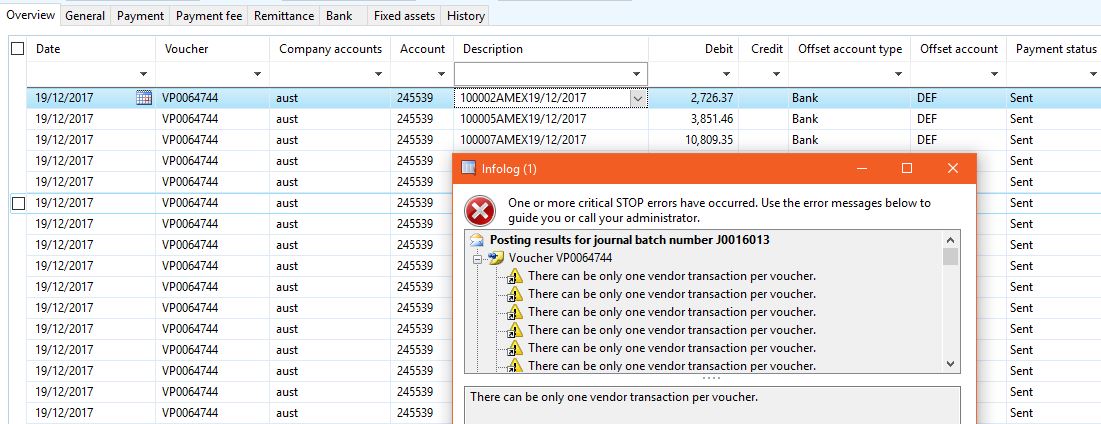
Receipts-Journal-Error.JPG

Thanks in advance.

*This post is locked for comments

I have the same question (0)
  • Suggested answer
    Mahmoud Hakim Profile Picture
    17,887 on at

    you can check this thread for same error

    community.dynamics.com/.../196099

  • Ludwig Reinhard Profile Picture
    Microsoft Employee on at

    Hi,

    This looks not like a product receipt journal but a GL journal. How did you create those lines and why do you have a single voucher only?

    Best regards

    Ludwig

  • Community Member Profile Picture
    on at

    Hi Ludwig,

    This journal was created via an Atlas upload. It is to pay off all our employee corporate Amex cards pretty much.

    The process is done monthly.

  • Chandra Wijaya Setiawan Profile Picture
    1,145 on at

    You may want to check your journal name setup under GL/setup/journal/journal name

    Then look the parameter new voucher value should be 'in connection's with balance

    With this parameter you should have one voucher number per line instead of same voucher for all linrs as per Ludwig question

  • Suggested answer
    Ludwig Reinhard Profile Picture
    Microsoft Employee on at

    Hi Satrangi,

    In the uploaded journal there is only a single voucher used ..64744.

    Has this also been the case in the previous months?

    Because you have an account and Offset account in each line I would expect seeing multiple voucher numbers.

    Can this be an issue with the numbers and Cent-roundings so that AX cannot identify the new voucher number?

    Best regards,

    Ludwig

  • Community Member Profile Picture
    on at

    Hi Ludwig - Yes, this is the same process every month and previously the journals have posted without an issue. It is only in the last couple of months i.e last two journals that this error has popped up. I have investigated the previous journals and they are all the same voucher number.

    Hi Chandra - Yes, you are right. It says in connection with balance. It is the Vendor Payment journal process. Would it be possible to replicate this payment setup and create a new journal name for amex payments with the one voucher number only setup? Will the two clash and cause issues?

  • Suggested answer
    Chandra Wijaya Setiawan Profile Picture
    1,145 on at

    Actually you should contact globe software support to check it the behavior. In connection with balance means it will create new voucher for the line if previous entry has balanced debit and credit

    Let say you enter first line voucher v001 credit vendor 100

    Second line voucher is same because debit credit not balance yet you enter debit expense 100

    Third line system check hey previous lines balance already then third line will be assigned with new voucher v002

    If you are using offset account basically it is balance debit credit so each line will be different

    You can test this behavior with manual entry not upload

    Your issue two vendor transaction can't use same voucher is standard ax behavior to prevent issue on exchange adjustment but this is another topic

    So the things I don't understand is why previously ax can accept multiple vendor transaction using same voucher

    Secondly the atlasxl behaviorthe upload not following ax setup which is wrong

    I have used atlas before it works for setup in connection with balance

    So it must be wrong with the atlas template or version u are using

    Another thing you may check on the journal line did you enter value in invoice field. It should be empty I think for payment transaction

  • Suggested answer
    Ludwig Reinhard Profile Picture
    Microsoft Employee on at

    Hi Satrangi,

    When you prepare your data in Atlas can you ensure that the amounts uploaded have only 2 decimal places and balance on those 2 decimal places?

    Please double check that by copying the data to Excel.

    I once had a similar issue where we prepared the data in a way that figures with more than 4 decimal places were uploaded and did not exactly balance.

    Another thing that you can test is whether changing your currency rounding rules for example to 0.01 helps.

    Best regards,

    Ludwig

  • Verified answer
    Community Member Profile Picture
    on at

    Hello Ludwig and Chandra,

    After some more digging, I was able to get a journal posted. Here are a few things I found which ties back to some of your points.

    The journal is a vendor payment journal loaded via Atlas.

    The journal loads with only one Voucher number.

    The Offset Bank account does not populate for some reason so it has to be manually entered by the user.

    The voucher does not post if there is a tax invoice number or Document ID.

    We got the journal to post by loading it without invoice or document number.

    I'm not an Atlas pro but I believe we need to fix the load file to ensure the Offset account gets populated which should trigger the voucher number to change per line. Otherwise, we'll have to do dr and cr on the same journal load to trigger this.

  • Ludwig Reinhard Profile Picture
    Microsoft Employee on at

    Hi Satrangi,

    Good to hear that you found the underlying issue. If this is the solution you applied, please be so Kind and mark your solution as verified so that also other community members know what to do if they experience the same issue.

    Many thanks and best regards,

    Ludwig

Under review

Thank you for your reply! To ensure a great experience for everyone, your content is awaiting approval by our Community Managers. Please check back later.

Helpful resources

Quick Links

Introducing the 2026 Season 1 community Super Users

Congratulations to our 2026 Super Stars!

Meet the Microsoft Dynamics 365 Contact Center Champions

We are thrilled to have these Champions in our Community!

Congratulations to the April Top 10 Community Leaders

These are the community rock stars!

Leaderboard > 🔒一 Microsoft Dynamics AX (Archived)

#1
CP04-islander Profile Picture

CP04-islander 24

#2
Michel ROY Profile Picture

Michel ROY 14

#3
Jagadabi Profile Picture

Jagadabi 6

Last 30 days Overall leaderboard

Featured topics

Product updates

Dynamics 365 release plans
