Hi Anders,
OOB CRM does not allow a Quote to use more than 1 Price List and you should pick product from the selected price list.
But, if you notice, when you key in the Existing Product, it will give you list of Product by providing the list of Price List Item, which you can choose product from different price list.
If you choose All price List Item, it will show all product that having Price List Item, you will be able to pick product from other price list.

We have this requirement before, because client in their business want to quote to customer 1 quote multiple product from different price list (for example: Promotion Price List, Second Hand Price List, Brand New Price List). So, what we do we are being forced to customize by allowing user to select from other price list.
And even we customize the Quote Product to link to Price List.
But, there is a requirement, you need to make sure that the selected Product + Unit, having default Price List for specific unit, with same currency with Quote Header, otherwise, your extended amount will not be calculated.
To know more about Default Price List you can refer to this blog:
http://missdynamicscrm.blogspot.com/2014/07/10-facts-about-default-price-list-in-CRM2011-2013-that-you-might-not-have-noticed.html
So, let's say you have 3 price for this product:
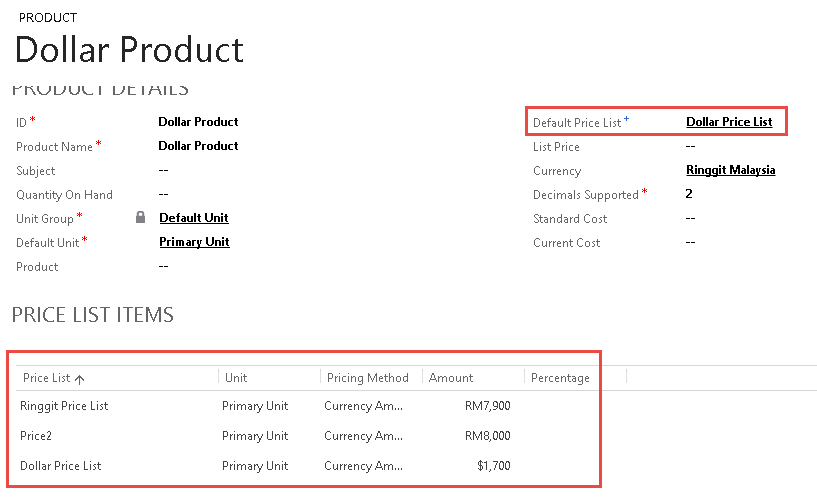
But in the Quote Header you put another Price List,

*Remember in the Product, your default Price List is Dollar Price List.
you can still add in as long as the Product is having Default Price List with same currency, otherwise, you will have a warning (warning only).

So, this example is in the Quote Header you are using Price 3 and Ringgit.
Then, You choose Dollar Product as your Existing Product to be Quoted in this Quote.
The Dollar Product has 3 Price List Item, which is none of them are Price 3 (Price List in the Quote Header), but the Default Price List for this Product, you choose Dollar Price List.
Dollar Product has price $1700 in Dollar Price List Item.
What happened when you select the Dollar Product in the Quote?
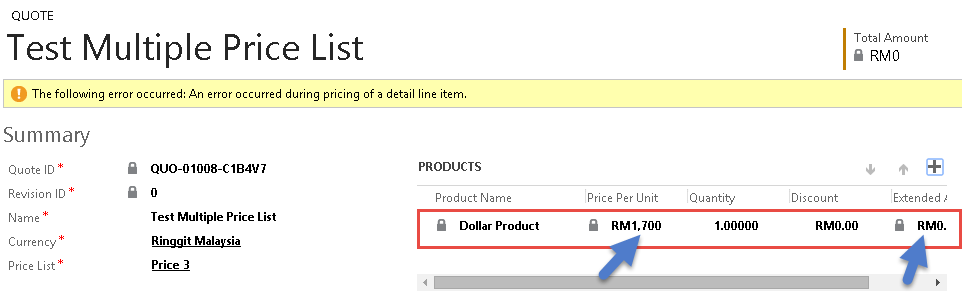
Well, it copy the 1700 as amount, but, it will still use RM (Ringgit), not $, so it will be RM 1700, not $1700.
When you key in Quote Product, you select the Dollar Product as a Product, it will only get you the amount (1700), and it is converted to RM.
And you have Extended Amount = 0 (cannot calculate) because CRM cannot find Dollar Product with Primary Unit with Dollar Price List in currency = Dollar.
What if you change the default price list of this Product to Ringgit Price List (same currency with Header)

*Remember the Price from Default Price list is RM 7900
Then you add new Product and choose Dollar Product:

Yes, it gives you correct figure, RM 7900, yes, it is in RM and it is correct.
So, your question:
is there a way to pick products from more than one price list when creating a quote/order or invoice?
Answer: Yes, you can pick product from different price list as long as the product has default price list with specific unit you defined in the Quote/Order or Invoice Item lines.
Because CRM allows you to choose All Price List Item in the existing product selector so it means basically CRM allows you to add product from many price list even though different from selected Price List in the Quote Header.
But, it is only limited to price list with same currency, because if you select from different currency, remember, in the header there is a Currency, CRM will allow you to pick the Product, but CRM will give you wrong converted amount, if your product is in Price List 2 = 1700 (in Euro), but your Quote Header is USD, then the amount will be USD 1700 (1700 in USD, not in Euro).
So, the answer of your question based on the title is: Yes, Product can have multiple price list with different currency (so, yes product can have multiple currencies set), but Quote/Order/Invoice doesn't support multi currency, 1 Quote can only use 1 Currency selected in the Header for each Product pricing.
Another way, this is only affect you if you use default in the pricing method, different if you use override price, you can use override price to manually calculate your converted amount, converted 1700 (Euro) to x (in USD).
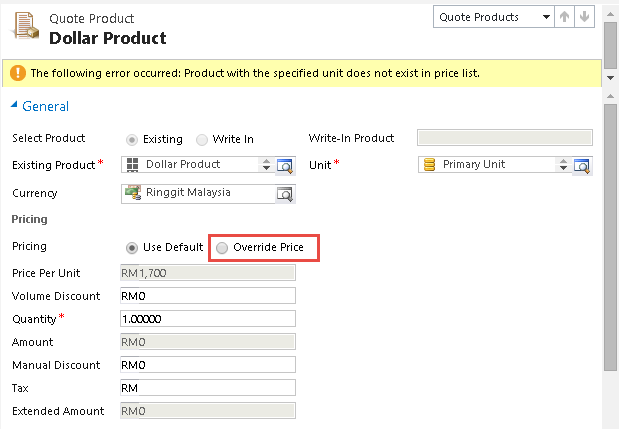
But, again, you need to manually calculated the extended amount since CRM doesn't know this product price.
Thank you.







