web
You’re offline. This is a read only version of the page.
close
Skip to main content

Announcements

No record found.

News and Announcements icon
Community site session details

Community site session details

Session Id :
Finance | Project Operations, Human Resources, ...
Suggested Answer

Create Electronic reporting data model, configuration components missing

(0) ShareShare
ReportReport
Posted on by 75

Hello guys, 

I need to make some changes in Electronic reporting and for that I need to create new data model based on the Payment model in ER. For that I have tried to create new one using "create configuration"
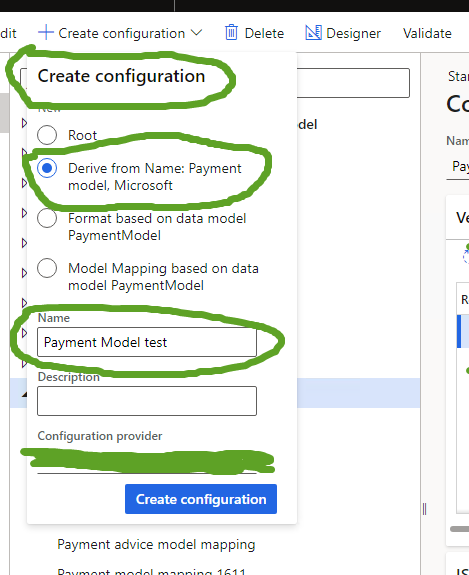
pastedimage1670343163241v5.png

It creates new model, but without Configuration components, especially CT mapping, this is how it looks for Payment model:
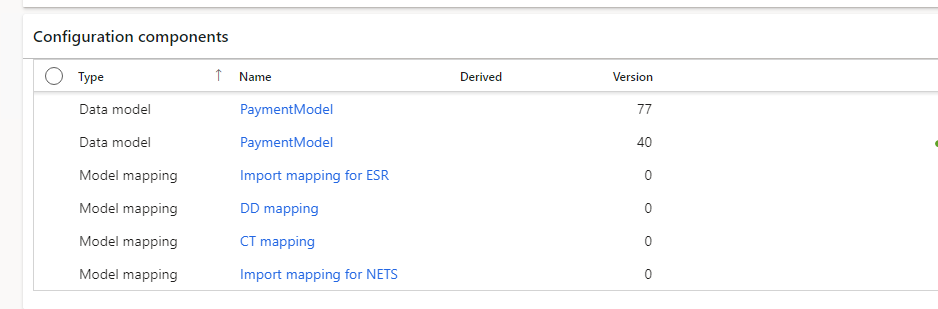
pastedimage1670342940755v3.png

but for the one that I have created, it is like this:
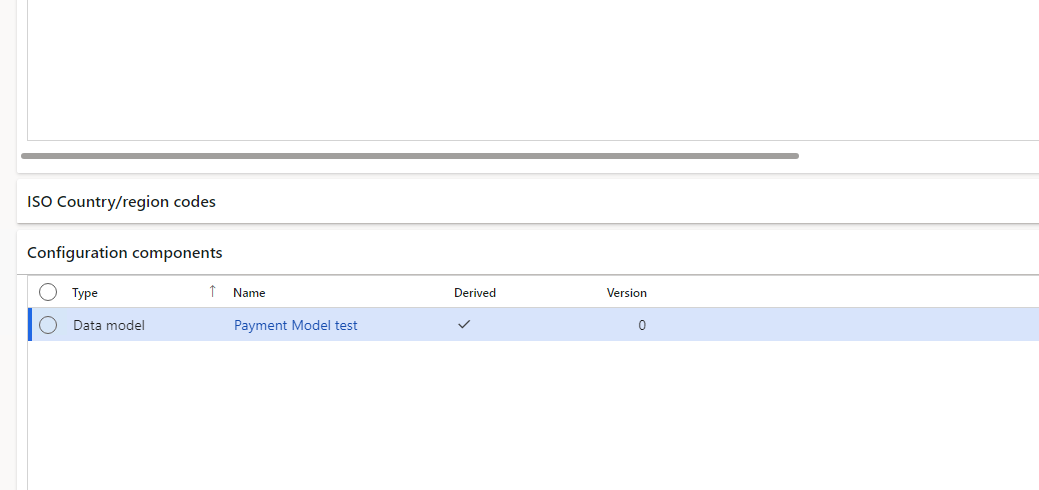
pastedimage1670342979996v4.png

I need to work with CT mapping, but I have no idea how can I get it to the new model, can someone help me, please?

I have tried also other functions in Create configurations, but did not get the required results.

Thanks

I have the same question (0)
  • Suggested answer
    huijij Profile Picture
    19,811 on at

    Hi Sayid,

    To complete the derived data model and model mapping, we have to set the state of the model to completed:

    www.linkedin.com/.../using-er-electronic-reporting-esr-credit-transfer-paul-heisterkamp

  • Sayid Profile Picture
    75 on at

    Hi Judy,

    unfortunately it does not work, it only creates new Data model in Configuration components:

    pastedimage1671108111200v1.png

    isn't somehow necessary to "load from XML file"? 

    pastedimage1671108176242v2.png

    I'm trying that but getting only error "Can not overwrite a version"

Under review

Thank you for your reply! To ensure a great experience for everyone, your content is awaiting approval by our Community Managers. Please check back later.

Helpful resources

Quick Links

Introducing the 2026 Season 1 community Super Users

Congratulations to our 2026 Super Stars!

Meet the Microsoft Dynamics 365 Contact Center Champions

We are thrilled to have these Champions in our Community!

Congratulations to the April Top 10 Community Leaders

These are the community rock stars!

Leaderboard > Finance | Project Operations, Human Resources, AX, GP, SL

#1
André Arnaud de Calavon Profile Picture

André Arnaud de Cal... 593 Super User 2026 Season 1

#2
Giorgio Bonacorsi Profile Picture

Giorgio Bonacorsi 543

#3
CP04-islander Profile Picture

CP04-islander 430

Last 30 days Overall leaderboard

Product updates

Dynamics 365 release plans
