web
You’re offline. This is a read only version of the page.
close
Skip to main content

Announcements

No record found.

News and Announcements icon
Community site session details

Community site session details

Session Id :
Microsoft Dynamics AX (Archived)

Invoice Posting error (from PO)

(0) ShareShare
ReportReport
Posted on by

Hello Colleagues and Expert,

I would like to ask your help since I can' t get out from the problem below:

PONxxx - Approval Status Confirmed.
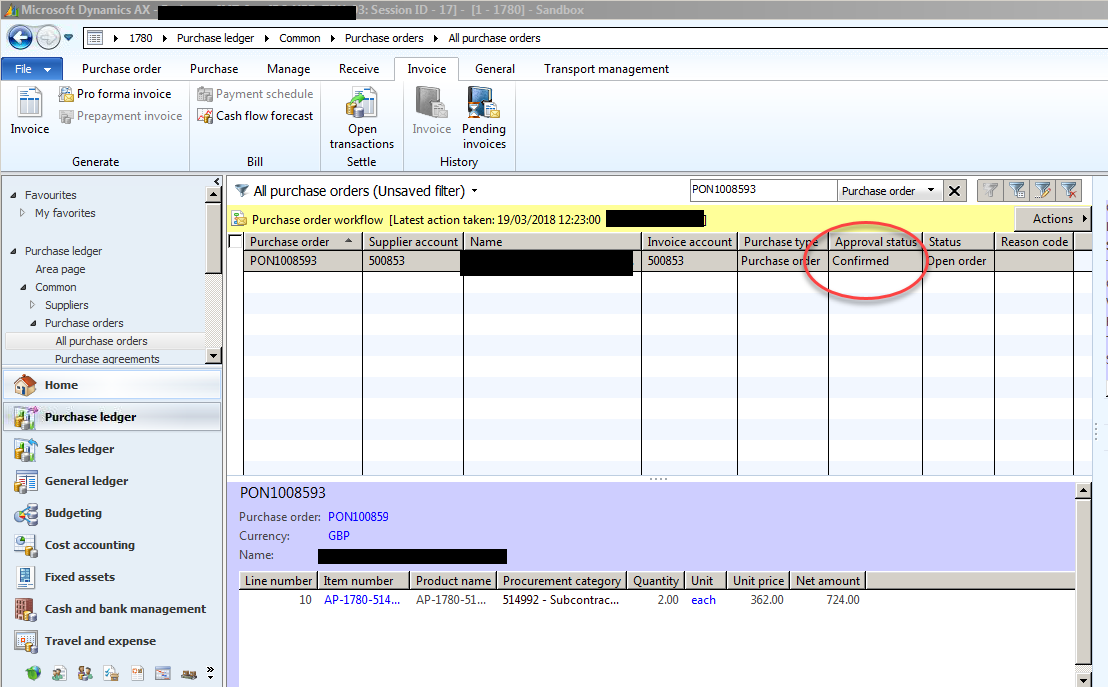
47146.1.png

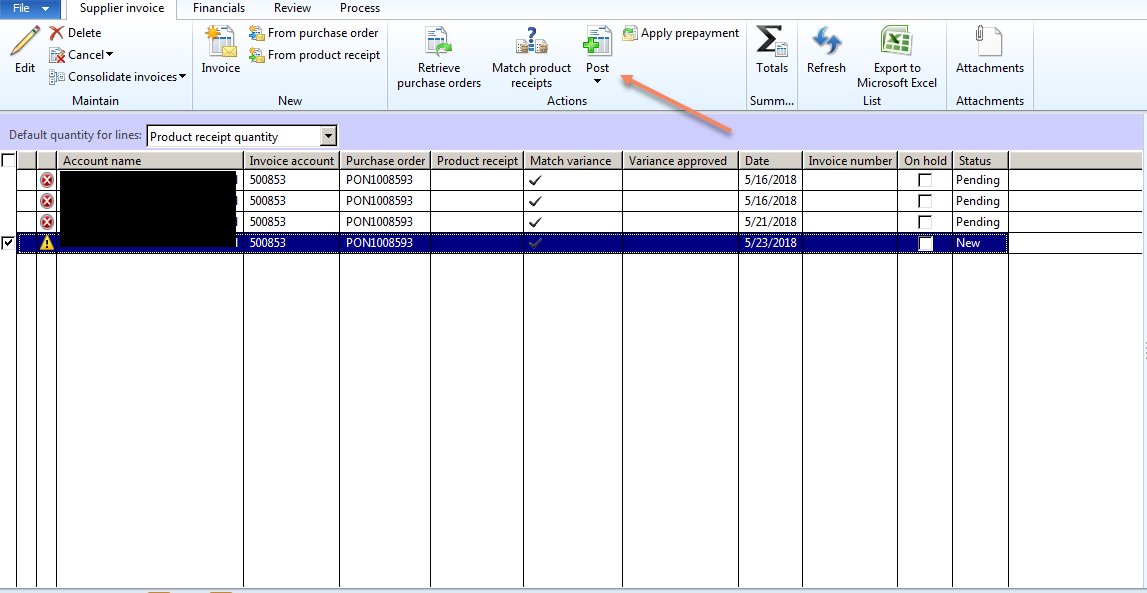
Posting the Invoice.

47004.2.png

the Error is Triggered.

67204.3.png

according at the error (I think) the Product receipt - Receipt list is missing.
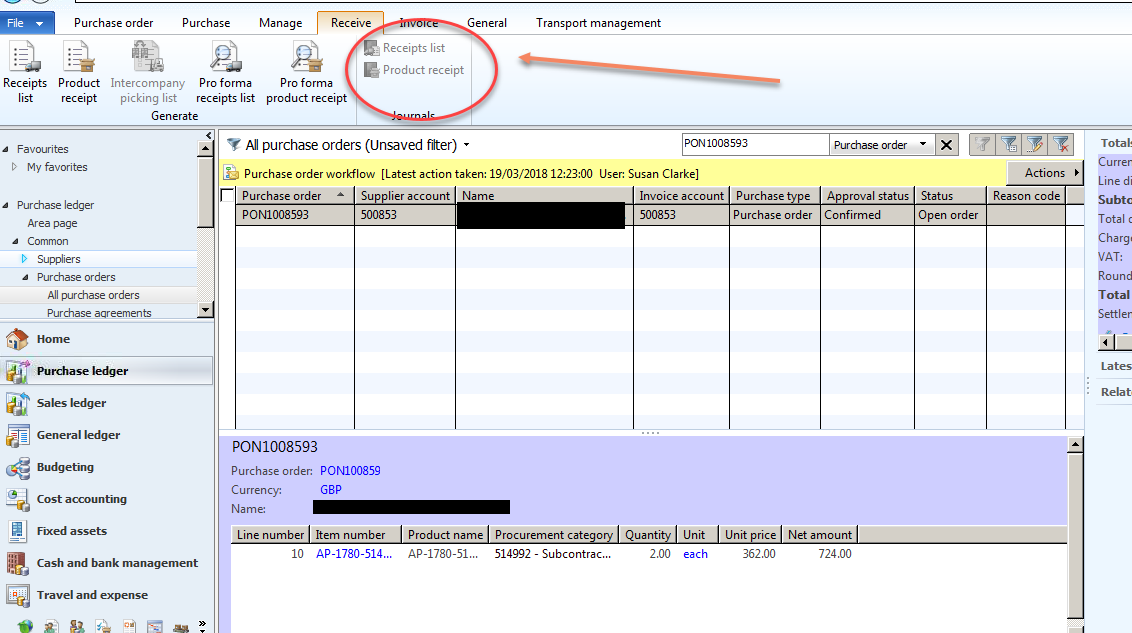
3187.4.png

So the user tried to correct the same however the status of the PO is Received. 

Do you please have any suggestion?

Thanks,
Kind Regards

*This post is locked for comments

I have the same question (0)
  • Verified answer
    Galyna Fedorova Profile Picture
    3,566 on at

    Hi,

    I see that Default quantity for lines field is Product receipt quantity. It means that all received quantities will be selected for the invoice. Since you don't have product receipt, none lines can be selected. You should post Product receipt for Purchase order first (based on the screenshot the status of the purchase order is Open order, not Received). Or you can change Default quantity for lines to one of these: Ordered quantity, Receive now quantity, Registered quantity. Depends on the state of your purchase lines.

  • Suggested answer
    Hossein.K Profile Picture
    6,648 on at

    Hi F. G.,

    You should first Receipt and after invoice.

    Respectively,After add PO:

    1-Purchase Tab/Confirmation

    2-Receive Tab/ProductReceipt

    3-Invoice Tab/Invoice=>Post

  • Community Member Profile Picture
    on at

    Hi Galyna,

    thanks for you suggestion.

    The thing is (I am in Sandbox) when I post Product Receipt I get the below error:

    3806.error.png

  • Verified answer
    Galyna Fedorova Profile Picture
    3,566 on at

    You are experiencing that error, because you are trying to post the product receipt in the closed period. You will need to change the product receipt date or open fiscal period like it's described here: gfeaxblog.wordpress.com/.../ax2012-fiscal-period-is-not-open

  • Community Member Profile Picture
    on at

    Hi Galyna,

    I have now tested in Production and I' ve got a different behavior.

    I need to dig in the matter with the user.

    Thanks for now

  • Community Member Profile Picture
    on at

    Hi Galyna,

    it seems like the Fiscal Period is operating however I still get the error. It is odd.

    2570.calendar.png

  • Suggested answer
    Galyna Fedorova Profile Picture
    3,566 on at

    Please go to General ledger > Setup > Ledger > Ledger calendar button and check period status there. It could be on hold

  • Community Member Profile Picture
    on at

    Morning Galyna,

    the Period 5 is operating - 5/1/2018 - 5/31/2018

  • Suggested answer
    Galyna Fedorova Profile Picture
    3,566 on at

    Morning F.G.,

    I am curious about the Period status, not about Type. Check also Module access level as well. Period status should be Open and Module access should be All

    3441.Calendar.png

  • Community Member Profile Picture
    on at

    Hi Galyna

    I don' t see Period Status into grid

    galy.png

Under review

Thank you for your reply! To ensure a great experience for everyone, your content is awaiting approval by our Community Managers. Please check back later.

Helpful resources

Quick Links

Introducing the 2026 Season 1 community Super Users

Congratulations to our 2026 Super Stars!

Congratulations to our 2025 Community Spotlights

Thanks to all of our 2025 Community Spotlight stars!

Leaderboard > 🔒一 Microsoft Dynamics AX (Archived)

#1
Joris dG Profile Picture

Joris dG 5

#2
Alexey Lekanov Profile Picture

Alexey Lekanov 2

#2
Henrik Nordlöf Profile Picture

Henrik Nordlöf 2 User Group Leader

Last 30 days Overall leaderboard

Featured topics

Product updates

Dynamics 365 release plans