web
You’re offline. This is a read only version of the page.
close
Skip to main content

Announcements

No record found.

News and Announcements icon
Community site session details

Community site session details

Session Id :
Finance | Project Operations, Human Resources, ...
Answered

Creating Electronic Reporting Based on VendInvoiceJournal table in ax365

(0) ShareShare
ReportReport
Posted on by 156

Hi

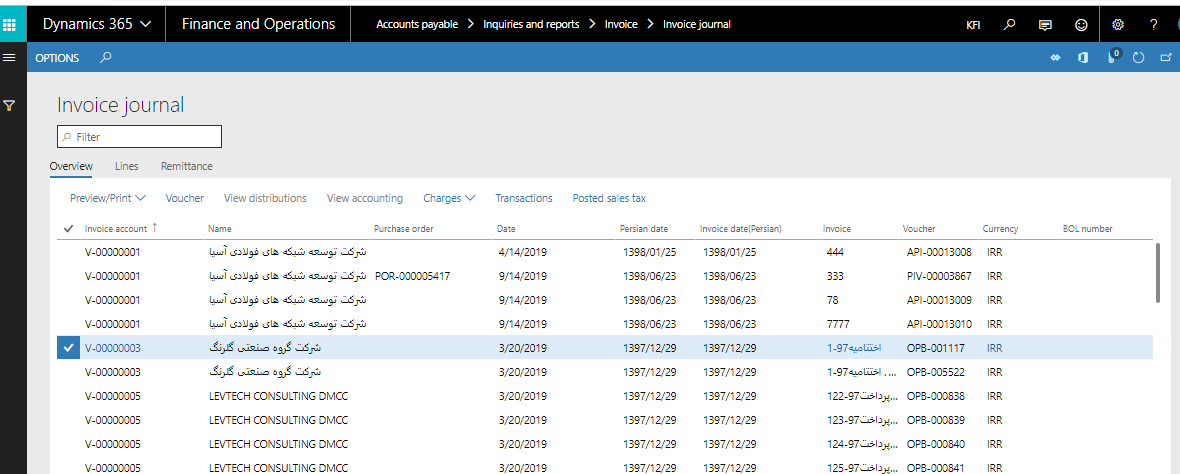
I Wanna to create an Electronic Report Base on VendInvoiceJournal table.

Account Payable--Inquiries and report--invoice--Invoice Journal
pastedimage1576649944370v1.png

in my Report i need to group by based on Invoice Account and in result i should to show sum of (invoice Amount ) and sum of (SalesTax).

i did this below steps:

1- Electronic report--Repositories--Vendor invoice declaration report (IS). and import this.

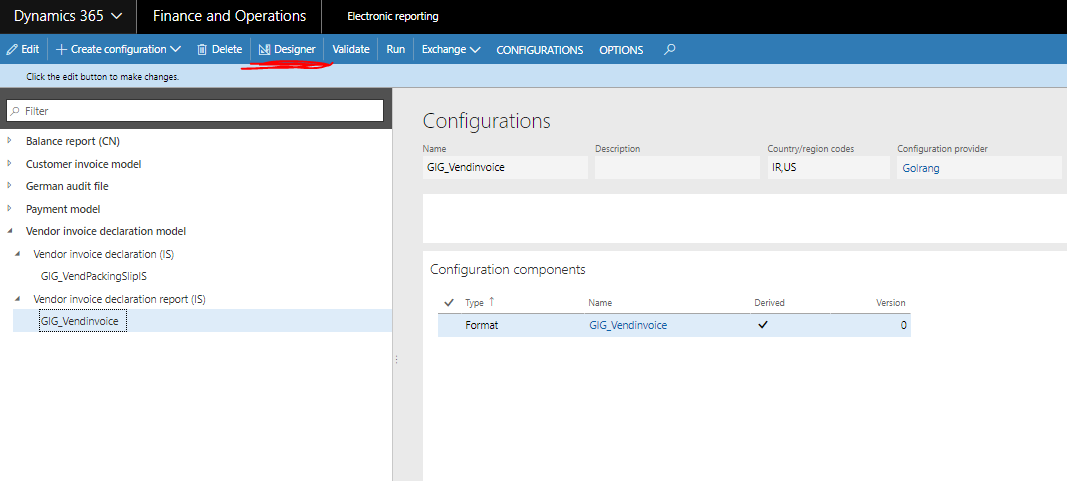
2- i created new configuration based on ( Derive from Name: Vendor invoice declaration report (IS), Microsoft).

3-
pastedimage1576651317778v3.png

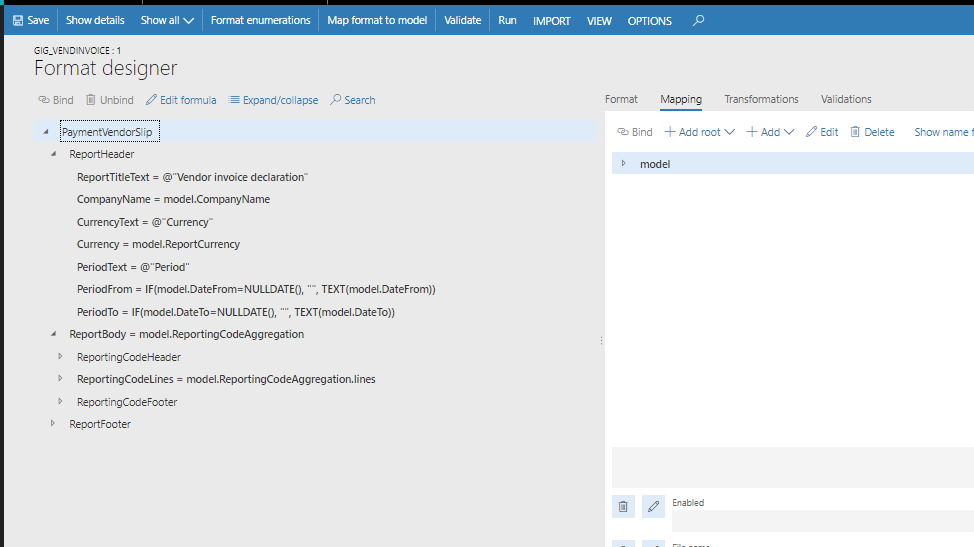
4-  i didn't any changes and select "save" ,
pastedimage1576651391789v4.png

5- i selected "Run".

PaymentVendorSlip.xlsx is created but it's empty!!!!!

--------------------------------------------------------------------------

For Creating  an Electronic Report Base on VendInvoiceJournal table  , What Should i do?/////

Are my steps Correct?

any one can help me?

Regards,

Zahra

I have the same question (0)
  • Suggested answer
    MU-25040629-0 Profile Picture
    Microsoft Employee on at

    Dear Zahra,

    Thank you for posting this issue to our community.

    You must run this report from the menu, not from reporting configuration as you are not passing any data to process. Not sure this report is added to the menu.

  • Zahra Mirzazadeh Profile Picture
    156 on at

    Dear Mihaela

    Thanks for Responding my question.

    which menu do you mean? Could you please explain more?

    For Creating Electronic reporting Based on VendInvoiceJour what should i do ?

    In addition, i wanna show that report, group by (Invoice Account) filed and i should show sum of (invoice Amount) field.

    Could you please help me?

    Regards,

    Zahra

  • Ludwig Reinhard Profile Picture
    Microsoft Employee on at

    Hi Zahra,

    For testing purposes your run should actually work and show some data.

    I have a tip for you:

    Can you import the ISO2022 Credit transfer DE model / configuration in your machine?

    I know that it might not be applicable in your country but it has a payment advice / covering letter included and you seem to look out for something similar

    2146.cover.png

    I think that you will be able to 'borrow' from what has been setup there and compare it with your own design. 

    Best regards, 

    Ludwig

  • Suggested answer
    MU-25040629-0 Profile Picture
    Microsoft Employee on at

    Dear Zahra,

    I made some research and found these instructions for this configuration.

    https://docs.microsoft.com/en-us/dynamics365/finance/localizations/iceland

    Some of the setup is available if legal entity address is set for Iceland. After doing all setup I am able to print the report when I run it from Accounts payable > Inquiries and reports > Invoice > Vendor invoice declaration report. This is what I meant to say that the configuration like this without parameters in the dialog form must be run from the menu. Since there is no selection criteria from electronic reporting it means the data is brought to electronic reporting indirectly, not directly via configuration. This is why you got empty report.

    This is the dialog form when you navigate to Accounts payable > Inquiries and reports > Invoice > Vendor invoice declaration report and represents the selection criteria for the report.

    pastedimage1576669944242v1.png

    This is the output:

    pastedimage1576670006918v2.png

    It might not be a good example of a configuration for you to use if you are not planning to use for a legal entity having similar setup. This is why it would be best if you start from Payment model and create a format based on the payment model.

    Stand on payment model, choose create configuration and select Format based on data model
    pastedimage1576670114731v3.png

    Hope this helps.

  • Zahra Mirzazadeh Profile Picture
    156 on at

    Hi Mihaela 

     As you said in my legal entity there is n't Vendor invoice declaration report In  my Account Payable.

    pastedimage1576735474297v1.png

    and I understood the reason that i got Empty Report from electronic Reporting (Vendor invoice declaration report (IS)) .Thanks for your answer.

    i did your solution and created format based on the payment model:

    1-

    pastedimage1576736409295v2.png

    2-Desigener--Import.

    I Imported SampleVendPaymWsReport.xlsx.

    pastedimage1576739086224v3.png

    3- in Format Designer -- Mapping

    I can see Data Model Based on "Payment". but  i need to add VendInvoiceJour Table tp "PaymentDataModel".

    How Can i Add VendInvoiceJour  table to this Data Model.

    pastedimage1576740684994v5.png

    Could you Please help me ?

    Regards,

    Zahra

  • Zahra Mirzazadeh Profile Picture
    156 on at

    Hi Ludwig

    Thank you for your answer.

    1- I imported ISO2022 Credit transfer DE

    2- i Created Configuration based on this

    3- i add my country to region

    4- i changend status to "Completed".

    How can i use  this Configuration ?(from which form or Report i can see the Result of this Configuration)?

    Many thanks ,

    Zahra

  • Verified answer
    Ludwig Reinhard Profile Picture
    Microsoft Employee on at

    Hi Zahra,

    You probably can't because it is specific for Germany.

    The reason why I mentioned that is because this format has a payment covering letter included (please see my previous screenprint).

    If you open the format designer you can see this covering letter and borrow / copy from this design for your own configuration.

    Best regards,

    Ludwig

  • Zahra Mirzazadeh Profile Picture
    156 on at

    Hi ludwing

    As you Mentioned i did this below steps:

    1-

    pastedimage1576749427668v2.png

    2-

    in Designer i saw Covering Letter.

    3- i added my region country,then changing status to completed.

    pastedimage1576749555044v3.png

    now I want to see the result.

    how can you use this configuration? Could you please show me the Screen shot Of Result and how you use this Configuration?

    Many thanks

    Regards,

    Zahra

  • Suggested answer
    MU-25040629-0 Profile Picture
    Microsoft Employee on at

    Dear Zahra,

    Please check this documentation:

    docs.microsoft.com/.../set-up-method-payment-iso20022-credit-transfer

  • Zahra Mirzazadeh Profile Picture
    156 on at

    Hi Mihaela

    Based on "docs.microsoft.com/.../set-up-method-payment-iso20022-credit-transfer",

    you mentioned about that ,my iso20022 is working well and i can see the output. thanks you very much.

    but still my problem does n't solve. because i want to have a report for all vendors , but in payment journal just show output for one payment, also i need to have group by based on invoiceAccount in vendInvoiceJour table, if i know that how can add my custom data model to default datamodel ,i think my problem will be solved.

    Could you please help me?

    regards,

    Zahra

Under review

Thank you for your reply! To ensure a great experience for everyone, your content is awaiting approval by our Community Managers. Please check back later.

Helpful resources

Quick Links

Introducing the 2026 Season 1 community Super Users

Congratulations to our 2026 Super Stars!

Meet the Microsoft Dynamics 365 Contact Center Champions

We are thrilled to have these Champions in our Community!

Congratulations to the April Top 10 Community Leaders

These are the community rock stars!

Leaderboard > Finance | Project Operations, Human Resources, AX, GP, SL

#1
Giorgio Bonacorsi Profile Picture

Giorgio Bonacorsi 608

#2
André Arnaud de Calavon Profile Picture

André Arnaud de Cal... 591 Super User 2026 Season 1

#3
CP04-islander Profile Picture

CP04-islander 430

Last 30 days Overall leaderboard

Product updates

Dynamics 365 release plans
