web
You’re offline. This is a read only version of the page.
close
Skip to main content

Notifications

Announcements

No record found.

Community site session details

Community site session details

Session Id :
Microsoft Dynamics CRM (Archived)

CrmServiceClient service proxy is null

(0) ShareShare
ReportReport
Posted on by 10

I have a connection problem using the occurs when running a webapi 2 project that connects to CRM online, I cannot connect to CRM online when running locally or when running from Azure as WebApp

I create the client like so
var serviceClient = new CrmServiceClient(AuthType=Office365;Username=<USER_NAME>; Password=<PASSWORD>;Url=https://<HOSTNAME>.api.crm4.dynamics.com/XRMServices/2011/Organization.svc);

Often I have the following properties on the client once instantiated, that means I get a null ref exception when I try to use the client
IsReady = false
+ OrganizationServiceProxy null Microsoft.Xrm.Sdk.Client.OrganizationServiceProxy
+ OrganizationWebProxyClient null Microsoft.Xrm.Sdk.WebServiceClient.OrganizationWebProxyClient
LastCrmError "Unable to Login to Dynamics CRMOrganizationServiceProxy is nullOrganizationServiceProxy is nullOrganizationServiceProxy is nullOrganizationServiceProxy is nullOrganizationServiceProxy is null" string

I've tried creating the following app setting in Azure WEBSITE_LOAD_USER_PROFILE = 1 (true), and in my webapi app I have edited my .vs\config\applicationhost.config so that my app pool has the same setting i.e. <processModel loadUserProfile="true" />

Even though the first error is "clientCredentials.UserName.UserName or clientCredentials.Windows.ClientCredential.UserName MUST be populated!", I know that I am populating the username and password in the connection string, shouldn't that get passed through to the clientcredentials? It seems to be that it cannot connect to the discovery service and I'm guessing it is a authentication issue. Do I need to do more that just use a connection string containing a username and password? Should I be using something like OAuth?

Example
Running webapi 2 project on my machine, connecting to CRM 2016 online

TRACE LOG for failed attempt.

Microsoft.Xrm.Tooling.Connector.CrmServiceClient Error: 2 : Exception while trying to connect Discovery Server, (Canada) URI is = disco.crm3.dynamics.com/.../Discovery.svc
Microsoft.Xrm.Tooling.Connector.CrmServiceClient Information: 8 : Trying Live Discovery Server, (India) URI is = disco.crm8.dynamics.com/.../Discovery.svc
Microsoft.Xrm.Tooling.Connector.CrmServiceClient Information: 8 : DiscoverOrganizations - Initializing Discovery Server Object with disco.crm8.dynamics.com/.../Discovery.svc
Microsoft.Xrm.Tooling.Connector.CrmServiceClient Verbose: 16 : DiscoverOrganizations - attempting to connect to CRM server @ disco.crm8.dynamics.com/.../Discovery.svc
Microsoft.Xrm.Tooling.Connector.CrmServiceClient Verbose: 16 : DiscoverOrganizations - created CRM server proxy configuration for disco.crm8.dynamics.com/.../Discovery.svc - duration: 00:00:01.2694818
Microsoft.Xrm.Tooling.Connector.CrmServiceClient Verbose: 16 : DiscoverOrganizations - proxy requiring authentication type : OnlineFederation
Microsoft.Xrm.Tooling.Connector.CrmServiceClient Error: 2 : Exception while trying to connect Discovery Server, (India) URI is = disco.crm8.dynamics.com/.../Discovery.svc
Microsoft.Xrm.Tooling.Connector.CrmServiceClient Information: 8 : Found 5 Org(s)
Microsoft.Xrm.Tooling.Connector.CrmServiceClient Information: 8 : looking for Org = <HOSTNAME> in the results from CRM's Discovery server list.
Microsoft.Xrm.Tooling.Connector.CrmServiceClient Information: 8 : found User Org = <HOSTNAME> in results

Microsoft.Xrm.Tooling.Connector.CrmServiceClient Verbose: 16 : DiscoveryServer indicated organization service location = https://<HOSTNAME>.api.crm4.dynamics.com/XRMServices/2011/Organization.svc
Microsoft.Xrm.Tooling.Connector.CrmServiceClient Information: 8 : Organization Service URI is = https://<HOSTNAME>.api.crm4.dynamics.com/XRMServices/2011/Organization.svc
Microsoft.Xrm.Tooling.Connector.CrmServiceClient Information: 8 : ConnectAndInitCrmOrgService - Initializing Organization Service Object
Microsoft.Xrm.Tooling.Connector.CrmServiceClient Information: 8 : ConnectAndInitCrmOrgService - Requesting connection to Org with CRM Version: 8.1.0.359
Microsoft.Xrm.Tooling.Connector.CrmServiceClient Information: 8 : ConnectAndInitCrmOrgService - Using ISerivceManagement
Microsoft.Xrm.Tooling.Connector.CrmServiceClient Verbose: 16 : ConnectAndInitCrmOrgService - attempting to connect to CRM server @ https://<HOSTNAME>.api.crm4.dynamics.com/XRMServices/2011/Organization.svc
Microsoft.Xrm.Tooling.Connector.CrmServiceClient Verbose: 16 : ConnectAndInitCrmOrgService - created CRM server proxy configuration for https://<HOSTNAME>.api.crm4.dynamics.com/XRMServices/2011/Organization.svc - duration: 00:00:00.4700699
Microsoft.Xrm.Tooling.Connector.CrmServiceClient Verbose: 16 : ConnectAndInitCrmOrgService - proxy requiring authentication type : OnlineFederation
Microsoft.Xrm.Tooling.Connector.CrmServiceClient Error: 2 : Source : Microsoft.Xrm.Sdk
Method : Assert
Date : 04/06/2016
Time : 14:03:03
Error : clientCredentials.UserName.UserName or clientCredentials.Windows.ClientCredential.UserName MUST be populated!
Stack Trace : at Microsoft.Xrm.Sdk.ClientExceptionHelper.Assert(Boolean condition, String message)
at Microsoft.Xrm.Sdk.Client.ServiceConfiguration`1.GetIdentityProvider(ClientCredentials clientCredentials)
at Microsoft.Xrm.Sdk.Client.ServiceConfiguration`1.AuthenticateOnlineFederationInternal(AuthenticationCredentials authenticationCredentials)
at Microsoft.Xrm.Sdk.Client.ServiceConfiguration`1.Authenticate(AuthenticationCredentials authenticationCredentials)
at Microsoft.Xrm.Sdk.Client.OrganizationServiceConfiguration.Authenticate(AuthenticationCredentials authenticationCredentials)
at Microsoft.Xrm.Tooling.Connector.CrmWebSvc.ClaimsIFDFailOverAuth[T](IServiceManagement`1 servicecfg, Uri homeRealm, ClientCredentials userCredentials, ClientCredentials deviceCredentials, Int32 depthLevel, Boolean tryNetworkCred)
at Microsoft.Xrm.Tooling.Connector.CrmWebSvc.CreateAndAuthenticateProxy[T](IServiceManagement`1 servicecfg, Uri ServiceUri, Uri homeRealm, ClientCredentials userCredentials, ClientCredentials deviceCredentials, String LogString)
at Microsoft.Xrm.Tooling.Connector.CrmWebSvc.ConnectAndInitCrmOrgService(OrganizationDetail orgdata, Boolean IsOnPrem, Uri homeRealmUri)
at Microsoft.Xrm.Tooling.Connector.CrmWebSvc.InitCRM2011Service()

======================================================================================================================

Microsoft.Xrm.Tooling.Connector.CrmServiceClient Error: 2 : Unable to Login to Dynamics CRM
'iisexpress.exe' (CLR v4.0.30319: <REMOVED>): Loaded 'C:\WINDOWS\assembly\GAC_MSIL\Microsoft.VisualStudio.Debugger.Runtime\<REMOVED>\Microsoft.VisualStudio.Debugger.Runtime.dll'. Skipped loading symbols. Module is optimized and the debugger option 'Just My Code' is enabled.
Microsoft.Xrm.Tooling.Connector.CrmServiceClient Error: 2 : OrganizationServiceProxy is null
Microsoft.Xrm.Tooling.Connector.CrmServiceClient Error: 2 : OrganizationWebProxyClient is null
Microsoft.Xrm.Tooling.Connector.CrmServiceClient Error: 2 : OrganizationServiceProxy is null
Microsoft.Xrm.Tooling.Connector.CrmServiceClient Error: 2 : OrganizationWebProxyClient is null

*This post is locked for comments

I have the same question (0)
  • Verified answer
    Sairam89 Profile Picture
    244 on at

    Dear Daniel Ellar,


    Please Check Following link it May help you.


    stackoverflow.com/.../crmserviceclient-is-always-returning-null-organization-service


  • MattB-MSFT Profile Picture
    on at

    Remove the .api. from your URL.

    We have a fix coming for this in the libs in the near future.

  • Kenneth Leong Profile Picture
    360 on at

    Hi, has this been fixed yet? i'm not using v9 but i can't authenticate to crm 365 online when the code is running inside webapi2. running .net 4.5.2 But it's fine going through a console.

    I've tried changing to use .net 4.7, but same result.

    Any idea?

  • MattB-MSFT Profile Picture
    on at

    when your failing to connect, are you in visual studio debugging? or running it independently ?

    also you should be able to enable the log output on the connector which should tell you what the low level errors are.

    MattB

  • Kenneth Leong Profile Picture
    360 on at

    Console works. Failed at a webapi2 project. Enabled diagnostic in web.config. It says it can't load assembly system.runtime version 4.1. Any idea?

  • Suggested answer
    Community Member Profile Picture
    on at

    Hello All,


    As per latest Microsoft recommendation we are not supposed to use “AuthType=Office365”.


    https://docs.microsoft.com/en-us/powerapps/developer/common-data-service/authenticate-office365-deprecation


    We can use Application Account (Client ID & Secret Key) to generate Token & access Dynamics CRM Organization Service. But if you want to use User ID & PWD then Use (AuthType = OAuth)


    Sample Code :


    string connectionString = "AuthType = OAuth; Url = 'https://*****.crm.dynamics.com'; Username = '*******'; Password = '*******'; AppId = 51f81489-12ee-4a9e-aaae-a2591f45987d; RedirectUri = app://58145B91-0C36-4500-8554-080854F2AC97;LoginPrompt=Never";


    ServicePointManager.SecurityProtocol = SecurityProtocolType.Tls12;


    CrmServiceClient crmServiceClient = new CrmServiceClient(connectionString);

    WhoAmIResponse whoAmIResponse = crmServiceClient.Execute(new WhoAmIRequest()) as WhoAmIResponse;


    Note : While trying to use this from Azure Function I got below errors :

    1. ERROR REQUESTING Token FROM THE Authentication contextNeed a non-empty authority
    2. One or more errors occurred. => An error occurred while sending the request. => The underlying connection was closed: An unexpected error occurred on a send. => Unable to read data from the transport connection: An existing connection was forcibly closed by the remote host. => An existing connection was forcibly closed by the remote hostERROR REQUESTING Token FROM THE Authentication context
    3. CurrentAccessToken = 'crmServiceClient.CurrentAccessToken' threw an exception of type 'System.NullReferenceException'


    Easily you can resolve these using just one additional line  :    ServicePointManager.SecurityProtocol = SecurityProtocolType.Tls12;


    Ref URL : https://support.microsoft.com/en-us/help/4051700 

    Microsoft Dynamics 365 Customer Engagement (online) to require TLS 1.2 for connectivity


    Pls let me know if you are facing any other issues.


    Thanks,
    Sumit

  • Community Member Profile Picture
    on at

    Hi,

    I am using

    AuthType=ClientSecret connection string

    ServicePointManager.SecurityProtocol = SecurityProtocolType.Tls12

    my console app is able to connect CRM, but not from Azure function API

    still, I am getting below error

    One or more errors occurred.

    => An error occurred while sending the request. =>

    The underlying connection was closed: An unexpected error occurred on a send. =>

    Authentication failed because the remote party has closed the transport stream.

    ERROR REQUESTING Token FROM THE Authentication context ERROR REQUESTING Token FROM THE Authentication contextNeed a non-empty authority Parameter name:

    AuthorityUnable to connect to CRM: Need a non-empty authority

    Parameter name: Authority Need a non-empty authority

    Parameter name: AuthorityUnable to Login to Dynamics CRM Unable to Login to Dynamics CRM Unable to Login to Dynamics CRM

    please help here.

  • Suggested answer
    Community Member Profile Picture
    on at

    Hi Divakar,

    Can you please make sure Nuget packages  are also  updated.  I am able to connect CRM Services from Azure Functions based on two different approaches :
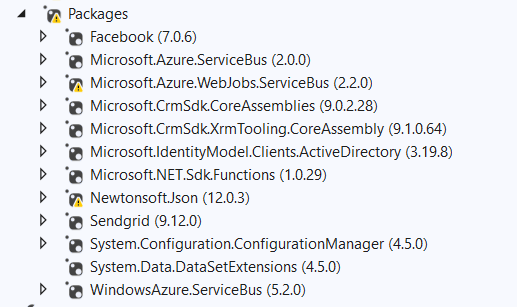
    pastedimage1608053527931v1.png

            public static async Task<IOrganizationService> OpenDynamicsCRMConnectionAsync(ILogger log)

            {

                try

                {

                    log.LogInformation($"Trying to Connect to CRM Instance at: {DateTime.Now}");


                    IOrganizationService organizationService = null;


                    // Create Dynamics CRM Connection ....................................

                    string ClientID = System.Configuration.ConfigurationManager.AppSettings["CRMClientID"].ToString();

                    string ClientSecret = System.Configuration.ConfigurationManager.AppSettings["CRMClientSecret"].ToString();

                    string Resource = System.Configuration.ConfigurationManager.AppSettings["Resource"].ToString();

                    string Authority = System.Configuration.ConfigurationManager.AppSettings["CRMAuthorize"].ToString();


                    log.LogInformation($"CRMClientID: {ClientID}");

                    //log.Info($"CRMClientSecret: {ClientSecret}");

                    log.LogInformation($"Resource: {Resource}");

                    log.LogInformation($"CRMAuthorize: {Authority}");


                    AuthenticationResult _authResult;


                    AuthenticationContext authContext = new AuthenticationContext(Authority);


                    ClientCredential credentials = new ClientCredential(ClientID, ClientSecret);

                    _authResult = await authContext.AcquireTokenAsync(Resource, credentials);


                    string Authtoken = _authResult.AccessToken;


                    // log.LogInformation($"Authtoken: {Authtoken}");

                    log.LogInformation($"Authtoken Generated Successfully");


                    string strCRMServiceURL = System.Configuration.ConfigurationManager.AppSettings["CRMServiceURL"].ToString();


                    Uri serviceUrl = new Uri(Resource + strCRMServiceURL.ToString());


                    log.LogInformation($"serviceUrl :" + serviceUrl.ToString());


                    using (OrganizationWebProxyClient sdkService = new OrganizationWebProxyClient(serviceUrl, false))

                    {

                        sdkService.HeaderToken = Authtoken;

                        organizationService = (IOrganizationService)sdkService;

                        //Guid userid = ((WhoAmIResponse)organizationService.Execute(new WhoAmIRequest())).UserId;

                        //log.Info($"userid: {userid.ToString()}");

                    }


                    return organizationService;


                    //IOrganizationService organizationService = null;

                    //ClientCredentials clientCredentials = new ClientCredentials();

                    //clientCredentials.UserName.UserName = Environment.GetEnvironmentVariable("CRMAPPUserID").ToString();

                    //clientCredentials.UserName.Password = Environment.GetEnvironmentVariable("CRMAPPUserIDPwd").ToString();

                    //ServicePointManager.SecurityProtocol = SecurityProtocolType.Tls12;


                    //string strCRMOrgURL = Environment.GetEnvironmentVariable("CRMOrgURL").ToString();


                    //organizationService = (IOrganizationService)new OrganizationServiceProxy(new Uri(strCRMOrgURL), null, clientCredentials, null);


                    //if (organizationService != null)

                    //{

                    //    Guid userid = ((WhoAmIResponse)organizationService.Execute(new WhoAmIRequest())).UserId;

                    //    log.LogInformation($"userid: {userid.ToString()}");

                    //}


                }

                catch (Exception ex)

                {

                    log.LogError($"Error Description CRM Connection: {ex.Message.ToString()}");

                    throw new System.Exception("CRM Connection Issue - " + ex.Message.ToString());

                }

            }


            public static IOrganizationService OpenDynamicsCRMConnection_UnitTesting(ILogger log)

            {

                IOrganizationService organizationService = null;


                try

                {

                    log.LogInformation($"Trying to Connect to CRM Instance at: {DateTime.Now}");


                    // Create Dynamics CRM Connection ....................................

                    //string strCRMAPPUserID = System.Configuration.ConfigurationManager.AppSettings["CRMAPPUserID"].ToString();

                    //string strCRMAPPUserIDPwd = System.Configuration.ConfigurationManager.AppSettings["CRMAPPUserIDPwd"].ToString();

                    //string strCRMOrgURL = System.Configuration.ConfigurationManager.AppSettings["CRMOrgURL"].ToString();


                    //log.LogInformation($"strCRMAPPUserID: {strCRMAPPUserID}");

                    //log.LogInformation($"strCRMAPPUserIDPwd: {strCRMAPPUserIDPwd}");

                    //log.LogInformation($"strCRMOrgURL: {strCRMOrgURL}");


                    //ClientCredentials clientCredentials = new ClientCredentials();

                    //clientCredentials.UserName.UserName = strCRMAPPUserID;

                    //clientCredentials.UserName.Password = strCRMAPPUserIDPwd;

                    //ServicePointManager.SecurityProtocol = SecurityProtocolType.Tls12;


                    //organizationService = (IOrganizationService)new OrganizationServiceProxy(new Uri(strCRMOrgURL), null, clientCredentials, null);


                    //if (organizationService != null)

                    //{

                    //    Guid userid = ((WhoAmIResponse)organizationService.Execute(new WhoAmIRequest())).UserId;

                    //    log.LogInformation($"userid: {userid.ToString()}");

                    //}


                    // Create Dynamics CRM Connection ....................................

                    string CRMOAuthConnectionString = System.Configuration.ConfigurationManager.AppSettings["CRMOAuthConnection"].ToString();


                    log.LogInformation($"CRMOAuthConnection: {CRMOAuthConnectionString}");


                    ServicePointManager.SecurityProtocol = SecurityProtocolType.Tls12;


                    CrmServiceClient crmServiceClient = new CrmServiceClient(CRMOAuthConnectionString);

                    WhoAmIResponse whoAmIResponse = crmServiceClient.Execute(new WhoAmIRequest()) as WhoAmIResponse;


                    organizationService = crmServiceClient;


                    if (organizationService != null)

                    {

                        Guid userid = ((WhoAmIResponse)organizationService.Execute(new WhoAmIRequest())).UserId;

                        log.LogInformation($"userid: {userid.ToString()}");

                    }


                    return organizationService;


                }

                catch (Exception ex)

                {

                    log.LogError($"Error Description CRM Connection: {ex.Message.ToString()}");

                    throw new System.Exception("CRM Connection Issue - " + ex.Message.ToString());

                }

            }

    Sample format from config file : 

    "CRMClientID": "*******-****-****-*********",
    "CRMClientSecret": "******************",
    "Resource": "https://******.crm.dynamics.com",
    "CRMAuthorize": "">login.microsoftonline.com/.../authorize",
    "CRMServiceURL": "/xrmservices/2011/organization.svc/web?SdkClientVersion=9.1",
    "CRMOAuthConnection": "AuthType = OAuth; Url = 'https://******.crm.dynamics.com'; Username = '*******'; Password = '******'; AppId = 51f81489-12ee-4a9e-aaae-a2591f45987d; RedirectUri = app://58145B91-0C36-4500-8554-080854F2AC97;LoginPrompt=Never",

  • Community Member Profile Picture
    on at

    Hi Sumit,

    I have verified all my packages are same as you showing. but still getting same error for me.

    here is my code :

    connection string:

    @"AuthType=ClientSecret;Url={0};ClientId={1};ClientSecret={2};RequireNewInstance=True;"

    Code:

    ServicePointManager.SecurityProtocol = SecurityProtocolType.Tls12;

               ServiceClient = new CrmServiceClient(connectionString);

               log.LogInformation($"{ServiceClient.CrmConnectOrgUriActual} : {ServiceClient.LastCrmError} : {ServiceClient.LastCrmException?.Message}");

               OrgService = ServiceClient.OrganizationWebProxyClient as IOrganizationService ??

                            ServiceClient.OrganizationServiceProxy as IOrganizationService ??

                            orgService;

               log.LogInformation($"OrgService is: {OrgService}");

               ServiceContext = new OrganizationServiceContext(OrgService);

    Please help me

  • Community Member Profile Picture
    on at

    Hi Sumit,

    even I am able to connect CRM from my console app. this error is occur at after deploy in Dev environment while hitting the API in the browser.

Under review

Thank you for your reply! To ensure a great experience for everyone, your content is awaiting approval by our Community Managers. Please check back later.

Helpful resources

Quick Links

Responsible AI policies

As AI tools become more common, we’re introducing a Responsible AI Use…

Neeraj Kumar – Community Spotlight

We are honored to recognize Neeraj Kumar as our Community Spotlight honoree for…

Leaderboard > 🔒一 Microsoft Dynamics CRM (Archived)

#1
SA-08121319-0 Profile Picture

SA-08121319-0 4

#1
Calum MacFarlane Profile Picture

Calum MacFarlane 4

#3
Alex Fun Wei Jie Profile Picture

Alex Fun Wei Jie 2

Last 30 days Overall leaderboard

Featured topics

Product updates

Dynamics 365 release plans
