web
You’re offline. This is a read only version of the page.
close
Skip to main content

Notifications

Announcements

No record found.

Community site session details

Community site session details

Session Id :
Microsoft Dynamics CRM (Archived)

Hide/Disable values in Optionset using javascript Form onLoad on custom entity

(0) ShareShare
ReportReport
Posted on by

Hi CRM Community, 

ALERT!!! Novice java coder, but need help in disabling expired values in an optionset in Dynamics  CRM 365 online on a custom entity.

We have a custom entity named Mgmt Discount Reqs. This is used when reps need to request additional discounts on the opportunity which needs management approval before closing out the opportunity. Every management discount is created as a new record via a quick create form on the opportunity.

Optionset field name :  Reason for Request (schema name: aaa_reasonforrequest)

Values in the field have become outdated and need to be hidden so that these values cannot be selected but need to remain for historical data mining purposes.

Values to remove: 

Label: NB Spiff - 10% Comm Grps 1&2TBKs    Value: 811110003

Label: SL Spiff 3+ Months +5%   Value: 811110006

Label: NB Spiff - No Special Discount   Value: 811110001

Label: NB Spiff - Discount Requested   Value:  811110002

In the mgmt discount form editor - form properties,  I  added a form library named aaa_modifyreasonforrequest with the following script.

// JScript source code
function OnLoad() {
if (Xrm.Page.ui.getFormType() != 1) {
// Disable the field if the mgmt discount form is CREATE Mode
Xrm.Page.ui.controls.get("aaa_reasonforrequest").setDisabled(true);
}
else {
//If Create Form
Xrm.Page.getControl('aaa_reasonforrequest').removeOption(811110006);
}
}

I also added this to the event handlers on section: Control = Form / Function = OnLoad.  
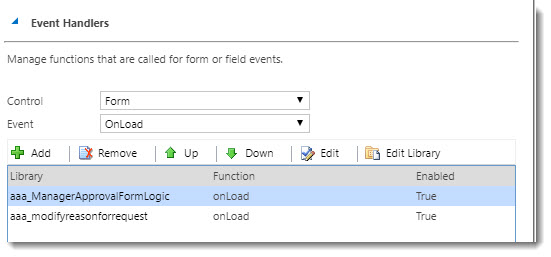
2017_2D00_10_2D00_05_5F00_13_2D00_40_2D00_03.jpg

2017_2D00_10_2D00_05_5F00_13_2D00_41_2D00_51.jpg

Code above does not execute when testing the first value. Please help me understand what I am doing wrong. Let me know if you need more information to better understand.

Thanks in advance!

*This post is locked for comments

I have the same question (0)
  • Suggested answer
    a33ik Profile Picture
    84,331 Most Valuable Professional on at

    Hello,

    Watch for case of your function naming. In example you provided you have OnLoad and in registration window is see onLoad.

    Values should be equal so you will have to use either OnLoad or onLoad.

    Good luck.

  • Community Member Profile Picture
    on at

    Andrew,

    First of all thanks for the prompt response. Before I make that change. Is this how the code should look with all values needed to be hidden?

    // JScript source code
    function OnLoad() {
    if (Xrm.Page.ui.getFormType() != 1) {
    // Disable the field if the mgmt discount form is CREATE Mode
    Xrm.Page.ui.controls.get("aaa_reasonforrequest").setDisabled(true);
    }
    else {
    //If Create Form
    Xrm.Page.getControl('aaa_reasonforrequest').removeOption(811110006);
    } 
    else {
    Xrm.Page.getControl('aaa_reasonforrequest').removeOption(811110003);
    } 
    else {
    Xrm.Page.getControl('aaa_reasonforrequest').removeOption(811110001);
    } 
    else {
    Xrm.Page.getControl('aaa_reasonforrequest').removeOption(811110002);
    }


  • Verified answer
    a33ik Profile Picture
    84,331 Most Valuable Professional on at

    Hello,

    It should look like following:

    function OnLoad() {

    if (Xrm.Page.ui.getFormType() != 1) {

    // Disable the field if the mgmt discount form is CREATE Mode

    Xrm.Page.getControl("aaa_reasonforrequest").setDisabled(true);

    } else {

    //If Create Form

    Xrm.Page.getControl('aaa_reasonforrequest').removeOption(811110006);

    Xrm.Page.getControl('aaa_reasonforrequest').removeOption(811110003);

    Xrm.Page.getControl('aaa_reasonforrequest').removeOption(811110001);

    Xrm.Page.getControl('aaa_reasonforrequest').removeOption(811110002);

    }

    }

  • Suggested answer
    Community Member Profile Picture
    on at

    Thank you. You have saved me a tremendous amount of time and I learned something.

  • Saddamk206 Profile Picture
    777 on at

    Hi,

    Also can try this:-

    for (var i = 0; i < Xrm.Page.getAttribute("FieldName").getOptions().length; i++)
    {

    Xrm.Page.getControl("FieldName").removeOption(Xrm.Page.getAttribute("FieldName").getOptions()[i].value);
    }

Under review

Thank you for your reply! To ensure a great experience for everyone, your content is awaiting approval by our Community Managers. Please check back later.

Helpful resources

Quick Links

Responsible AI policies

As AI tools become more common, we’re introducing a Responsible AI Use…

Neeraj Kumar – Community Spotlight

We are honored to recognize Neeraj Kumar as our Community Spotlight honoree for…

Leaderboard > 🔒一 Microsoft Dynamics CRM (Archived)

#1
SA-08121319-0 Profile Picture

SA-08121319-0 4

#1
Calum MacFarlane Profile Picture

Calum MacFarlane 4

#3
Alex Fun Wei Jie Profile Picture

Alex Fun Wei Jie 2

Last 30 days Overall leaderboard

Featured topics

Product updates

Dynamics 365 release plans



