web
You’re offline. This is a read only version of the page.
close
Skip to main content

Notifications

Announcements

No record found.

Community site session details

Community site session details

Session Id :
Supply chain | Supply Chain Management, Commerce
Unanswered

Receive products in Blocked status

(0) ShareShare
ReportReport
Posted on by 20

Good day all

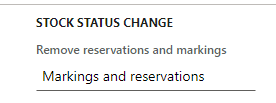
We have a requirement to receive items in blocked status. Reason being that we have Sales order integrations that looks at the "Available physical" field for on hand stock qty's. When an item is received, the available physical is updated even if there is open work against the item to move to binning etc. I've tried using the "Stock status change" function but I get an error saying the item could not be processed. What is interesting is that I can do status change for my Binning location which is just another location to which I move the stock before putting in Bin. I run a batch job every minute to update all products in Binning to blocked status, and when the final put is done in the product's bin, the status is updated to Available via default data on the mobile app menu. I've update the following parameter but it made no difference:
pastedimage1653463733908v1.png

When trying to add a "Blocked" status to the default status on the warehouse I get an error saying that I cannot select a blocking status as the default status.

Any help would be greatly appreciated! 

I have the same question (0)
  • Jean Du Toit Profile Picture
    20 on at

    I've checked and there's no difference between the locations or location profiles. This what the stock on enquiry looks like after doing the receiving:

    pastedimage1653464987433v1.png_2D00_640x480.png_2D00_640x480.png

  • huijij Profile Picture
    19,811 on at

    Hi Jean,

    Please wait patiently from others on the forum.

  • chmanrubia Profile Picture
    35 on at

    Hi Jean,

    Did you try to use a different "inventory status" without inventory blocking in the purchase line? Reservation hierarchy use always the inventory status to work, so if you use a different one from the sales order you will keep the stock "unreserved" as long as you want even without using an inventory blocking.

  • chmanrubia Profile Picture
    35 on at

    Thinking a bit about your requirement, maybe it can be useful for you the “disposition codes” associates to the “mobile device menu item”, so using that tool you can set up a new inventory status to your purchase order stock registrations using the mobile device. You can check them here:

    docs.microsoft.com/.../set-up-disposition-codes

Under review

Thank you for your reply! To ensure a great experience for everyone, your content is awaiting approval by our Community Managers. Please check back later.

Helpful resources

Quick Links

Responsible AI policies

As AI tools become more common, we’re introducing a Responsible AI Use…

Neeraj Kumar – Community Spotlight

We are honored to recognize Neeraj Kumar as our Community Spotlight honoree for…

Leaderboard > Supply chain | Supply Chain Management, Commerce

#1
Laurens vd Tang Profile Picture

Laurens vd Tang 298 Super User 2025 Season 2

#2
Siv Sagar Profile Picture

Siv Sagar 179 Super User 2025 Season 2

#3
André Arnaud de Calavon Profile Picture

André Arnaud de Cal... 121 Super User 2025 Season 2

Last 30 days Overall leaderboard

Featured topics

Product updates

Dynamics 365 release plans



