web
You’re offline. This is a read only version of the page.
close
Skip to main content

Notifications

Announcements

No record found.

Community site session details

Community site session details

Session Id :
Microsoft Dynamics CRM (Archived)

Hide Toolbar SSRS report CRM 365 Online V9

(0) ShareShare
ReportReport
Posted on by 5

Hello All, 

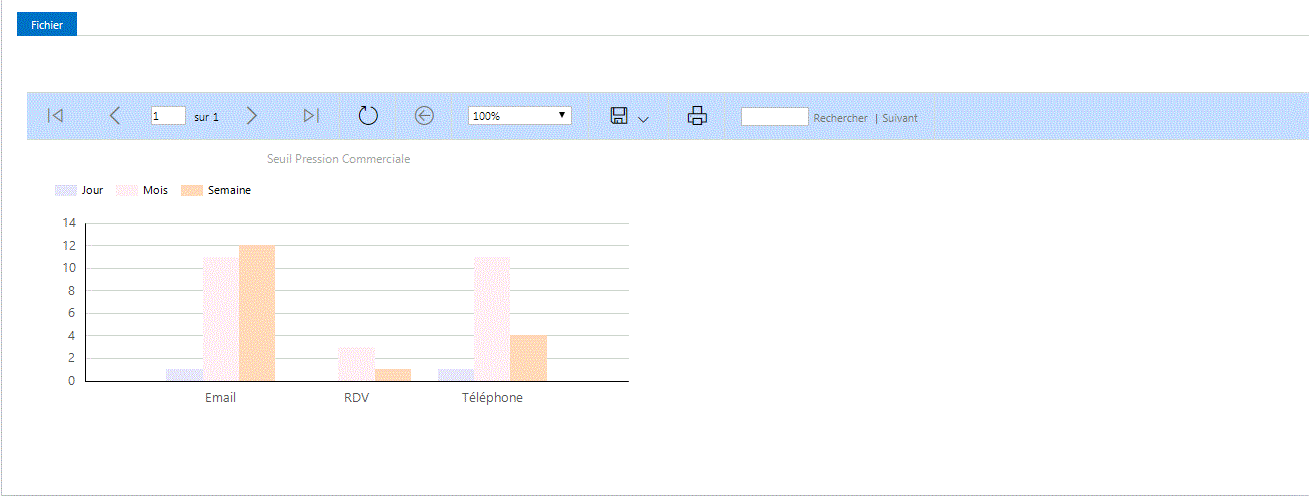
I have a SSRS report embedded in an Iframe using a js fonction 

and I need to hide the toolbar I tried  "&rc:Toolbar=false" but it doesn't work for me !!

Could any one help me on this please .....?
4743.Capture.GIF

function showReportSSRS() {

//Get iframe control 
var iframeObject = executionContext.getControl("IFRAME_OverviewReport");
var clientUrl = parent.Xrm.Page.context.getClientUrl();
if (iframeObject != null) {
var clientUrlapi = executionContext.context.getClientUrl() + "/api/data/v9.0/reports?$select=reportid&$filter=name eq 'Limite Pression Commerciale sur contact'";
GetDataFromWebApi(clientUrlapi,
function set_intitule(reponse) {
var id = "%7b" + reponse.value[0].reportid + "%7d";
iframeObject.setSrc(clientUrl + "/crmreports/viewer/viewer.aspx?action=run&id=" + id + "");

});
}
}

*This post is locked for comments

I have the same question (0)
  • David Jennaway Profile Picture
    14,065 on at

    The rc:Toolbar querystring parameter applies to Url access in ReportServer - i.e. directly accessing a report via the ReportServer web app. You're using /crmreports/viewer/viewer.aspx , which is a separate page within the CRM website, and doesn't support the rc:Toolbar querystring parameter

  • Jamil Lamyae Profile Picture
    5 on at

    So what's the workaround I can apply in this case ?

  • Suggested answer
    a33ik Profile Picture
    84,331 Most Valuable Professional on at

    I believe David mentioned that you will have to look for other workaround to apply.

    You can check approach I described here - butenko.pro/.../ms-crm-2011-embed-context-report-to-left-navigation-pane

    Obviously you will have to doublecheck that provided solution works for you and not hope that code will work as is.

  • Jamil Lamyae Profile Picture
    5 on at

    Hi Andrew , I have already the report embedded in iframe

  • Suggested answer
    a33ik Profile Picture
    84,331 Most Valuable Professional on at

    Then you will have to leave it as it is or rework using suggestion I posted.

    Good luck.

  • Jamil Lamyae Profile Picture
    5 on at

    In the post the toolbar still appear ,it isn't clear for me could you please clarify me the utility of the post in my case ?

  • Suggested answer
    a33ik Profile Picture
    84,331 Most Valuable Professional on at

    My suggestion is usage of JavaScript to hide it. That's main suggestion.

  • Jamil Lamyae Profile Picture
    5 on at

    Andrew I think getelementbyId  it's not allowed by Microsoft , am I missing something ?

    --------------------------------------------------------------------------------------------------------------------------------------

    When dealing with the CRM UI, the SDK documents the exposed objects and the properties that are available to interface with. As a general rule, you should adhere to the exposed objects and interact with them via the documented properties and methods using the Xrm.Page object model.

    Many developers who know JavaScript and understand that these controls can be found in the HTML tend to go straight to the HTML DOM and manipulate the UI in this manner. This basically bypasses the supported means that is documented in the SDK. The problem with this approach is that the Microsoft Dynamics CRM development team reserves the right to change how pages are composed, all the way down to the ID values for elements. So by using the Xrm.Page object model, you can be assured that your code is protected from future changes in how pages are implemented.

    For example, if you were navigating the HTML DOM structure (instead of using the Xrm.Page protocol) and using window.getElementById or even manipulating the innerHTML or outerHTML, an update rollup or a service pack could cause your script to fail. Additionally, the DOM structure can be different from one browser to the next, so using this navigation method introduces risk, while using the documented API of the Xrm.Page object model has no navigation risks.

  • Verified answer
    a33ik Profile Picture
    84,331 Most Valuable Professional on at

    You asked for a workaround, not for 100% supported solution.

    Thanks for mentioning - yes, I know that getElementById is not supported. But it's not supported when you use form scripts. When you develop html webresource (that's my suggestion) you're not limited.

    Anyway it's up to you how to resolve your issue. My goal is just show you the direction.

  • Jamil Lamyae Profile Picture
    5 on at

    Thanks Andrew for the clarification its clear for me now

Under review

Thank you for your reply! To ensure a great experience for everyone, your content is awaiting approval by our Community Managers. Please check back later.

Helpful resources

Quick Links

Responsible AI policies

As AI tools become more common, we’re introducing a Responsible AI Use…

Neeraj Kumar – Community Spotlight

We are honored to recognize Neeraj Kumar as our Community Spotlight honoree for…

Leaderboard > 🔒一 Microsoft Dynamics CRM (Archived)

#1
SA-08121319-0 Profile Picture

SA-08121319-0 4

#1
Calum MacFarlane Profile Picture

Calum MacFarlane 4

#3
Alex Fun Wei Jie Profile Picture

Alex Fun Wei Jie 2

Last 30 days Overall leaderboard

Featured topics

Product updates

Dynamics 365 release plans



