web
You’re offline. This is a read only version of the page.
close
Skip to main content

Notifications

Announcements

No record found.

Community site session details

Community site session details

Session Id :
Customer experience | Sales, Customer Insights,...
Suggested Answer

Error while Creating the record in the custom entity.

(0) ShareShare
ReportReport
Posted on by

While creating a new record in the custom entity I am getting below error.

"The requested record was not found or you do not have sufficient permissions to view it."

More info:-

Error code: 0x80040217Session Id: a0aee625-8ed2-42be-85a2-76d0d599e8c0Activity Id: 4cba0836-4408-4189-8d1d-44fc04af1887Time: Mon Jan 06 2020 13:25:39 GMT+0530 (India Standard Time)

I am the system admin of the env.
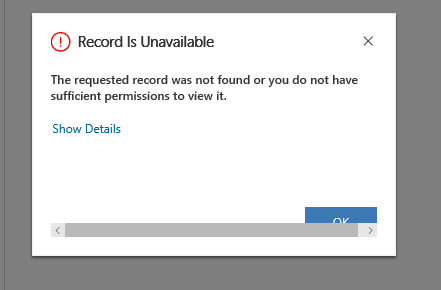
1602.Project-Error.PNG

Error Log File:-

at Microsoft.Crm.Extensibility.OrganizationSdkServiceInternal.CreateInternal(Entity entity, InvocationContext invocationContext, CallerOriginToken callerOriginToken, WebServiceType serviceType, Boolean checkAdminMode, Dictionary`2 optionalParameters)
at Microsoft.Crm.Extensibility.OData.CrmODataExecutionContext.CreateOrganizationResponse(Entity entity)
at Microsoft.Crm.Extensibility.OData.CrmODataServiceDataProvider.CreateEdmEntity(CrmODataExecutionContext context, String edmEntityName, EdmEntityObject entityObject, Boolean isUpsert)
at Microsoft.Crm.Extensibility.OData.EntityController.PostEntitySetImplementation(String& entitySetName, EdmEntityObject entityObject)
at Microsoft.PowerApps.CoreFramework.ActivityLoggerExtensions.Execute[TResult](ILogger logger, EventId eventId, ActivityType activityType, Func`1 func, IEnumerable`1 additionalCustomProperties)
at Microsoft.Xrm.Telemetry.XrmTelemetryExtensions.Execute[TResult](ILogger logger, XrmTelemetryActivityType activityType, Func`1 func)
at lambda_method(Closure , Object , Object[] )
at System.Web.Http.Controllers.ReflectedHttpActionDescriptor.ActionExecutor.<>c__DisplayClass10.<GetExecutor>b__9(Object instance, Object[] methodParameters)
at System.Web.Http.Controllers.ReflectedHttpActionDescriptor.ExecuteAsync(HttpControllerContext controllerContext, IDictionary`2 arguments, CancellationToken cancellationToken)
--- End of stack trace from previous location where exception was thrown ---
at System.Runtime.ExceptionServices.ExceptionDispatchInfo.Throw()
at System.Runtime.CompilerServices.TaskAwaiter.HandleNonSuccessAndDebuggerNotification(Task task)
at System.Web.Http.Controllers.ApiControllerActionInvoker.<InvokeActionAsyncCore>d__0.MoveNext()
--- End of stack trace from previous location where exception was thrown ---
at System.Runtime.ExceptionServices.ExceptionDispatchInfo.Throw()
at System.Runtime.CompilerServices.TaskAwaiter.HandleNonSuccessAndDebuggerNotification(Task task)
at System.Web.Http.Controllers.ActionFilterResult.<ExecuteAsync>d__2.MoveNext()
--- End of stack trace from previous location where exception was thrown ---
at System.Runtime.ExceptionServices.ExceptionDispatchInfo.Throw()
at System.Runtime.CompilerServices.TaskAwaiter.HandleNonSuccessAndDebuggerNotification(Task task)
at System.Web.Http.Dispatcher.HttpControllerDispatcher.<SendAsync>d__1.MoveNext()
Activity Id: 4cba0836-4408-4189-8d1d-44fc04af1887

I have the same question (0)
  • Mohana Yadav Profile Picture
    61,001 Super User 2025 Season 2 on at

    is it business central related or CRM related?

  • Community Member Profile Picture
    on at

    CRM related.

  • Suggested answer
    ashish12 Profile Picture
    3,079 on at

    Hi Naveen,

    Are you running any WF or PlugIn on this entity?

    If yes, then try after disabling it.

    Also, if you are using Chrome try clearing temporary internet files. Maybe there's something in the cache

    Thanks

  • Suggested answer
    Pawar Pravin  Profile Picture
    5,237 on at

    Have you checked any plugin registered on create of the custom entity ?

    Please disable it and try again.

  • Suggested answer
    ba365guy Profile Picture
    2,950 on at

    Hi

    Following could be one of the reasons: (please try and confirm)

    1. User creating this custom entity record doesn't have read privilege (through he has create privilege) OR

    2. There is a flow triggering on the create of custom record and current user doesn't have proper flow (pr power apps) license OR

    2.1. Flow quota has reached

    3. A flow is getting triggered and it is running in to an error due t the data of the custom entity record (Or due to flow configuration)

    3.1. A record is created via the flow and this has security privilege issue for current user.

    Let me know if it works for you.

  • ba365guy Profile Picture
    2,950 on at

    Hi

    Did it work for you?

  • Community Member Profile Picture
    on at

    Thanks you all for your answers and reply.

    I found the issue which is not allowing me to create the record. There is lookup field on the form which contains a default value. It seems dynamics is not able to reference that record. When I populate the field with different value it is allowing me to create the record.

    Hope this help someone to resolve the issue.

  • Lalit Singh Profile Picture
    175 on at

    I am getting same error, cleared cache on chrome, disabled all plugins looks like no cache issue.

Under review

Thank you for your reply! To ensure a great experience for everyone, your content is awaiting approval by our Community Managers. Please check back later.

Helpful resources

Quick Links

Responsible AI policies

As AI tools become more common, we’re introducing a Responsible AI Use…

Neeraj Kumar – Community Spotlight

We are honored to recognize Neeraj Kumar as our Community Spotlight honoree for…

Leaderboard > Customer experience | Sales, Customer Insights, CRM

#1
Tom_Gioielli Profile Picture

Tom_Gioielli 108 Super User 2025 Season 2

#2
Jimmy Passeti Profile Picture

Jimmy Passeti 50 Most Valuable Professional

#3
Gerardo Rentería García Profile Picture

Gerardo Rentería Ga... 49 Most Valuable Professional

Last 30 days Overall leaderboard

Product updates

Dynamics 365 release plans
