web
You’re offline. This is a read only version of the page.
close
Skip to main content

Announcements

No record found.

News and Announcements icon
Community site session details

Community site session details

Session Id :
Customer experience | Sales, Customer Insights,...
Suggested Answer

Use marketing email to send download

(0) ShareShare
ReportReport
Posted on by

Hey, 

I was wondering if anybody is using the inbound customer journey function to send download links to their customers? 

(https://docs.microsoft.com/nl-nl/dynamics365/marketing/create-inbound-customer-journey)

In this document they have it as an example, so I guess it should work.

However, my emails on average take 7-15 minutes to send. I never had it under 7 minutes. 

My situation: people fill in a download form on a webpage and should immediately (within 1 minute) receive their download link. Is anyone able to actually do this (since Microsoft uses it in their documentation)? Or is their something wrong with my installation? Just wondering if this is a bad implementation/marketing limitation or if I should contact Microsoft to see if we can speed up our email sending.

thanks! :) 

I have the same question (0)
  • Suggested answer
    cloflyMao Profile Picture
    25,210 on at

    Hi Niels,

    Could you share size of your segment in customer journey? A possible reason which cause delivery delay would be that there were large amount of recipients.

    You could build a small size segment to test whether delivered time could be within 1 or 2 minutes.(or just use new Send now feature in marketing email)

    In my trial envrionment, my test segment is always around 5 members and they can receive email in about 1 minute.

    Also, check whether Time zone field is set to your timezone.

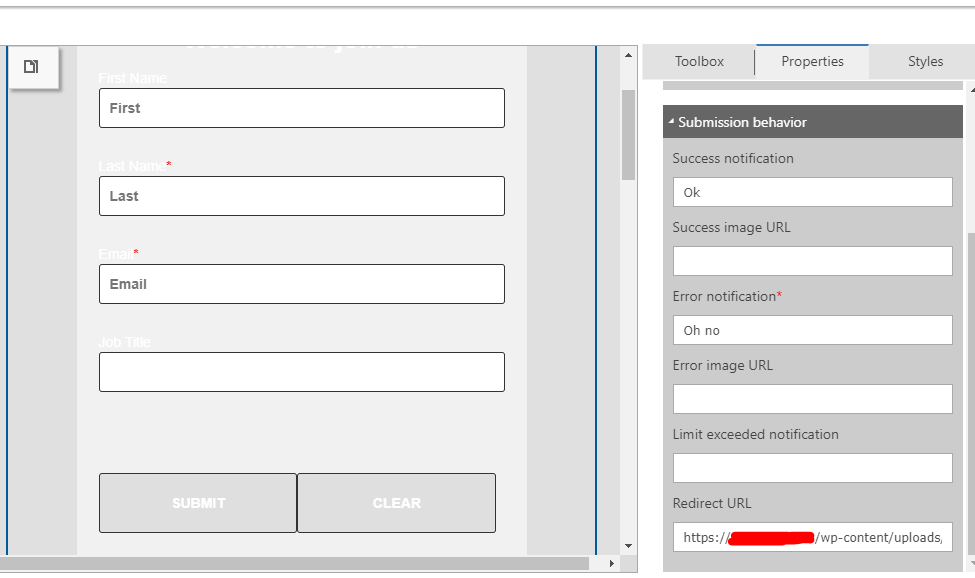
    In addition, as alternative for send email with download link, you could instead set your file link as marketing form redirect URL, after people have submitted form successfully,

    then a browser download dialog will immediately open.(Or redirect them to a custom page in Portal, and attach the link on the page)
    pastedimage1579512047853v1.png

    Regards,

    Clofly

  • Community Member Profile Picture
    on at

    Thank you for your reply!

    Now I know that this could indeed be faster. I escalated it to Microsoft support now. I don't have a segment size, because i'm not using segments, but I start the customer journey with the form instead (inbound customer journey). This should be the fastest way to do it according to my information.

Under review

Thank you for your reply! To ensure a great experience for everyone, your content is awaiting approval by our Community Managers. Please check back later.

Helpful resources

Quick Links

Introducing the 2026 Season 1 community Super Users

Congratulations to our 2026 Super Stars!

Meet the Microsoft Dynamics 365 Contact Center Champions

We are thrilled to have these Champions in our Community!

Congratulations to the March Top 10 Community Leaders

These are the community rock stars!

Leaderboard > Customer experience | Sales, Customer Insights, CRM

#1
11manish Profile Picture

11manish 176

#2
ManoVerse Profile Picture

ManoVerse 149 Super User 2026 Season 1

#3
Jimmy Passeti Profile Picture

Jimmy Passeti 57 Most Valuable Professional

Last 30 days Overall leaderboard

Product updates

Dynamics 365 release plans
