web
You’re offline. This is a read only version of the page.
close
Skip to main content

Notifications

Announcements

No record found.

Community site session details

Community site session details

Session Id :
Microsoft Dynamics CRM (Archived)

Show more than one field in AddCustomView

(0) ShareShare
ReportReport
Posted on by 365

I am trying to Filter a lookup with related entities using the AddCustomView but my problem is i need to show more than one field in the lookup droplist

var layoutXml = ""  
        ""  
        ""  
        ""  
        ""  
        "";
    var viewId = "{00000000-0000-0000-0000-000000000003}";
    var viewDisplayName = "Filtre Droit";
    //add filter
    if (_formContext.getControl("entitlementid") != null) {
        _formContext.getControl("entitlementid").addCustomView(viewId, "entitlement", viewDisplayName, fetchXml, layoutXml, true);
    }

here is how it shows
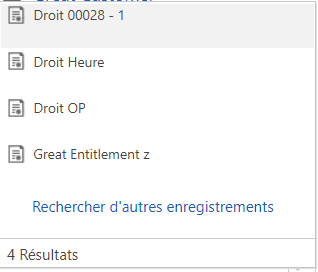
pastedimage1568301588813v1.png

but i need to show it like other default views
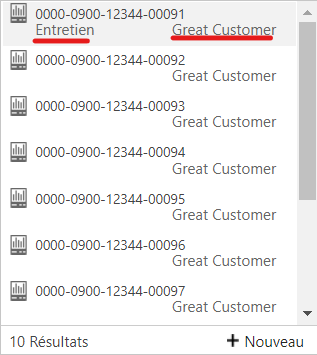
pastedimage1568301900658v2.png

*This post is locked for comments

I have the same question (0)
  • Suggested answer
    ajyendra Profile Picture
    1,738 on at

    Hi,

    Did You first try this:

    var layoutXml = "<grid name='resultset' object='9700' jump='name' select='1' icon='1' preview='1'>" +
    "<row name='result' id='entitlementid'>" +
    "<cell name='name' width='200' />" +
    "<cell name='owner' width='125' />" +
    "<cell name='createdon' width='125' />" +
    "</row></grid>";

    and Check that this field is display on your lookup or not if it will display there that means the Following records that shown in your lookup do't have data on project or contactdeservice field 

    and if it will not display please provide fetchXml also.

    For Getting some idea how to do it Check link

    https://www.c-sharpcorner.com/blogs/how-to-create-custom-lookup-view-in-crm2

    Hope it helps.

    Thanks

    Ajyendra

    if these answer is helpful to you . Please mark as verified.

  • ajyendra Profile Picture
    1,738 on at

    Hi Anas Rafik,

    Is these thing work for you. Mark as verified . So that it will help for others.

    Thanks

    Ajyendra

    [quote user="ajyendra"]

    Hi,

    Did You first try this:

    var layoutXml = "<grid name='resultset' object='9700' jump='name' select='1' icon='1' preview='1'>" +
    "<row name='result' id='entitlementid'>" +
    "<cell name='name' width='200' />" +
    "<cell name='owner' width='125' />" +
    "<cell name='createdon' width='125' />" +
    "</row></grid>";

    and Check that this field is display on your lookup or not if it will display there that means the Following records that shown in your lookup do't have data on project or contactdeservice field 

    and if it will not display please provide fetchXml also.

    For Getting some idea how to do it Check link

    https://www.c-sharpcorner.com/blogs/how-to-create-custom-lookup-view-in-crm2

    Hope it helps.

    Thanks

    Ajyendra

    if these answer is helpful to you . Please mark as verified.

    [/quote]
  • Anas Rafik Profile Picture
    365 on at

    It works using createtdon and ownerid

    pastedimage1568825045270v2.png

    but still not work with other fields

    pastedimage1568825421715v3.png

    pastedimage1568825450825v4.png

  • Verified answer
    ajyendra Profile Picture
    1,738 on at

    Hi,

    I also Created one Custom lookup field name Project .and Its Working from my end.

    pastedimage1568871403977v1.png
    Hope it helps
    Thanks
    Ajyendra
    If this answer is helpful. Please Mark as Verified.

Under review

Thank you for your reply! To ensure a great experience for everyone, your content is awaiting approval by our Community Managers. Please check back later.

Helpful resources

Quick Links

Responsible AI policies

As AI tools become more common, we’re introducing a Responsible AI Use…

Neeraj Kumar – Community Spotlight

We are honored to recognize Neeraj Kumar as our Community Spotlight honoree for…

Leaderboard > 🔒一 Microsoft Dynamics CRM (Archived)

#1
SA-08121319-0 Profile Picture

SA-08121319-0 4

#1
Calum MacFarlane Profile Picture

Calum MacFarlane 4

#3
Alex Fun Wei Jie Profile Picture

Alex Fun Wei Jie 2

Last 30 days Overall leaderboard

Featured topics

Product updates

Dynamics 365 release plans



