web
You’re offline. This is a read only version of the page.
close
Skip to main content

Announcements

No record found.

News and Announcements icon
Community site session details

Community site session details

Session Id :
Microsoft Dynamics AX (Archived)

"dynamics:\\" link opening a new session each time

(0) ShareShare
ReportReport
Posted on by 11,310

Hi All. I'm currently experiencing an issue where each time a user clicks on a dynamics hyper link e.g. "dynamics:\\" from an email etc a entirely new session is created.

This is very annoying if  sessions already exist and the user is going through multiple links (e.g. for workflow approval). They end up with loads of AX main windows. I know that the users should be told to "just close the sessions" but I would like to make this as easy as possible for them. 

Has anyone encountered this issue?

*This post is locked for comments

I have the same question (0)
  • Verified answer
    Douglas Noel Profile Picture
    3,907 on at

    Hi Jonathan,

    never seen this.  But some ideas. (better said: two ideas)

    Before launching the Ax Client with a certain startup command, the AxHLink tool (the one assigned with the dynamics:// URL anchestor), tries to detect if a 'matching' Ax32 is running.

    This is done by searching for a NamedPipe on the system (client) with a certain name. This Pipe is created if starting a Ax32.Exe client. The Pipe Name is built up from a prefix

    'Dynamics\Event\', the matching ID (to support different clients running against different AOSses) and the so calles LogonSID

    The 'matching ID' is taken from the following system parameter 'DrillDown Target' (in this example 33)
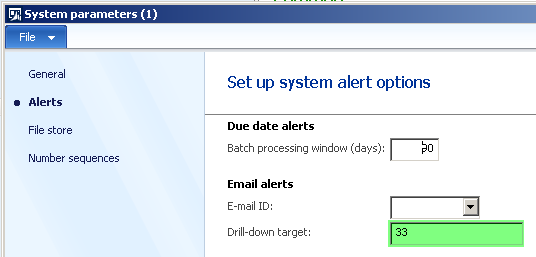
    NPEvent.png

    maybe it's a security issue for the user (not allowed to create a named pipe server or something)

    Can you please start the Ax32.Exe (using the user which reported a malfunction)

    and look if the named pipe server really exists.

    Use (for example) PipeList.Exe Tool from SysInternals (Commandline-Tool)

    https://technet.microsoft.com/en-us/sysinternals/dd581625.aspx

    There should be an entry like.
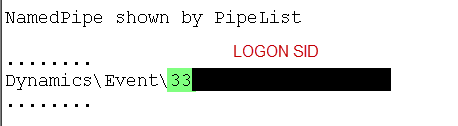
    NPEvent.png

    As described the AxHLink tool searches for the existance of this pipe name and writes the 'command' to this pipe.

    The DrilldownTarget  ID is part of the URL

    dynamics://33/?Drilldown_12345  (12345 is the InboxID(not the recID) of table EventInbox)

    If no NP found Ax32.Exe is started.

    Second idea: (seen sometimes)

    Beside constructing the named pipe server on startup, this pipe is read by a timeout based operation.

    This processes the command and reset the timeout (for the next call) afterwards.

    I'm not sure, but I think sometimes this works only once (at least in earlier versions) . If a exception is thrown during processing of the command, the code for setTimeout isn't executed again.

    Maybe you can post your results after investigation of the problem here.

    regards

    Douglas

  • Jonathan  Halland Profile Picture
    11,310 on at

    Hi Douglas

    Thanks so much, this DrillDownTargetID is exactly what I was looking for. The URL's were being constructed incorrectly based on this field so I assume (based on your explaination) that they did not open recognise the environment I was working in. I've fixed the URL construction and it works 100%.

Under review

Thank you for your reply! To ensure a great experience for everyone, your content is awaiting approval by our Community Managers. Please check back later.

Helpful resources

Quick Links

Introducing the 2026 Season 1 community Super Users

Congratulations to our 2026 Super Stars!

Meet the Microsoft Dynamics 365 Contact Center Champions

We are thrilled to have these Champions in our Community!

Congratulations to the March Top 10 Community Leaders

These are the community rock stars!

Leaderboard > 🔒一 Microsoft Dynamics AX (Archived)

#1
CP04-islander Profile Picture

CP04-islander 39

#2
Michel ROY Profile Picture

Michel ROY 14

#3
imran ul haq Profile Picture

imran ul haq 8

Last 30 days Overall leaderboard

Featured topics

Product updates

Dynamics 365 release plans
