web
You’re offline. This is a read only version of the page.
close
Skip to main content

Notifications

Announcements

No record found.

Community site session details

Community site session details

Session Id :
Microsoft Dynamics CRM (Archived)

Workflow triggering multiple times.

(0) ShareShare
ReportReport
Posted on by 189

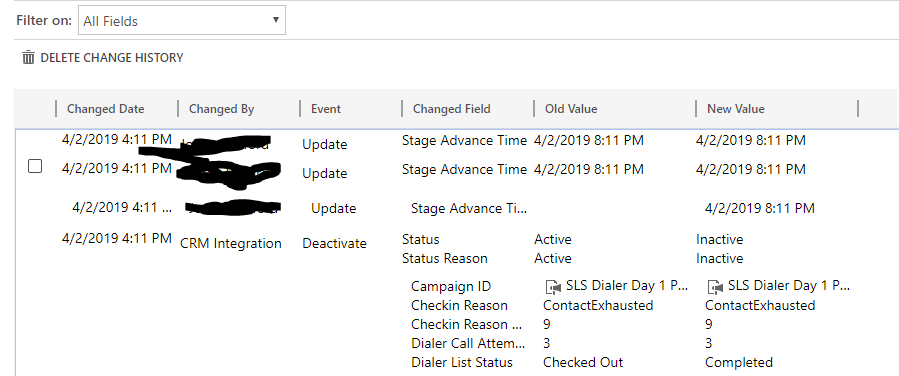
I have a workflow set to activate on the update of a field. In the first line of the workflow, a condition checks that field for the value I want. I've validated that the Audit History shows that the field I'm looking for changes multiple times, but only changes to the value I'm seeking once. However, when I go and look at the system processes, the workflow is triggered multiple times and gets PAST the conditional check that (even if the workflow runs more than once) should ONLY pass the condition one time.

Is there a known issue with workflows configured to react to field changes?

Audit History:
WF-Error-1.PNG

Workflow conditional step, workflow is configured to wait a specified amount of time before continuing.

WF-Error-2.PNG

Three duplicate system processes. All three successfully passed the above conditional step.

WF-Error-3.PNG

*This post is locked for comments

I have the same question (0)
  • Suggested answer
    Kokulan Profile Picture
    18,054 on at

    Hi

    Could you check if you have any plugins on this entity and if so, could you disable the plugin and try again if it still triggers three times.

    If there are no plugins, I would also check and make sure the step that updates with the new Stage Advance Time is within the If scope, i came across bugs sometimes where the step is not within the condition scope so it always executed.

  • JFulfordMS Profile Picture
    189 on at

    I have validated that there are no other plugins or processes running on this record. I've removed the step that updates the Stage Advance Time, and validated that ALL other steps are nested under the first IF condition (If I collapse the IF condition, all other steps are hidden).

    It is still firing off 3 times as of just a few minutes ago.

    2046.Workflow.PNG

    5751.Workflow-2.PNGWorkflow-3.PNG

    The condition is only ever satisfied with this single update according to audit history.

  • Suggested answer
    Charles Abi Khirs Profile Picture
    3,569 on at

    Hello,

    What is the condition that triggers the WF? Maybe it is on update of the same field you are updating in the WF and that's why it is being triggered multiple times?

  • JFulfordMS Profile Picture
    189 on at

    I've adjusted the workflow and process to not update the record in question at all. The trigger is on the Dialer List Status field, which should trigger the workflow more than once, but it should fail the first conditional statement. However, it is not failing that statement.

    Would changing this to a real-time workflow potentially fix this? Maybe this is an issue with asynchronous operations?

    Its also worth noting that this Workflow runs successfully when the record initially changes to "Checked Out" and fails the conditional statement.

    Workflow-4.PNG

  • Suggested answer
    Kokulan Profile Picture
    18,054 on at

    Hi

    I think the problem you are facing here is due to Dialer List Status fields is changing really fast, so the workflow instances are fired almost at the same time (milliseconds or fractions of seconds gap) so at the time when all three workflow check the condition it is satisfied and that's why they all update.

    Could you try the following?  you update the Dialer List Status field at least in more than one minute gap (use Thread.Sleep or something similar), only first workflow should update and other two conditions will fail.

    You are right in thinking about converting this to Real-Time, that will most likely solve your problem.

    One word of caution, firing loads of Real-Time is a bit more expensive than actually moving this code to a plugin. if you convert to RTWF, check the performance as well.

  • JFulfordMS Profile Picture
    189 on at

    We have a 3rd party integration that is updating the status on that record so I cannot throttle it in any way. I will try converting it to a RTWF and if that doesn't solve it, I'll attempt to move it into a plug-in.

  • Kokulan Profile Picture
    18,054 on at

    Had a thought about your 3rd party tool, your workflow has actually revealed a potential issure really. Why is that tool updating this fast, its going to hit some perf issues down the line as records grow may be?

  • JFulfordMS Profile Picture
    189 on at

    I'm going to ask them about that today. They're really making unnecessary secondary and tertiary updates.

    I'm trying to re-configure this workflow to Real-Time, but I no longer have the option to add a wait condition. I thought RTWF could use wait conditions and timeouts as any other workflow could?

  • Charles Abi Khirs Profile Picture
    3,569 on at

    RTWF must not have this possibility because RTWF will force the end user to wait until it is completed. That's why it is not available.

  • Suggested answer
    Kokulan Profile Picture
    18,054 on at

    Hi

    Yes the waiting is only for Background WF not for RTWF.

    The following is just an idea, i have not tried but dont see why its not possible

    If the waiting is really important, one trick you could try is to create a CWA that does a

     System.Threading.Thread.Sleep(60000);

    But if this waiting logic will have to be there, you might again run into similar issue as there will be 3 Thread.Sleeps, Do you really need the waiting logic?

Under review

Thank you for your reply! To ensure a great experience for everyone, your content is awaiting approval by our Community Managers. Please check back later.

Helpful resources

Quick Links

Responsible AI policies

As AI tools become more common, we’re introducing a Responsible AI Use…

Neeraj Kumar – Community Spotlight

We are honored to recognize Neeraj Kumar as our Community Spotlight honoree for…

Leaderboard > 🔒一 Microsoft Dynamics CRM (Archived)

#1
SA-08121319-0 Profile Picture

SA-08121319-0 4

#1
Calum MacFarlane Profile Picture

Calum MacFarlane 4

#3
Alex Fun Wei Jie Profile Picture

Alex Fun Wei Jie 2

Last 30 days Overall leaderboard

Featured topics

Product updates

Dynamics 365 release plans
