web
You’re offline. This is a read only version of the page.
close
Skip to main content

Notifications

Announcements

No record found.

Community site session details

Community site session details

Session Id :
Microsoft Dynamics AX (Archived)

Font size problem

(0) ShareShare
ReportReport
Posted on by

Hello,

Recently when I open AX 2012 R3 the fonts are incredibly large:
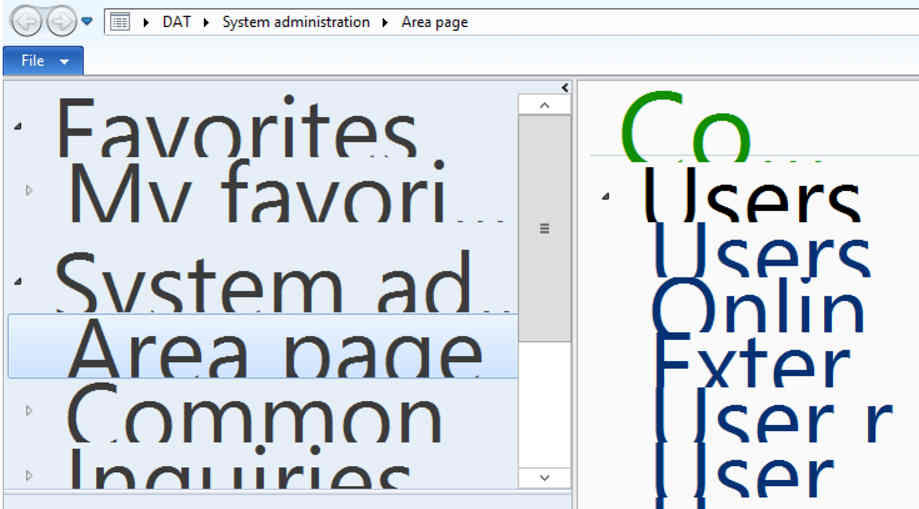
Font-size.jpg

When I click on something on the right panel (for example Users) the right panel gets the right format, but the left panel has still very large fonts.

I have recently installed Windows 10, but a colleague of mine has the same problem on Windows 7, and not all people with Windows 10 have this problem.

Thanks a lot in advance for any suggestion.

Agostino

*This post is locked for comments

I have the same question (0)
  • Verified answer
    Community Member Profile Picture
    on at

    Have you tried altering the font size in Windows 10:

    Settings > System > Display > Change the size of text, apps and other items

    You can adjust the size there.

    A1JpAVc.png

  • Community Member Profile Picture
    on at

    This answers my question, but other elements outside AX become too small. So it must be a bug of Windows 10. Thank you.

  • Guy Terry Profile Picture
    28,924 Moderator on at

    Hi Agostino,

    I did some investigation on this once (although not on Windows 10):

    guyterry.wordpress.com/.../wrong-font-size-on-r3-demo-virtual-machine

    However, the short answer seems to be to tick 'Disable display scaling on high dpi settings' on the windows shortcut that you use to open the AX client. To do this, right-click the application’s shortcut and then click Properties. On the Compatibility tab, select Disable Display Scaling On High DPI Settings, and then click OK.

  • Community Member Profile Picture
    on at

    Hi Guy,

    Thank you, if check "display scaling on high dpi settings" it reduces the size of the fonts, but the icons on the left bottom side of the window become so small that they are unreadable.

  • Guy Terry Profile Picture
    28,924 Moderator on at

    It's not a Windows 10 bug; AX 2012 R3 only 'supports' the font size that you get by moving the slider in Steffen's screenshot all the way to the left.

    What resolution are you running on your monitor?

  • Community Member Profile Picture
    on at

    My resolution is 2880x1620. I connect to AX that is in an Azure VM via RDP.

  • dekaasboer Profile Picture
    1,530 on at

    Thanks Guy Terry. Even op PC's with normal resolution and no special scaling the font sizes would sometimes shift a little or become somewhat blurry. This fixed that allso!

  • Community Member Profile Picture
    on at

    RE: Guy Terry's post:

    "However, the short answer seems to be to tick 'Disable display scaling on high dpi settings' on the windows shortcut that you use to open the AX client. To do this, right-click the application’s shortcut and then click Properties. On the Compatibility tab, select Disable Display Scaling On High DPI Settings, and then click OK."

    Anyone know how to implement this in a RemoteApp environment?  Can the Compatibility setting be made for all users on the RD server?

    Thanks,

    Russell

  • Suggested answer
    Community Member Profile Picture
    on at

    This issue is because automatic font scaling (your windows 10 has more than 100% font sizing for hi-res screen, and use RDP to connect to AX Client) here how to fix it.

    1.- In your RDP connection close any AX client

    2.-Right click on the AX icon properties

    GOTO compatibility TAB

    Check the "Disable display scaling on high DPI settings"

    rdp-fix.jpg

    3.- Press OK and you are DONE!

    If works for you ---a thank you is welcome

    Jorge Garcia

    Dynamics consultant
    georgegar@gmail.com

Under review

Thank you for your reply! To ensure a great experience for everyone, your content is awaiting approval by our Community Managers. Please check back later.

Helpful resources

Quick Links

Responsible AI policies

As AI tools become more common, we’re introducing a Responsible AI Use…

Neeraj Kumar – Community Spotlight

We are honored to recognize Neeraj Kumar as our Community Spotlight honoree for…

Leaderboard > 🔒一 Microsoft Dynamics AX (Archived)

#1
Martin Dráb Profile Picture

Martin Dráb 4 Most Valuable Professional

#1
Priya_K Profile Picture

Priya_K 4

#3
MyDynamicsNAV Profile Picture

MyDynamicsNAV 2

Last 30 days Overall leaderboard

Featured topics

Product updates

Dynamics 365 release plans
