web
You’re offline. This is a read only version of the page.
close
Skip to main content

Notifications

Announcements

No record found.

Community site session details

Community site session details

Session Id :
Finance | Project Operations, Human Resources, ...
Suggested Answer

How to read Work creation history log

(0) ShareShare
ReportReport
Posted on by 537

Hi guys, 

We have a load with this item and quantity. However the whole load cannot release to WH, and asked to check work creation history log.
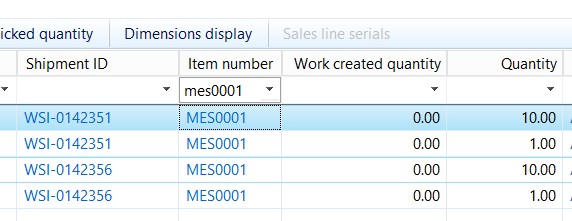
pastedimage1594175499731v1.png

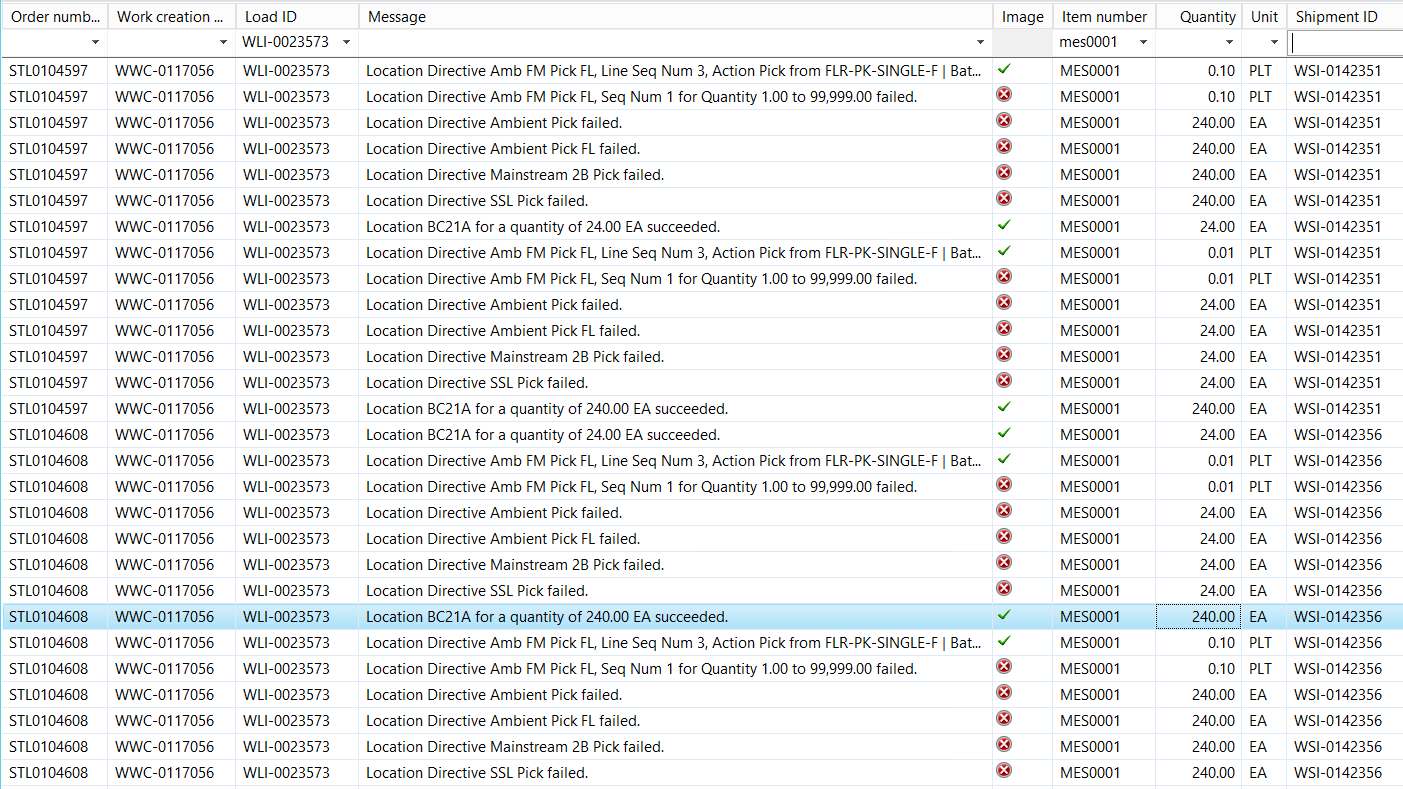
Just get this item as an example, i found it is quite weird. To be honest, I dont know how to read this table to understand where the error comes. 
pastedimage1594175664893v2.png

Could you please advise me?

Many thanks

Ett

I have the same question (0)
  • André Arnaud de Calavon Profile Picture
    301,069 Super User 2025 Season 2 on at

    Hi Ett,

    This is indeed a bit hard to understand. It could be related to non-matching queries, settings for allowing or not of mixed license plates, unit conversions etc. You showed a lot of errors. The first error is related to a location directive. Is there e.g. a restriction on the unit? So, you have to verify the settings with the details of the work which failed.

  • Ludwig Reinhard Profile Picture
    Microsoft Employee on at

    Hello Ett,

    Where does your second screenprint come from?

    Best regards,

    Ludwig

  • André Arnaud de Calavon Profile Picture
    301,069 Super User 2025 Season 2 on at

    The second screen is the work creation history log.

  • Ett Profile Picture
    537 on at

    Hi Andre,

    Now we found that 1 item got issue and cannot reserve.

    pastedimage1594790671407v1.png

    What should I start to check, please advise me. I have check UOM, stock onhand are fine

    Many thanks

    Ett

  • Ett Profile Picture
    537 on at

    Hi Andre,

    For The restriction on unit mentioned, how and where I can check if we have any restriction.

    Many thanks

    Ett

  • Suggested answer
    Austin Shen Profile Picture
    on at

    Hi ETT,

    You may have a work creation number for your releasing to warehouse to process, filter the work creation history with that number and your item number, then you could go through the history line by line. Generally saying, the system would  fetch one work template for the work, after that it would loop all location directives and check if one pick/put location could be get. For pick location directive, on-hand info, action strategy, action query etc. would be checked and the check result would be showed in the work creation history form. Similar for put location directive. Based on the work creation history log, you could check if the failure would be from on-hand shortage, missing settings etc.

    Hope it would help you a bit. Please let me know if you need further clarification. Thank you.

    Best Regards,

    Austin Shen

Under review

Thank you for your reply! To ensure a great experience for everyone, your content is awaiting approval by our Community Managers. Please check back later.

Helpful resources

Quick Links

Responsible AI policies

As AI tools become more common, we’re introducing a Responsible AI Use…

Neeraj Kumar – Community Spotlight

We are honored to recognize Neeraj Kumar as our Community Spotlight honoree for…

Leaderboard > Finance | Project Operations, Human Resources, AX, GP, SL

#1
Martin Dráb Profile Picture

Martin Dráb 592 Most Valuable Professional

#2
André Arnaud de Calavon Profile Picture

André Arnaud de Cal... 478 Super User 2025 Season 2

#3
BillurSamdancioglu Profile Picture

BillurSamdancioglu 305 Most Valuable Professional

Last 30 days Overall leaderboard

Product updates

Dynamics 365 release plans
