web
You’re offline. This is a read only version of the page.
close
Skip to main content

Announcements

No record found.

News and Announcements icon
Community site session details

Community site session details

Session Id :
Finance | Project Operations, Human Resources, ...
Suggested Answer

How to make tab pages aligned

(0) ShareShare
ReportReport
Posted on by 1,552

Hi,

I have a form with three tabs, where each tab is not directly under each other, how can I make them on the same level -- look at the grey space they are not aligned

pastedimage1675368581141v1.png

This is a form with custom patten

The form has actionPane, filter control and a tab. The tab extended style is tab_simpleFastTab

The tab has 3 tab pages

1st tab page Extended style is workspace_tileLayout   -- this is left side of form

2nd tab page Extended style is none   -- this is right side of form

3rd tab page Extended style is none  -- this is right side of form


so the form is divided to left, middle and right

**right side is not appearing in image below
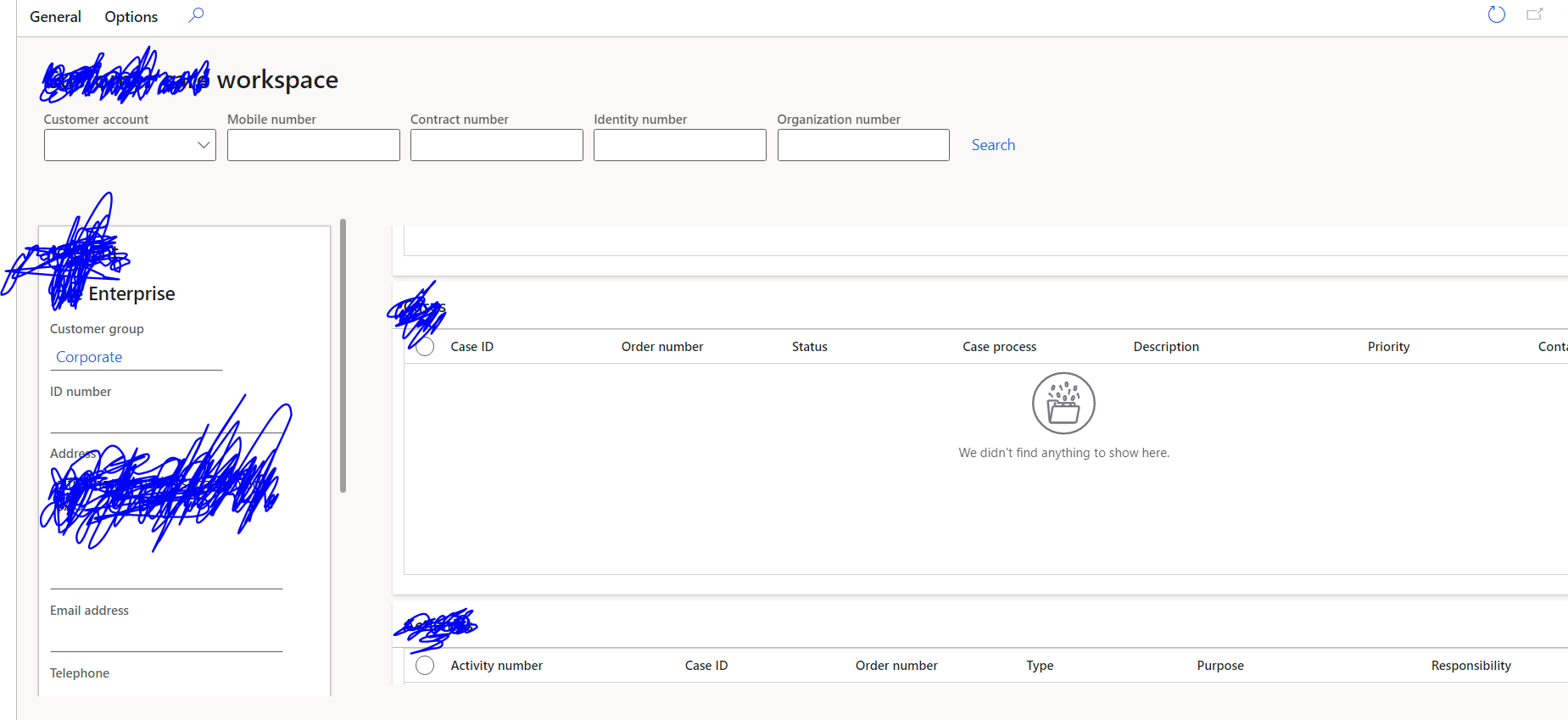
pastedimage1675368957786v2.png

I have the same question (0)
  • Suggested answer
    GirishS Profile Picture
    27,833 Moderator on at

    Hi junior Ax,

    This is the issue when you doesn't set any standard form patterns.

    Also your form looks more congested.

    If the tab page contains grids try to change the width mode property of grid on each tab page and check.

    Thanks,

    Girish S.

  • junior AX Profile Picture
    1,552 on at

    Hi Girish,

    Yesh each highlighted TabPage below, contains one gird, but i can't find width property on each grid, where can I find it?
    Also based on the design I made, is there a standard pattern that can give me what I want?
    pastedimage1675413050913v1.png

  • GirishS Profile Picture
    27,833 Moderator on at

    Width property will not be shown since you have set the pattern to the tab page control.

    Just assign Simple Details w/Fast Tabs and set the Tab property "Arrange method" to "Horizontal wrap" or some other properties related to horizontal.

    Thanks,

    Girish S.

  • junior AX Profile Picture
    1,552 on at

    Hi Girish,

    I removed the pattern on the tab page, shall I replace it with anything? and currently the width property appears, shall I put width mode as manual? and if yes what should the width be??

    Do you mean by simple Details, is to replace the custom pattern with it and it's going to give me the desired design that I want?

  • GirishS Profile Picture
    27,833 Moderator on at

    Width property is up to you. There are 3 properties available to set the width "Size to content", "Size to available", "Manual". Just change to each property value and see the output.

    This is trail and error and I wont give assurance that it will work..

    Just try the suggestions and see whether it works for your scenario.

    Thanks,

    Girish S.

Under review

Thank you for your reply! To ensure a great experience for everyone, your content is awaiting approval by our Community Managers. Please check back later.

Helpful resources

Quick Links

Introducing the 2026 Season 1 community Super Users

Congratulations to our 2026 Super Stars!

Congratulations to our 2025 Community Spotlights

Thanks to all of our 2025 Community Spotlight stars!

Leaderboard > Finance | Project Operations, Human Resources, AX, GP, SL

#1
André Arnaud de Calavon Profile Picture

André Arnaud de Cal... 521 Super User 2026 Season 1

#2
Giorgio Bonacorsi Profile Picture

Giorgio Bonacorsi 438

#3
Adis Profile Picture

Adis 261 Super User 2026 Season 1

Last 30 days Overall leaderboard

Product updates

Dynamics 365 release plans
