web
You’re offline. This is a read only version of the page.
close
Skip to main content

Notifications

Announcements

No record found.

Community site session details

Community site session details

Session Id :
Finance | Project Operations, Human Resources, ...
Unanswered

Excel attachments can't be previewed in browser. Service Unavailable Error

(0) ShareShare
ReportReport
Posted on by 5

Hi experts,

I've come across an odd issue when trying to preview excel attachments anywhere in the system (Sales Orders, Inventory Journals, etc). The preview refuses to load and instead throws a "Service Unavailable error", pictured here.
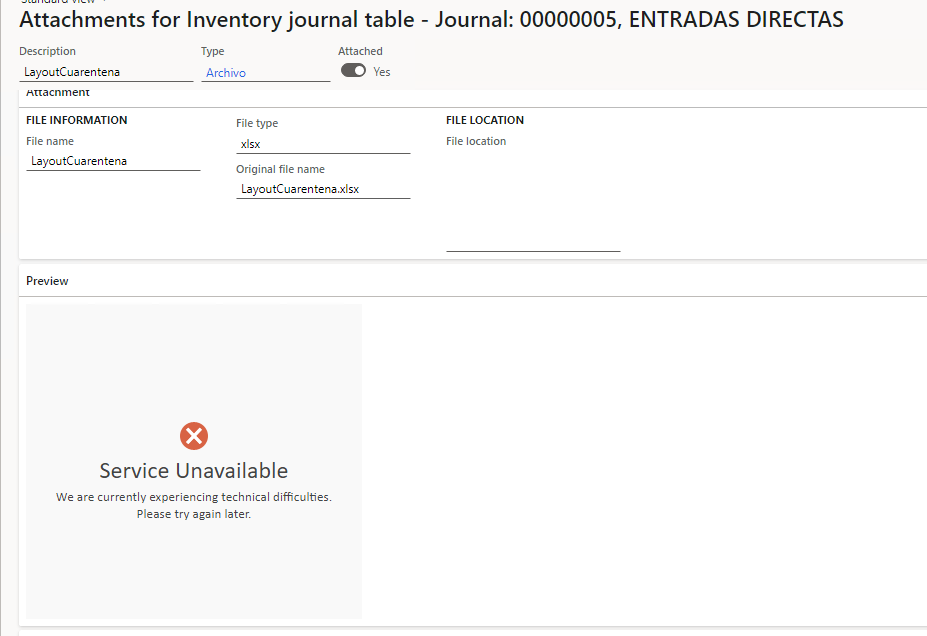
pastedimage1677520048050v2.png

Here's some info:

No customization has been made to these screens, I've tried with multiple users and browsers, clearing cache and whatnot. 

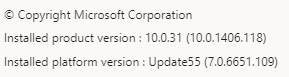
This happens in Dev VMs (I've read this is intentional by Microsoft, but I'd like to know if there's a way to go about it), and in our Sandbox and Production environments. The Sandbox and Production environments are running these versions:
pastedimage1677515862617v3.png

Going to document management parameters, I've set the value for "natively web renderable" to yes for both of the excel types, but "No" and "Yes" don't really change the results. 

pastedimage1677515628914v1.png

We do not have a sharepoint server configured, but I don't know if this is relevant to the issue.
Finally, the Office Web Apps Server is configured to https://onenote.officeapps.live.com, as per Microsoft's documentation. 

pastedimage1677516108014v4.png

Is there a configuration I'm missing, or an update that solves this issue?

Thanks in advance for any insight you can give me here!

I have the same question (0)
  • Alireza Eshaghzadeh Profile Picture
    14,679 Super User 2025 Season 2 on at

    Hi Salvador,

    Ref. to the following issue, this behavior is by design for Developer VM.

    pastedimage1677563986973v1.png

  • Salvador Rodriguez Profile Picture
    5 on at

    Thank you for your answer.

    I was aware that this is the standard behavior for Dev VM's, however, this doesn't really explain why the sandbox and production environments (which are not virtual machines) have this issue.

  • Alireza Eshaghzadeh Profile Picture
    14,679 Super User 2025 Season 2 on at

    Hi,

    Does it apply to all users? Can you download the document and open it in your local pc?

    Which product version do have on sandbox and production environments?

  • Salvador Rodriguez Profile Picture
    5 on at

    Yes, this applies to all users, on multiple browsers. All files can be downloaded with no issues, main complaint from users was not being able to preview it in the browser before downloading.

    Product version: 10.0.31 (10.0.1406.118)

    Platform version: Update55

    One thing I forgot to mention is that the solution is on-premises.

Under review

Thank you for your reply! To ensure a great experience for everyone, your content is awaiting approval by our Community Managers. Please check back later.

Helpful resources

Quick Links

Responsible AI policies

As AI tools become more common, we’re introducing a Responsible AI Use…

Neeraj Kumar – Community Spotlight

We are honored to recognize Neeraj Kumar as our Community Spotlight honoree for…

Leaderboard > Finance | Project Operations, Human Resources, AX, GP, SL

#1
Martin Dráb Profile Picture

Martin Dráb 646 Most Valuable Professional

#2
André Arnaud de Calavon Profile Picture

André Arnaud de Cal... 529 Super User 2025 Season 2

#3
Sohaib Cheema Profile Picture

Sohaib Cheema 285 User Group Leader

Last 30 days Overall leaderboard

Product updates

Dynamics 365 release plans
