Hi Dan,
The AD FS 4.0 compatibility problem does not show in typical use cases.
For instance if the users are just using the CRM web app through https://orgname.domain.com it works fine every time.
But using the CRM SDK's own LoginControlTester.exe tool it is easy to reproduce the issue.
First, change the logging level to Verbose in this file LoginControlTester.exe.config in the <switches> section.
Then run the LoginControlTester tool and fill the fields as shown below (NOTE: In Server use the internal CRM URL)
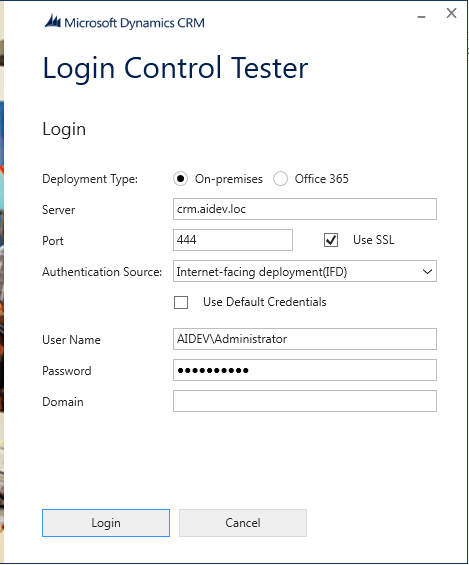
Click Login and you get this:
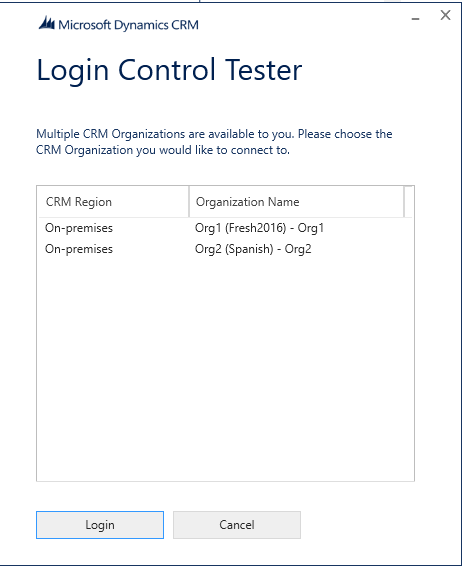
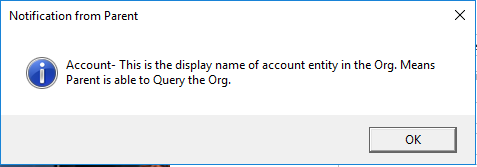
Select first Org and click Login and you get these two popups which means everything worked.

But clicking the Login a second time (on the first page) it fails:
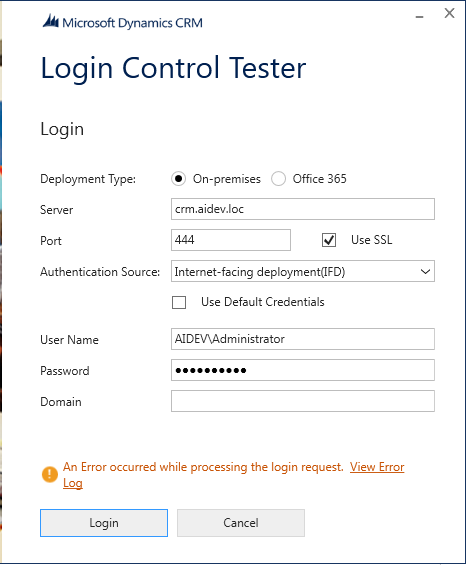
The error file opened from the link above says this:
Source : mscorlib
Method : HandleReturnMessage
Date : 26/07/17
Time : 17:51:31
Error : An unsecured or incorrectly secured fault was received from the other party. See the inner FaultException for the fault code and detail.
Stack Trace : Server stack trace:
at System.ServiceModel.Channels.SecurityChannelFactory`1.SecurityRequestChannel.ProcessReply(Message reply, SecurityProtocolCorrelationState correlationState, TimeSpan timeout)
at System.ServiceModel.Channels.SecurityChannelFactory`1.SecurityRequestChannel.Request(Message message, TimeSpan timeout)
at System.ServiceModel.Dispatcher.RequestChannelBinder.Request(Message message, TimeSpan timeout)
at System.ServiceModel.Channels.ServiceChannel.Call(String action, Boolean oneway, ProxyOperationRuntime operation, Object[] ins, Object[] outs, TimeSpan timeout)
at System.ServiceModel.Channels.ServiceChannelProxy.InvokeService(IMethodCallMessage methodCall, ProxyOperationRuntime operation)
at System.ServiceModel.Channels.ServiceChannelProxy.Invoke(IMessage message)
Exception rethrown at [0]:
at System.Runtime.Remoting.Proxies.RealProxy.HandleReturnMessage(IMessage reqMsg, IMessage retMsg)
at System.Runtime.Remoting.Proxies.RealProxy.PrivateInvoke(MessageData& msgData, Int32 type)
at Microsoft.Xrm.Sdk.Discovery.IDiscoveryService.Execute(DiscoveryRequest request)
at Microsoft.Xrm.Sdk.Client.DiscoveryServiceProxy.Execute(DiscoveryRequest request)
at Microsoft.Xrm.Tooling.Connector.CrmWebSvc.DiscoverOrganizations(Uri discoveryServiceUri, Uri homeRealmUri, ClientCredentials clientCredentials, ClientCredentials deviceCredentials)
at Microsoft.Xrm.Tooling.Connector.CrmWebSvc.DiscoverOrganizations(Uri discoveryServiceUri, Uri homeRealmUri, NetworkCredential networkCredential)
at Microsoft.Xrm.Tooling.Connector.CrmServiceClient.DiscoverOrganizations(Uri discoveryServiceUri, Uri homeRealmUri, NetworkCredential networkCredential)
at Microsoft.Xrm.Tooling.CrmConnectControl.CrmConnectionManager.ValidateServerConnection(CrmOrgByServer selectedOrg)
======================================================================================================================
Inner Exception Level 1 :
Source : Not Provided
Method : Not Provided
Date : 26/07/17
Time : 17:51:31
Error : At least one security token in the message could not be validated.
Stack Trace : Not Provided
======================================================================================================================
And in the Tools verbose log file called LoginControlTesterLog.txt, you'll find more details:
Microsoft.Xrm.Tooling.CrmConnectControl Information: 8 : Created CrmConnectionManager
Microsoft.Xrm.Tooling.CrmConnectControl Information: 8 : CheckBoxState = False
Microsoft.Xrm.Tooling.CrmConnectControl Information: 8 : CheckBoxState = False
Microsoft.Xrm.Tooling.CrmConnectControl Information: 8 : SetConfigKeyInfo, Key Count = 13
Microsoft.Xrm.Tooling.CrmConnectControl Information: 8 : Login Status in Connect is = Connecting to the Microsoft Dynamics CRM server...
Microsoft.Xrm.Tooling.CrmConnectControl Information: 8 : Using CRM deployment type Prem
Microsoft.Xrm.Tooling.CrmConnectControl Information: 8 : SSL Connection = True
Microsoft.Xrm.Tooling.CrmConnectControl Information: 8 : Discovery URI is = crm.aidev.loc/.../Discovery.svc
Microsoft.Xrm.Tooling.CrmConnectControl Information: 8 : Login Status in Connect is = Initializing UII core connections to Microsoft Dynamics CRM...
Microsoft.Xrm.Tooling.CrmConnectControl Information: 8 : Login Status in Connect is = Connecting to the Microsoft Dynamics CRM server...
Microsoft.Xrm.Tooling.CrmConnectControl Information: 8 : Login Status in Connect is = Retrieving organizations from CRM...
Microsoft.Xrm.Tooling.Connector.CrmServiceClient Information: 8 : DiscoverOrganizations - Initializing Discovery Server Object with crm.aidev.loc/.../Discovery.svc
Microsoft.Xrm.Tooling.Connector.CrmServiceClient Verbose: 16 : DiscoverOrganizations - attempting to connect to CRM server @ crm.aidev.loc/.../Discovery.svc
Microsoft.Xrm.Tooling.Connector.CrmServiceClient Verbose: 16 : DiscoverOrganizations - created CRM server proxy configuration for crm.aidev.loc/.../Discovery.svc - duration: 00:00:00.2624787
Microsoft.Xrm.Tooling.Connector.CrmServiceClient Verbose: 16 : DiscoverOrganizations - proxy requiring authentication type : Federation
Microsoft.Xrm.Tooling.Connector.CrmServiceClient Verbose: 16 : DiscoverOrganizations - Authenticated via Federation. Auth Elapsed:00:00:00.1067817
Microsoft.Xrm.Tooling.Connector.CrmServiceClient Verbose: 16 : DiscoverOrganizations - service proxy created - total create duration: 00:00:00.3722563
Microsoft.Xrm.Tooling.Connector.CrmServiceClient Information: 8 : DiscoverOrganizations - Discovery Server Get Orgs Call Complete - Elapsed:00:00:00.4247037
Microsoft.Xrm.Tooling.CrmConnectControl Information: 8 : Found 2 Org(s)
Microsoft.Xrm.Tooling.CrmConnectControl Information: 8 : Login Status in Connect is = Connecting to the Microsoft Dynamics CRM server...
Microsoft.Xrm.Tooling.CrmConnectControl Information: 8 : Using CRM deployment type Prem
Microsoft.Xrm.Tooling.CrmConnectControl Information: 8 : SSL Connection = True
Microsoft.Xrm.Tooling.CrmConnectControl Verbose: 16 : DiscoveryServer indicated organization service location = crm.aidev.loc/.../Organization.svc
Microsoft.Xrm.Tooling.CrmConnectControl Information: 8 : Organization Service URI is = crm.aidev.loc/.../Organization.svc
Microsoft.Xrm.Tooling.CrmConnectControl Information: 8 : Validating connection to Microsoft Dynamics CRM...
Microsoft.Xrm.Tooling.CrmConnectControl Information: 8 : Login Status in Connect is = Initializing UII core connections to Microsoft Dynamics CRM...
Microsoft.Xrm.Tooling.CrmConnectControl Information: 8 : Login Status in Connect is = Validating connection to Microsoft Dynamics CRM...
Microsoft.Xrm.Tooling.Connector.CrmServiceClient Information: 8 : Process is bypassed.. OrgDetail object was provided
Microsoft.Xrm.Tooling.Connector.CrmServiceClient Verbose: 16 : DiscoveryServer indicated organization service location = crm.aidev.loc/.../Organization.svc
Microsoft.Xrm.Tooling.Connector.CrmServiceClient Information: 8 : Organization Service URI is = crm.aidev.loc/.../Organization.svc
Microsoft.Xrm.Tooling.Connector.CrmServiceClient Information: 8 : ConnectAndInitCrmOrgService - Initializing Organization Service Object
Microsoft.Xrm.Tooling.Connector.CrmServiceClient Information: 8 : ConnectAndInitCrmOrgService - Requesting connection to Org with CRM Version: 8.2.1.176
Microsoft.Xrm.Tooling.Connector.CrmServiceClient Information: 8 : ConnectAndInitCrmOrgService - Using ISerivceManagement
Microsoft.Xrm.Tooling.Connector.CrmServiceClient Verbose: 16 : ConnectAndInitCrmOrgService - attempting to connect to CRM server @ crm.aidev.loc/.../Organization.svc
Microsoft.Xrm.Tooling.Connector.CrmServiceClient Verbose: 16 : ConnectAndInitCrmOrgService - created CRM server proxy configuration for crm.aidev.loc/.../Organization.svc - duration: 00:00:00.1293431
Microsoft.Xrm.Tooling.Connector.CrmServiceClient Verbose: 16 : ConnectAndInitCrmOrgService - proxy requiring authentication type : Federation
Microsoft.Xrm.Tooling.Connector.CrmServiceClient Verbose: 16 : ConnectAndInitCrmOrgService - Authenticated via Federation. Auth Elapsed:00:00:00.0319331
Microsoft.Xrm.Tooling.Connector.CrmServiceClient Verbose: 16 : ConnectAndInitCrmOrgService - service proxy created - total create duration: 00:00:00.1612762
Microsoft.Xrm.Tooling.Connector.CrmServiceClient Information: 8 : ConnectAndInitCrmOrgService - Proxy created, total elapsed time: 00:00:00.1625290
Microsoft.Xrm.Tooling.Connector.CrmServiceClient Information: 8 : Beginning Validation of CRM Connection
Microsoft.Xrm.Tooling.Connector.CrmServiceClient Information: 8 : Validation of CRM Connection Complete, total duration: 00:00:00.1247456
Microsoft.Xrm.Tooling.Connector.CrmServiceClient Verbose: 16 : New Batch Manager Created, Max #of Batches:50000, Max #of RequestsPerBatch:5000
Microsoft.Xrm.Tooling.CrmConnectControl Information: 8 : Login Status in Connect is = Connection to CRM Complete [First connection was successful]
Microsoft.Xrm.Tooling.CrmConnectControl Information: 8 : CheckBoxState = False
Microsoft.Xrm.Tooling.Connector.CrmServiceClient Verbose: 16 : Claims Connection Token Debug:
SecurityToken is Not Null
Current Time is: 07/26/2017 15:17:50 + 2 Min for ValidFrom Check Only
Token ValidFrom is 07/26/2017 15:17:48, Is Valid = True
Token ValidTo is 07/26/2017 23:17:48, Is Valid = True
Microsoft.Xrm.Tooling.Connector.CrmServiceClient Verbose: 16 : Executed Command - RetrieveEntity : GetEntityMetadata : duration: 00:00:00.0628716
Microsoft.Xrm.Tooling.CrmConnectControl Information: 8 : SetConfigKeyInfo, Key Count = 13
Microsoft.Xrm.Tooling.CrmConnectControl Information: 8 : Login Status in Connect is = Connecting to the Microsoft Dynamics CRM server...
Microsoft.Xrm.Tooling.CrmConnectControl Information: 8 : Using CRM deployment type Prem
Microsoft.Xrm.Tooling.CrmConnectControl Information: 8 : SSL Connection = True
Microsoft.Xrm.Tooling.CrmConnectControl Information: 8 : Discovery URI is = crm.aidev.loc/.../Discovery.svc
Microsoft.Xrm.Tooling.Connector.CrmServiceClient Information: 8 : DiscoverOrganizations - Initializing Discovery Server Object with crm.aidev.loc/.../Discovery.svc
Microsoft.Xrm.Tooling.CrmConnectControl Information: 8 : Login Status in Connect is = Initializing UII core connections to Microsoft Dynamics CRM...
Microsoft.Xrm.Tooling.Connector.CrmServiceClient Verbose: 16 : DiscoverOrganizations - attempting to connect to CRM server @ crm.aidev.loc/.../Discovery.svc
Microsoft.Xrm.Tooling.CrmConnectControl Information: 8 : Login Status in Connect is = Connecting to the Microsoft Dynamics CRM server...
Microsoft.Xrm.Tooling.CrmConnectControl Information: 8 : Login Status in Connect is = Retrieving organizations from CRM...
Microsoft.Xrm.Tooling.Connector.CrmServiceClient Verbose: 16 : DiscoverOrganizations - created CRM server proxy configuration for crm.aidev.loc/.../Discovery.svc - duration: 00:00:00.1244064
Microsoft.Xrm.Tooling.Connector.CrmServiceClient Verbose: 16 : DiscoverOrganizations - proxy requiring authentication type : Federation
Microsoft.Xrm.Tooling.Connector.CrmServiceClient Verbose: 16 : DiscoverOrganizations - Authenticated via Federation. Auth Elapsed:00:00:00.0159697
Microsoft.Xrm.Tooling.Connector.CrmServiceClient Verbose: 16 : DiscoverOrganizations - service proxy created - total create duration: 00:00:00.1403761
Microsoft.Xrm.Tooling.Connector.CrmServiceClient Error: 2 : ERROR REQUESTING ORGS FROM THE DISCOVERY SERVER [Second connection failed]
Microsoft.Xrm.Tooling.Connector.CrmServiceClient Error: 2 : Source : mscorlib
Method : HandleReturnMessage
Date : 26/07/17
Time : 17:17:53
Error : An unsecured or incorrectly secured fault was received from the other party. See the inner FaultException for the fault code and detail.
Stack Trace : Server stack trace:
at System.ServiceModel.Channels.SecurityChannelFactory`1.SecurityRequestChannel.ProcessReply(Message reply, SecurityProtocolCorrelationState correlationState, TimeSpan timeout)
at System.ServiceModel.Channels.SecurityChannelFactory`1.SecurityRequestChannel.Request(Message message, TimeSpan timeout)
at System.ServiceModel.Dispatcher.RequestChannelBinder.Request(Message message, TimeSpan timeout)
at System.ServiceModel.Channels.ServiceChannel.Call(String action, Boolean oneway, ProxyOperationRuntime operation, Object[] ins, Object[] outs, TimeSpan timeout)
at System.ServiceModel.Channels.ServiceChannelProxy.InvokeService(IMethodCallMessage methodCall, ProxyOperationRuntime operation)
at System.ServiceModel.Channels.ServiceChannelProxy.Invoke(IMessage message)
Exception rethrown at [0]:
at System.Runtime.Remoting.Proxies.RealProxy.HandleReturnMessage(IMessage reqMsg, IMessage retMsg)
at System.Runtime.Remoting.Proxies.RealProxy.PrivateInvoke(MessageData& msgData, Int32 type)
at Microsoft.Xrm.Sdk.Discovery.IDiscoveryService.Execute(DiscoveryRequest request)
at Microsoft.Xrm.Sdk.Client.DiscoveryServiceProxy.Execute(DiscoveryRequest request)
at Microsoft.Xrm.Tooling.Connector.CrmWebSvc.DiscoverOrganizations(Uri discoveryServiceUri, Uri homeRealmUri, ClientCredentials clientCredentials, ClientCredentials deviceCredentials)
======================================================================================================================
Inner Exception Level 1 :
Source : Not Provided
Method : Not Provided
Date : 26/07/17
Time : 17:17:53
Error : At least one security token in the message could not be validated.
Stack Trace : Not Provided
======================================================================================================================
Microsoft.Xrm.Tooling.CrmConnectControl Error: 2 : Error Message: Exception logged by the CRM Connector control:
Source : mscorlib
Method : HandleReturnMessage
Date : 26/07/17
Time : 17:17:53
Error : An unsecured or incorrectly secured fault was received from the other party. See the inner FaultException for the fault code and detail.
Stack Trace : Server stack trace:
at System.ServiceModel.Channels.SecurityChannelFactory`1.SecurityRequestChannel.ProcessReply(Message reply, SecurityProtocolCorrelationState correlationState, TimeSpan timeout)
at System.ServiceModel.Channels.SecurityChannelFactory`1.SecurityRequestChannel.Request(Message message, TimeSpan timeout)
at System.ServiceModel.Dispatcher.RequestChannelBinder.Request(Message message, TimeSpan timeout)
at System.ServiceModel.Channels.ServiceChannel.Call(String action, Boolean oneway, ProxyOperationRuntime operation, Object[] ins, Object[] outs, TimeSpan timeout)
at System.ServiceModel.Channels.ServiceChannelProxy.InvokeService(IMethodCallMessage methodCall, ProxyOperationRuntime operation)
at System.ServiceModel.Channels.ServiceChannelProxy.Invoke(IMessage message)
Exception rethrown at [0]:
at System.Runtime.Remoting.Proxies.RealProxy.HandleReturnMessage(IMessage reqMsg, IMessage retMsg)
at System.Runtime.Remoting.Proxies.RealProxy.PrivateInvoke(MessageData& msgData, Int32 type)
at Microsoft.Xrm.Sdk.Discovery.IDiscoveryService.Execute(DiscoveryRequest request)
at Microsoft.Xrm.Sdk.Client.DiscoveryServiceProxy.Execute(DiscoveryRequest request)
at Microsoft.Xrm.Tooling.Connector.CrmWebSvc.DiscoverOrganizations(Uri discoveryServiceUri, Uri homeRealmUri, ClientCredentials clientCredentials, ClientCredentials deviceCredentials)
at Microsoft.Xrm.Tooling.Connector.CrmWebSvc.DiscoverOrganizations(Uri discoveryServiceUri, Uri homeRealmUri, NetworkCredential networkCredential)
at Microsoft.Xrm.Tooling.Connector.CrmServiceClient.DiscoverOrganizations(Uri discoveryServiceUri, Uri homeRealmUri, NetworkCredential networkCredential)
at Microsoft.Xrm.Tooling.CrmConnectControl.CrmConnectionManager.ValidateServerConnection(CrmOrgByServer selectedOrg)
======================================================================================================================
Inner Exception Level 1 :
Source : Not Provided
Method : Not Provided
Date : 26/07/17
Time : 17:17:53
Error : At least one security token in the message could not be validated.
Stack Trace : Not Provided
======================================================================================================================
Microsoft.Xrm.Tooling.CrmConnectControl Error: 2 : Error Message: Your security settings aren’t configured correctly. Contact your administrator to update your security settings.
Source : mscorlib
Method : HandleReturnMessage
Date : 26/07/17
Time : 17:17:53
Error : An unsecured or incorrectly secured fault was received from the other party. See the inner FaultException for the fault code and detail.
Stack Trace : Server stack trace:
at System.ServiceModel.Channels.SecurityChannelFactory`1.SecurityRequestChannel.ProcessReply(Message reply, SecurityProtocolCorrelationState correlationState, TimeSpan timeout)
at System.ServiceModel.Channels.SecurityChannelFactory`1.SecurityRequestChannel.Request(Message message, TimeSpan timeout)
at System.ServiceModel.Dispatcher.RequestChannelBinder.Request(Message message, TimeSpan timeout)
at System.ServiceModel.Channels.ServiceChannel.Call(String action, Boolean oneway, ProxyOperationRuntime operation, Object[] ins, Object[] outs, TimeSpan timeout)
at System.ServiceModel.Channels.ServiceChannelProxy.InvokeService(IMethodCallMessage methodCall, ProxyOperationRuntime operation)
at System.ServiceModel.Channels.ServiceChannelProxy.Invoke(IMessage message)
Exception rethrown at [0]:
at System.Runtime.Remoting.Proxies.RealProxy.HandleReturnMessage(IMessage reqMsg, IMessage retMsg)
at System.Runtime.Remoting.Proxies.RealProxy.PrivateInvoke(MessageData& msgData, Int32 type)
at Microsoft.Xrm.Sdk.Discovery.IDiscoveryService.Execute(DiscoveryRequest request)
at Microsoft.Xrm.Sdk.Client.DiscoveryServiceProxy.Execute(DiscoveryRequest request)
at Microsoft.Xrm.Tooling.Connector.CrmWebSvc.DiscoverOrganizations(Uri discoveryServiceUri, Uri homeRealmUri, ClientCredentials clientCredentials, ClientCredentials deviceCredentials)
at Microsoft.Xrm.Tooling.Connector.CrmWebSvc.DiscoverOrganizations(Uri discoveryServiceUri, Uri homeRealmUri, NetworkCredential networkCredential)
at Microsoft.Xrm.Tooling.Connector.CrmServiceClient.DiscoverOrganizations(Uri discoveryServiceUri, Uri homeRealmUri, NetworkCredential networkCredential)
at Microsoft.Xrm.Tooling.CrmConnectControl.CrmConnectionManager.ValidateServerConnection(CrmOrgByServer selectedOrg)
======================================================================================================================
Inner Exception Level 1 :
Source : Not Provided
Method : Not Provided
Date : 26/07/17
Time : 17:17:53
Error : At least one security token in the message could not be validated.
Stack Trace : Not Provided
======================================================================================================================
Microsoft.Xrm.Tooling.CrmConnectControl Information: 8 : Login Status in Connect is = Your security settings aren’t configured correctly. Contact your administrator to update your security settings.
However the actual error found in CRM Traces is more revealing:
ID1038: The AudienceRestrictionCondition was not valid because the specified Audience is not present in AudienceUris.
Audience: 'https : //crm.aidev.loc:444/XRMServices/2011/Discovery.svc'
As you can see the Audience URI is wrong. It should be https://crm.aidev.loc:444 without the rest of the stuff.
Why does the Audience URI include the path? Probably because it is a bug.
External apps connecting to an IFD CRM fail (second time) when they try to connect either to the internal CRM URL or discovery service URL.
Please fix this Microsoft. Thanks.







