web
You’re offline. This is a read only version of the page.
close
Skip to main content

Announcements

No record found.

News and Announcements icon
Community site session details

Community site session details

Session Id :
Microsoft Dynamics AX (Archived)

Financial Statement with dimension value

(0) ShareShare
ReportReport
Posted on by 475

Hi,

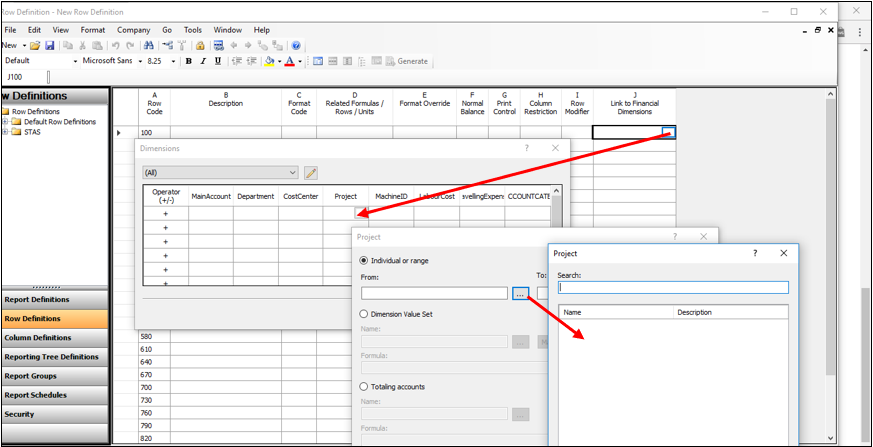
I were trying to design a financial statement with dimension value.

I able to drop down to select my Department value and Cost center value but when when i drop down to select my other financial dimensions such as Project in my example below, i found no value for selection 
row-definition.png

FYI, when i check my TB with dimension i can my TB by my dimension.

Wonder if anyone have this experience

*This post is locked for comments

I have the same question (0)
  • Suggested answer
    Ludwig Reinhard Profile Picture
    Microsoft Employee on at

    Hi,

    Have you integrated your financial dimension 'project' for the management reporter?

    Please check the GL form financial dim. configuration for integration applications.

    Best regards,

    Ludwig

  • Dexin Profile Picture
    475 on at

    Hi

    I have setup my financial reporting setup as below:

    Wonder is there any any setup that i miss up

    Financial-Reporting-Setup.JPG

  • Verified answer
    Ludwig Reinhard Profile Picture
    Microsoft Employee on at

    Hi,

    Can you try hitting the refresh cached financial data in MR. If this does not work, contact a technical admin who should be able with the correct integration / setup of the MR. Might be a technical setup that is missing. A good thing here is to export (backup) all of your reports that you have created because your colleagues might have to reset the MR datamart.

    Best regards,

    Ludwig

  • Dexin Profile Picture
    475 on at

    Hi Ludwig,

    Your suggestion to refresh cache is working

    Thanks a lot.

Under review

Thank you for your reply! To ensure a great experience for everyone, your content is awaiting approval by our Community Managers. Please check back later.

Helpful resources

Quick Links

Introducing the 2026 Season 1 community Super Users

Congratulations to our 2026 Super Stars!

Meet the Microsoft Dynamics 365 Contact Center Champions

We are thrilled to have these Champions in our Community!

Congratulations to the March Top 10 Community Leaders

These are the community rock stars!

Leaderboard > 🔒一 Microsoft Dynamics AX (Archived)

#1
CP04-islander Profile Picture

CP04-islander 39

#2
Michel ROY Profile Picture

Michel ROY 14

#3
imran ul haq Profile Picture

imran ul haq 8

Last 30 days Overall leaderboard

Featured topics

Product updates

Dynamics 365 release plans
