web
You’re offline. This is a read only version of the page.
close
Skip to main content

Announcements

No record found.

News and Announcements icon
Community site session details

Community site session details

Session Id :
Finance | Project Operations, Human Resources, ...
Answered

x++ lookup self join parent-child table

(0) ShareShare
ReportReport
Posted on by 625

Id

Name

ParentId

N1

Apple

N2

Banana

N1

N3

Carrot

N4

Durian


I have a table structure like above that is having self join parent-child relationship (one-to-many).
1643.Untitled.png

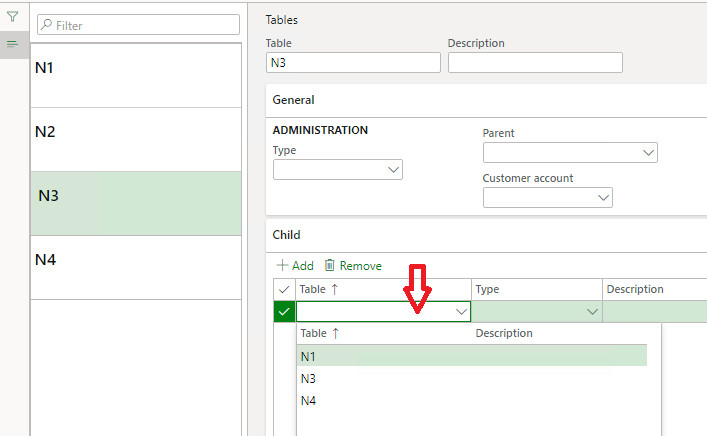
I am building a simple list & details form to show all records (N1, N2, N3, …) When select N1, I should be able to see the child record N2 in grid.

From the grid, I should be able to select child record that is not a parent, not a child, and not itself.

For example,

When select N1 lookup, it should filter child records to N2, N3, N4.

When select N3 lookup, it should filter child records to N4 only.

I am looking to build SQL like this :

SELECT * FROM TBLNAME AS a WHERE NOT EXISTS (SELECT * FROM TBLNAME AS b WHERE b.parentid = a.id) AND a.parentid = '' AND a.id != 'N3'

But what I get in x is :

SELECT * FROM TBLNAME NOTEXISTS JOIN * FROM TBLNAME WHERE ((ParentId = '')) AND ((NOT (Id= N'N3')))

My code as follow, how can I make it to show as I need ?

qbds = q.addDataSource(tableNum(TBLNAME));

qbds2 = qbds.addDataSource(tableNum(TBLNAME));

qbds2.joinMode(JoinMode::NoExistsJoin);  

qbds2.addRange(fieldNum(TBLNAME, ParentId)).value(SysQuery::valueEmptyString());

qbds2.addRange(fieldNum(TBLNAME, Id)).value(SysQuery::valueNot(_Id));

tableLookup.parmQuery(q);

tableLookup.performFormLookup();

I have the same question (0)
  • Verified answer
    Martin Dráb Profile Picture
    239,451 Most Valuable Professional on at

    I don't completely understand your requirement, but I do see a problem with your query.

    You're filtering qbds2 with a static value, instead of using a condition for the join. Remove the filter for Id and use addLink() instead:

    qbds2.addLink(fieldNum(TblName, Id), fieldNum(TblName, ParentId));

    By the way, please use Insert > Insert Code (in the rich formatting view) to paste source code.

  • tyhj Profile Picture
    625 on at

    I modified my explanation above hope it is clearer now. Using the example of N3, I should filter out itself so the static value is what I needed. The problem is when I go to N3 and select child, I want to see only N4. But I could not filter out N1(which is already a parent to N2).

    The add link doesn't seem working to filter out the id that are exist in the parentid field, I think because it could not differentiate the 2 different data source ?  

  • Martin Dráb Profile Picture
    239,451 Most Valuable Professional on at

    Trust me, the join is meaningless without any join condition (which can be done added either by addLink() or relations()). You really must fix this problem.

    addLink() is a standard method used for these purposes (use a search engine or cross-references if you want to see it yourself), so it indeed can be used for that. The first argument is a table field from the parent data source (qbds1 in your case). The second argument is for the QueryBuildDataSource object on which you're calling the method (qbds2).

  • tyhj Profile Picture
    625 on at

    Ok I think the problem is I have 3 conditions that I want to filter

    1. Parent - Id that is also Parent for other

    2. Child - ParentId is not null, so I will filter those ParentId = ''

    3. Itself - If I select N3, I want to exclude N3

    SELECT * FROM TBLNAME NOTEXISTS JOIN * FROM TBLNAME WHERE TBLNAME.Id = TBLNAME.ParentId AND ((ParentId = '')) AND ((NOT (Id= N'N3')))

    But the X query doesn't seem right...

  • Martin Dráb Profile Picture
    239,451 Most Valuable Professional on at

    If you struggle with using your data model, you should ask yourself if your data model is suitable for your purpose. Maybe you avoid your problems with querying by improving the data model. Consider a trivial example - if you maintain a flag on each record showing if the record is used in a hierarchy or not, finding records not used in any hierarchy would become trivial.

    If you want to stick to your current model, please show us your current code, what SQL code it generates and how it differs from what you intent to generate. It'll tell us which part you're struggling with.

  • tyhj Profile Picture
    625 on at

    What I intend to generate and what is actually generated are described in my question above.

    Thank you for your help and I will consider your suggestion if I can't fix the query.

  • Verified answer
    Martin Dráb Profile Picture
    239,451 Most Valuable Professional on at

    If you still have the same X++ code, notice that you're applying ranges to the wrong data source. Your SQL code filters 'a', while your X++ code filters 'b'. Fix that, try it again and show us your new code new results.

    Also note that toString() doesn't give you the actual T-SQL code, therefore you're comparing two (more or less) different things.

  • tyhj Profile Picture
    625 on at

    Yes you are right! I did wrong in the range there, so it should work as I expected!

Under review

Thank you for your reply! To ensure a great experience for everyone, your content is awaiting approval by our Community Managers. Please check back later.

Helpful resources

Quick Links

Introducing the 2026 Season 1 community Super Users

Congratulations to our 2026 Super Stars!

Meet the Microsoft Dynamics 365 Contact Center Champions

We are thrilled to have these Champions in our Community!

Congratulations to the April Top 10 Community Leaders

These are the community rock stars!

Leaderboard > Finance | Project Operations, Human Resources, AX, GP, SL

#1
André Arnaud de Calavon Profile Picture

André Arnaud de Cal... 593 Super User 2026 Season 1

#2
Giorgio Bonacorsi Profile Picture

Giorgio Bonacorsi 543

#3
CP04-islander Profile Picture

CP04-islander 430

Last 30 days Overall leaderboard

Product updates

Dynamics 365 release plans
