web
You’re offline. This is a read only version of the page.
close
Skip to main content

Notifications

Announcements

No record found.

Community site session details

Community site session details

Session Id :
Microsoft Dynamics 365 | Integration, Dataverse...
Suggested Answer

Missing New Power Bi Dashboard option

(0) ShareShare
ReportReport
Posted on by 35

Hi guys,

I'm setting up a new environment and wanted to add an existing Power Bi dashboard. 

My problem is that when I click on New, I only have the option to create a new Dynamics 365 dashboard, the Power Bi option is simply missing.

I don't think I've ever ran into something like this before.

It's not a licensing issue and I could find no articles that say anyhting other than "click on new and select Power Bi dashboard".

What am I missing here?
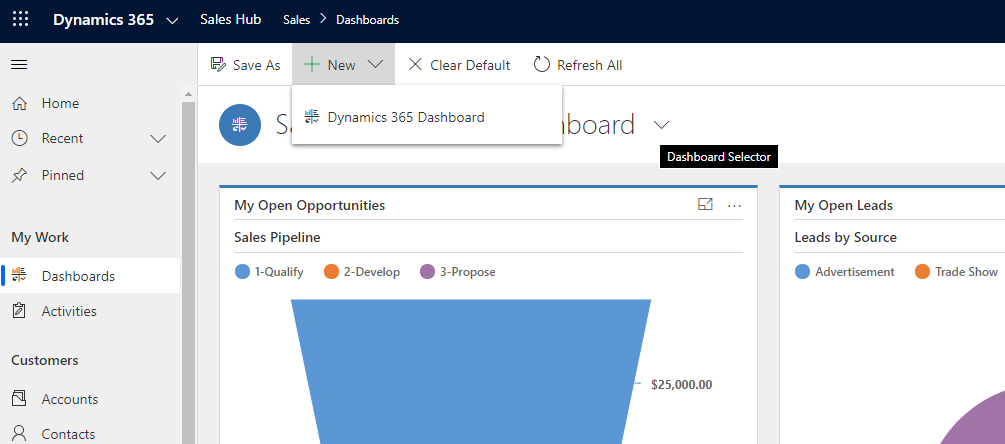
pastedimage1574351520905v1.png

I have the same question (0)
  • Suggested answer
    LeoAlt Profile Picture
    16,331 Moderator on at

    Hi partner,

    You should go to Advanced Settings->Administration->System Settings->Reporting

    pastedimage1574391846036v2.png

    pastedimage1574391814304v1.png

    Select "Allow Power BI visualization embedding".

    Then you will be able to add a new power BI dashboard.

    pastedimage1574391904527v3.png

    Hope it helps.

    Best Regards,

    Leo

  • SumDood Profile Picture
    5 on at

    The Power BI option is missing for me on the System Settings:

    pastedimage1643981524835v1.png

    I enabled it for the environment:

    pastedimage1643981597401v2.png

    Any idea what's going on?

Under review

Thank you for your reply! To ensure a great experience for everyone, your content is awaiting approval by our Community Managers. Please check back later.

Helpful resources

Quick Links

Responsible AI policies

As AI tools become more common, we’re introducing a Responsible AI Use…

Neeraj Kumar – Community Spotlight

We are honored to recognize Neeraj Kumar as our Community Spotlight honoree for…

Leaderboard > Microsoft Dynamics 365 | Integration, Dataverse, and general topics

#1
iampranjal Profile Picture

iampranjal 41

#2
Martin Dráb Profile Picture

Martin Dráb 38 Most Valuable Professional

#3
Satyam Prakash Profile Picture

Satyam Prakash 35

Last 30 days Overall leaderboard

Product updates

Dynamics 365 release plans



