Hi Chris,
If the option is a form field and mapped to a field of Contact entity, you can trigger the workflow on update of Contact entity and on change of that field.
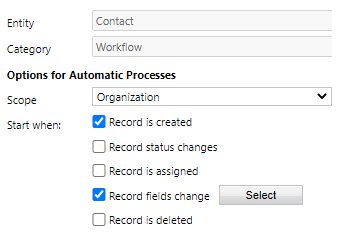
However, currently workflow couldn't capture update event from submission of subscription center form, in other word, it will monitor update operation of all contact records.
Therefore, you could refer to another approach: collect submissions with customization.
1. Create a custom entity to save submissions from subscription center, it may has following fields:
Submitted contact(Lookup)
Submitted Value(Multiple Lines of Text)
2. Create a HTTP Request Trigger in Power Automate to collection submitted data, then creating custom entity record with the data.
https://d365demystified.com/2020/07/29/accept-http-requests-in-a-flow-and-send-response-back-power-automate/
In the flow, use first name and last name to query match contact, then set Submitted contact field to the contact.
3. Call the trigger at submit event of form, capture value of fields with javascript.
https://docs.microsoft.com/en-us/dynamics365/marketing/developer/marketing-form-client-side-extensibility#examples
Finally, each submission will be logged, and you can produce a report base on those records.
(Marketing form has an option to store form submissions, however, it only works for landing page form.)
Regards,
Clofly


