web
You’re offline. This is a read only version of the page.
close
Skip to main content

Announcements

No record found.

News and Announcements icon
Community site session details

Community site session details

Session Id :
Microsoft Dynamics AX (Archived)

Transfer order error.

(0) ShareShare
ReportReport
Posted on by 1,260

Hi,

I was wondering if either of you could help explain to me why this happens, or if there is a way to avoid coming across this in the future. For Gift wrap sometimes the production rooms will ship a product two or three times to fulfill the full amount requested on the TO. They all have different batches. I am running into this error message a lot lately with a few of the production rooms. I would like a better understanding on why this happens. I think it may have something to do with activating the picking list but I could be wrong. It only allows the first batch to be picked and will not allow the qty to be adjusted. The only way I know how to resolve this issue currently is to cancel the picking lines that will not let us edit. Cancel the remainder qty of that item on the TO, and then make a whole new line on the transfer order and pick and ship. Please let me know if you have any useful tips! Thanks,

 Details:

We had received an error message when we tried to pick Rose Jam on T100010517.

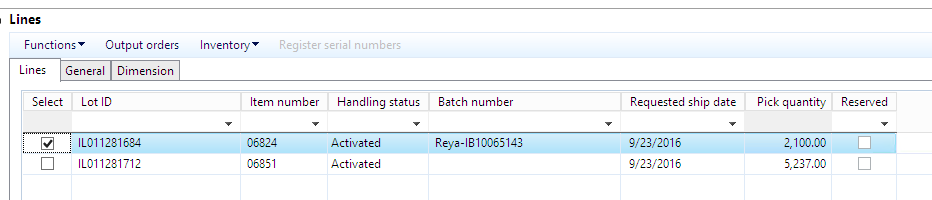
We had two partial shipments as follows:

 TOerror1.png


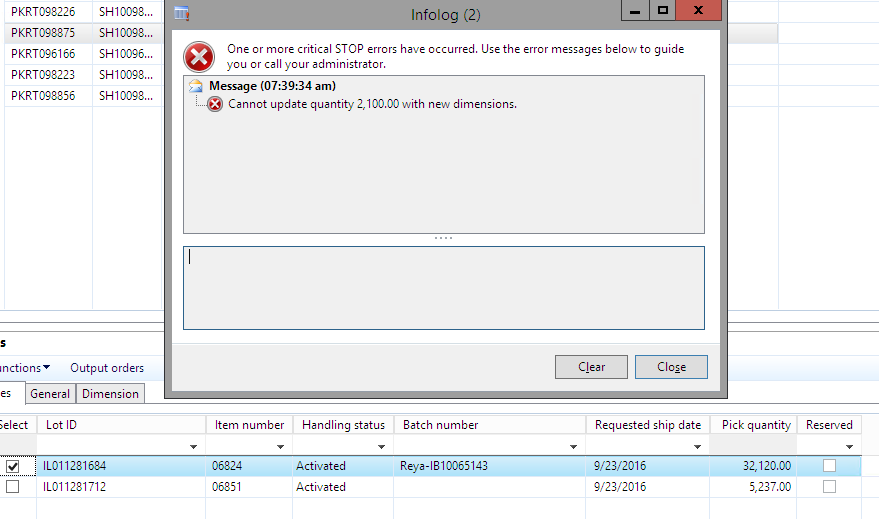
7380 pcs have been shipped without any problem, but when we tried to pick another 2100 pcs, we got error message.

Actually, the dimensions for these two shipments have the same IB number.
 TOerror2.png


Error Message:

 TOerror3.png

 We’ve canceled the picking line and recreated it, but it didn’t work.


Could somebody check and let us know how to resolve this?

*This post is locked for comments

I have the same question (0)
  • Fredrik Sætre Profile Picture
    12,644 on at

    What do the 3m and 3t fields indicate in your inventory?

  • Daljit Kaur Rahsi Profile Picture
    1,260 on at

    Fredrik,

    They are Warehouse.

  • Fredrik Sætre Profile Picture
    12,644 on at

    Are you picking from the 2100 in the other warehouse?

  • Suggested answer
    Community Member Profile Picture
    on at

    Hi D_Meethu, Have you changed any dimensions recently? If yes, then this error might be because of that, as the already existing transactions point to the older FDs and when you try to create new lines, there is a conflict with the already picked items.

    Thanks ~ Nidhi :)

  • Daljit Kaur Rahsi Profile Picture
    1,260 on at

    Fredrik,

    I did not catch you.

  • Daljit Kaur Rahsi Profile Picture
    1,260 on at

    Nidhi,

    I will have to check that, but I have canceled the picking lines and recreated it, but still it didn't work. Is it still using the old dimensions (if it is been changed)?

  • Suggested answer
    Community Member Profile Picture
    on at

    This is because the dimensions are related to the Transfer Order itself ans not just the picking lines.

    So you will have to create a new Transfer Order for it to be able to point to the current dimensions.

    Thanks ~ Nidhi :)

  • Daljit Kaur Rahsi Profile Picture
    1,260 on at

    Nidhi,

    The dimensions were not changed.

Under review

Thank you for your reply! To ensure a great experience for everyone, your content is awaiting approval by our Community Managers. Please check back later.

Helpful resources

Quick Links

Introducing the 2026 Season 1 community Super Users

Congratulations to our 2026 Super Stars!

Meet the Microsoft Dynamics 365 Contact Center Champions

We are thrilled to have these Champions in our Community!

Congratulations to the April Top 10 Community Leaders

These are the community rock stars!

Leaderboard > 🔒一 Microsoft Dynamics AX (Archived)

#1
CP04-islander Profile Picture

CP04-islander 28

#2
Michel ROY Profile Picture

Michel ROY 14

#3
imran ul haq Profile Picture

imran ul haq 8

Last 30 days Overall leaderboard

Featured topics

Product updates

Dynamics 365 release plans