web
You’re offline. This is a read only version of the page.
close
Skip to main content

Announcements

No record found.

News and Announcements icon
Community site session details

Community site session details

Session Id :
Finance | Project Operations, Human Resources, ...
Answered

How to record both tax and reverse tax code in purchase order?

(0) ShareShare
ReportReport
Posted on by 80

Hello experts!

I want to record both sales tax code and reverse tax code in purchase order but at present it is recording only sales tax code. Though actual sales tax showing calculated tax value but ultimately it is not adding with invoice amount which is correct. But customer wants to record both tax codes.

Any idea how to do this?

regards,

Pujari

I have the same question (0)
  • Suggested answer
    SouravDam Profile Picture
    11,730 on at

    Hi PujariD365,

    Could you kindly elaborate a bit as per below;

    --- You want to record both sales tax and reverse sales tax code in PO. Have you created 2 sales tax code (one for sales tax and other for reverse tax) or only one in Tax module?

    --- Is this for any reporting requirement? What is the purpose of doing this?

    --- How transactions are currently recording when you post the product receipt and invoice?

    Best regards,
    Sourav Dam

    Please take time to click 'Yes' against the answers that help you guide in right direction to help other community members.

  • PujariD365 Profile Picture
    80 on at

    Hello Sourav,

    Below is my response.

    Yes; we have created two sales tax code. One for sales tax and the other for reverse tax. And both should be recorded in PO.

    Yes; this is for reporting purpose. We need to show both tax codes in purchase order confirmation report as per requirement of the user. As per them, it will then give a clear picture why tax is not added with item cost just because it is reversed.

    There is no issue with product receipt and invoice journal as tax impact seems perfect. We are accruing sales tax at product receipt which is reversing at invoicing and actual tax is recorded.

    Regards,

    Pujari

  • Verified answer
    SouravDam Profile Picture
    11,730 on at

    Hi PujariD365,

    Can you please check if below setups have done properly or not.

    --- In Sales tax group form in Tax module; you have to set both sales tax code and reverse code.

    --- Setup need to do in Item sales tax groups form also.

    For example; if the sales tax code is TX, then reverse tax code is TX-R. Sales tax group say; V-GCC and item sales tax group say; PTAX. Now, if you want that while selecting this combination V-GCC and PTAX in PO, system should pick both TX and TX-R, then you need to set both these tax codes properly in Sales tax groups and Item sales tax groups forms. 

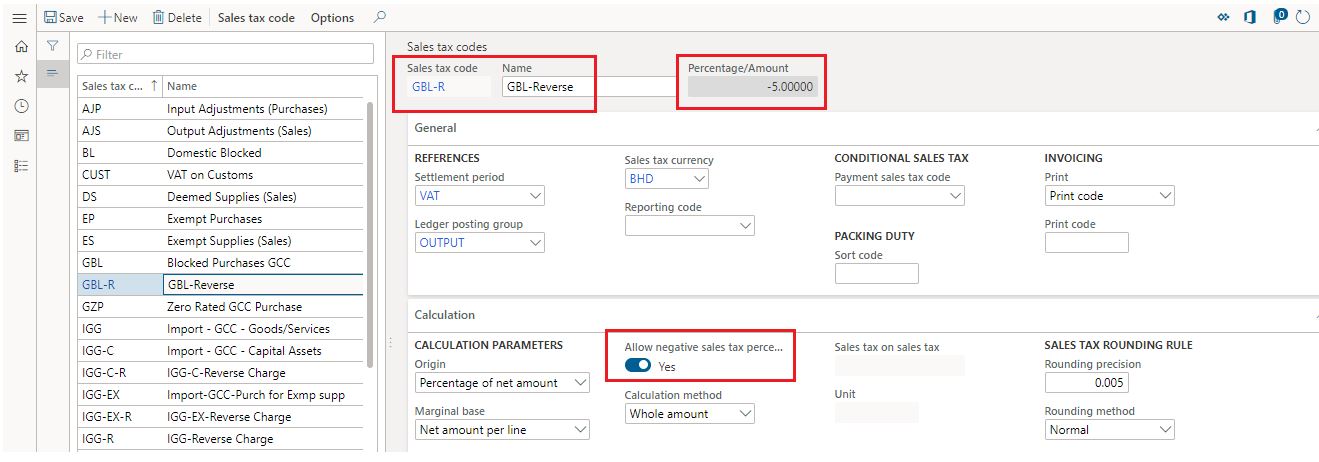
    --- In reverse sales tax code, you have to set Allow negative sales tax percentage as 'Yes'.

    --- Also in reverse tax code; you have to set the value in negative (-ve). Example -5.00
    7485.JPG

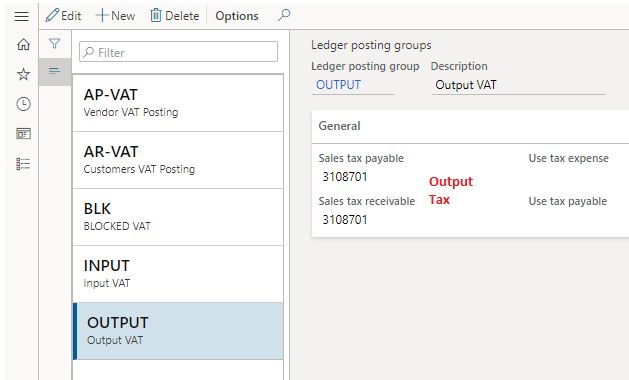
    --- Now in Ledger posting groups form; make sure that you have selected tax related main accounts properly. I think this you have already made as you are not getting any issue for tax calculation in PO.

    I have done below setup.

    3823.JPG   6012.JPG

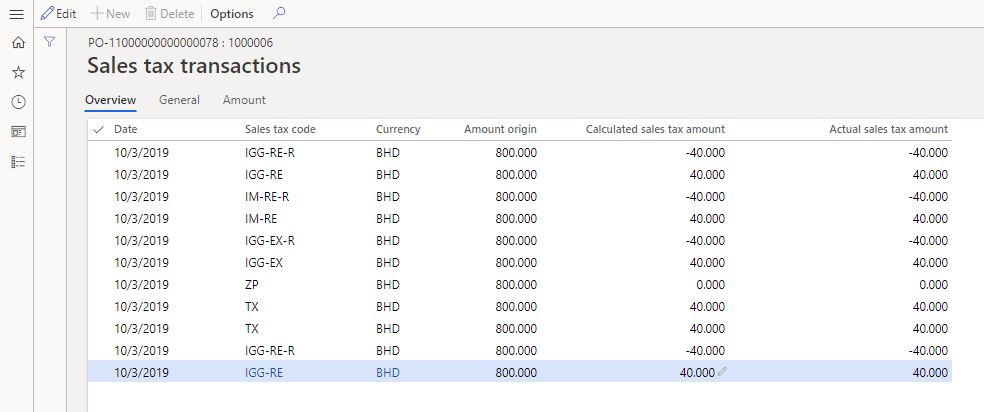
    Now after confirming the PO, sales tax are recorded like this (both sales tax and reverse sales tax codes) which you can fit in your PO confirmation report.
    8182.JPG

    Kindly check and update.

    Best regards,
    Sourav Dam

    Please take time to click 'Yes' against the answers that help you guide in right direction to help other community members.

  • PujariD365 Profile Picture
    80 on at

    Hello Sourav,

    Thanks for detailed explanation. Looks fine this time. Appreciated !!

    Regards,

    Pujari

  • AshokKumarGuptaEga Profile Picture
    Microsoft Employee on at

    Hello Pujari,

    Please help to share supporting screenshots, I will assist you in checking and addressing your issue.

Under review

Thank you for your reply! To ensure a great experience for everyone, your content is awaiting approval by our Community Managers. Please check back later.

Helpful resources

Quick Links

Introducing the 2026 Season 1 community Super Users

Congratulations to our 2026 Super Stars!

Meet the Microsoft Dynamics 365 Contact Center Champions

We are thrilled to have these Champions in our Community!

Congratulations to the March Top 10 Community Leaders

These are the community rock stars!

Leaderboard > Finance | Project Operations, Human Resources, AX, GP, SL

#1
Giorgio Bonacorsi Profile Picture

Giorgio Bonacorsi 689

#2
André Arnaud de Calavon Profile Picture

André Arnaud de Cal... 478 Super User 2026 Season 1

#3
Syed Haris Shah Profile Picture

Syed Haris Shah 258 Super User 2026 Season 1

Last 30 days Overall leaderboard

Product updates

Dynamics 365 release plans