web
You’re offline. This is a read only version of the page.
close
Skip to main content

Notifications

Announcements

No record found.

Community site session details

Community site session details

Session Id :
Small and medium business | Business Central, N...
Answered

Can you link a customer and a vendor record

(1) ShareShare
ReportReport
Posted on by 35

If we have a Customer that is also a Vendor in Business Central, can these two records be linked?  Or would we need to create separate companies in both Customers and Vendors?

I have the same question (0)
  • Suggested answer
    keoma Profile Picture
    32,729 on at

    simply create the company as customer and as vendor. thats needed, because the sales and purchase processes must be handled correctly.

    then add the company's vendor no. to the customer comments and vice versa.

  • AndyEnhanced Profile Picture
    35 on at

    Does this link them in BC though?  Or does it just allow people to see that there is an accompanying vendor/customer record that they can search for themselves if they open it?

  • Suggested answer
    keoma Profile Picture
    32,729 on at

    this is only an information.

    there is no concrete connection opportunity to link a customer and a vendor in bc.

    why do you need that in detail? whats your aim?

  • AndyEnhanced Profile Picture
    35 on at

    If we have a customer that is also a vendor and there outstanding invoices on both the credit and debit accounts, how would we go about doing contra postings?

  • Verified answer
    keoma Profile Picture
    32,729 on at

    that is not possible in standard bc, that needs a customization.

    e.g. an additional infobox in the customer card with according vendor details and/or the possibility to add a discount row in sales invoices with invoice data from the according vendor, if the same company has outstanding bills aso. in the first step it would helpful for you the add the vendor's oustanding bill sum as new field on the customer card and vice versa.

  • Verified answer
    Jeff Sergeant Profile Picture
    60 on at

    You need to create them in both Vendors and Customers, but they can be linked via Contacts.

    Create your customers, this will automatically create a 'Company' contact for each one.

    Go to Business Relations for the Company Contact,  Add a new Business Relation Code of e.g 'VENDINFO', (can't use the standard 'VEND' one)
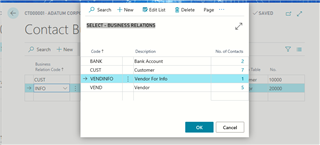
    pastedimage1582392055474v2.png

    Then, create a business relation for this contact with a code of 'VENDINFO', a Link-to table of 'Vendor' and select your Vendor code.
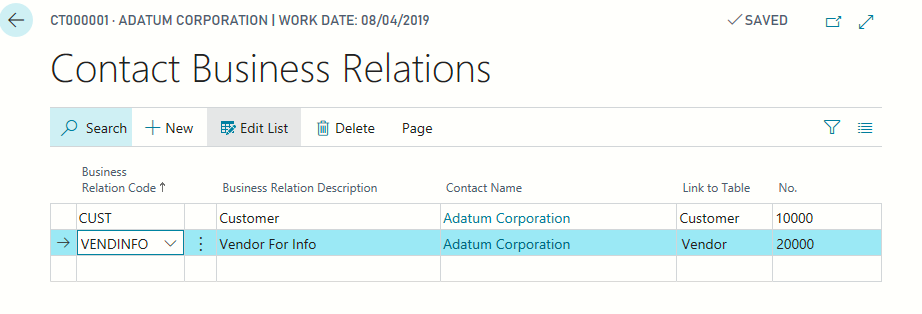
    pastedimage1582392074528v3.png

    Now, from the Vendor Card, you can do Vendor > Contacts and see the related Customer Contact.  
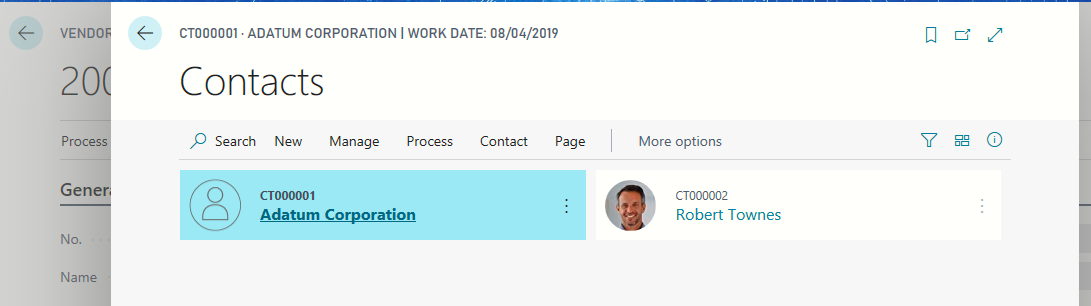
    pastedimage1582392193894v4.png

    And from there get to the customer card
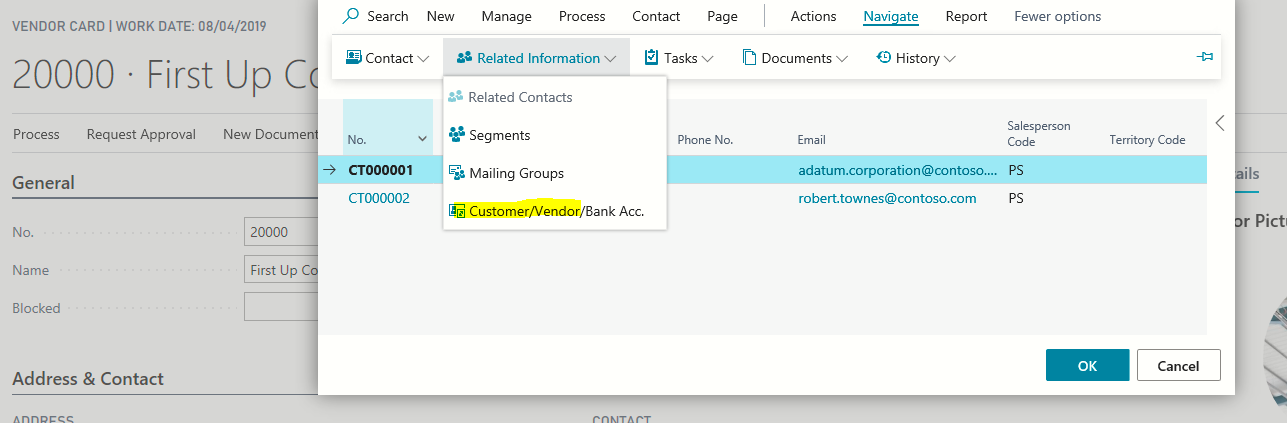
    pastedimage1582392327742v5.png

    You could even set this contact as the 'Contact' for your vendor.

    It's not perfect, and the link doesn't work as well the other way around, but a few small mods around this concept would give you a really neat solution.

  • AndyEnhanced Profile Picture
    35 on at

    Thanks for your detailed response Jeff.  This is a good solution and will definitely suffice.

Under review

Thank you for your reply! To ensure a great experience for everyone, your content is awaiting approval by our Community Managers. Please check back later.

Helpful resources

Quick Links

Responsible AI policies

As AI tools become more common, we’re introducing a Responsible AI Use…

Neeraj Kumar – Community Spotlight

We are honored to recognize Neeraj Kumar as our Community Spotlight honoree for…

Leaderboard > Small and medium business | Business Central, NAV, RMS

#1
OussamaSabbouh Profile Picture

OussamaSabbouh 2,990

#2
Jainam M. Kothari Profile Picture

Jainam M. Kothari 1,576 Super User 2025 Season 2

#3
YUN ZHU Profile Picture

YUN ZHU 1,028 Super User 2025 Season 2

Last 30 days Overall leaderboard

Featured topics

Product updates

Dynamics 365 release plans
