web
You’re offline. This is a read only version of the page.
close
Skip to main content

Notifications

Announcements

No record found.

Community site session details

Community site session details

Session Id :
Microsoft Dynamics AX (Archived)

Revocation Information for the Security Certificate for this Site is not available

(0) ShareShare
ReportReport
Posted on by 2,459

All the users receive an error when opening the AX client - "Revocation Information for the Security Certificate for this Site is not available".
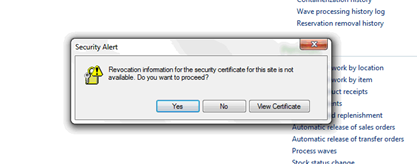
2018_2D00_01_2D00_10_5F00_0804.png

The certificate seems to be expired... Is there a way to renew it?
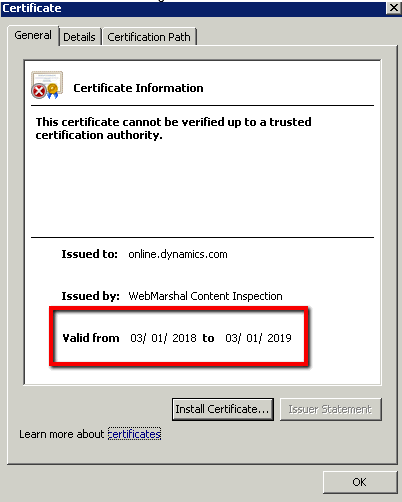
2018_2D00_01_2D00_10_5F00_0805.png

*This post is locked for comments

I have the same question (0)
  • SU-22040800-0 Profile Picture
    2,459 on at

    I suppose a better question would  be "Why does this message come up at all?"

  • BorisD Profile Picture
    2,826 Moderator on at

    How do they get to the AX Client? is the client published through RDS or Citrix, or is the client installed locally?

  • SU-22040800-0 Profile Picture
    2,459 on at

    Thanks for the reply Boris

    The client is installed locally.

  • BorisD Profile Picture
    2,826 Moderator on at

    Are you using Real-time service for the retail module?

  • SU-22040800-0 Profile Picture
    2,459 on at

    hi Boris

    No, we are not using the Retail Module at all..

  • Verified answer
    BorisD Profile Picture
    2,826 Moderator on at

    James, 

    The cert is not actually expired. The validation date is 3/1/2018 and will be good for 1 year.

    However, this cert seems to be applied to soon to your environment. This message will go away once we get to 3/1/2017. 

    The only thing I can think possible is maybe you use Enterprise Portal and a cert was applied to EP and set as active before its active date. 

    I can tell you how to suppress the message from coming up on the local client, but this is not recommended. 

    Maybe you can check IIS Manager and see what cert is applied to your EP and activate the one that has a valid date on it. 

  • SU-22040800-0 Profile Picture
    2,459 on at

    Thanks Boris

    The customer is going to just hide the message using IE settings.

  • SU-22040800-0 Profile Picture
    2,459 on at

    Hi Boris

    The client is not happy about hiding the message. Can I ask you to help me activate the cert? Where do I go? What do I click on?

    etc.

    thanks again

    James

  • BorisD Profile Picture
    2,826 Moderator on at

    Lets verify a few things.

    Is that the date and time on the client computers correct? Can you also let me know what version of Windows the client computers are running please? 

    Go to your SharePoint server, go to All Programs, Administrative Tools, click Internet Information Services (IIS) Manager.

    In the (IIS) Manager click your site, on the right under IIS double click Server Certifications. How many certs do you have listed? View each one by double clicking. Is the one that is displayed to the client one of these certs?

  • SU-22040800-0 Profile Picture
    2,459 on at

    Thanks Boris, but i dont see that icon on/in my iis manager..

    I'll send a screen shot when im at my computer

Under review

Thank you for your reply! To ensure a great experience for everyone, your content is awaiting approval by our Community Managers. Please check back later.

Helpful resources

Quick Links

Responsible AI policies

As AI tools become more common, we’re introducing a Responsible AI Use…

Neeraj Kumar – Community Spotlight

We are honored to recognize Neeraj Kumar as our Community Spotlight honoree for…

Leaderboard > 🔒一 Microsoft Dynamics AX (Archived)

#1
Martin Dráb Profile Picture

Martin Dráb 4 Most Valuable Professional

#1
Priya_K Profile Picture

Priya_K 4

#3
MyDynamicsNAV Profile Picture

MyDynamicsNAV 2

Last 30 days Overall leaderboard

Featured topics

Product updates

Dynamics 365 release plans
