web
You’re offline. This is a read only version of the page.
close
Skip to main content

Notifications

Announcements

No record found.

Community site session details

Community site session details

Session Id :
Microsoft Dynamics AX (Archived)

Account number for transaction type project- cost does not exist.

(0) ShareShare
ReportReport
Posted on by

Hello All,

I am having an error in Project management and accounting module.

When i try to Eliminate a project it gives me error message. i cannot understand why it is coming. any one can help me?

I am also sharing steps.

1. select any project.

in general , entered Eliminate to: Ledger, main account and sub account.
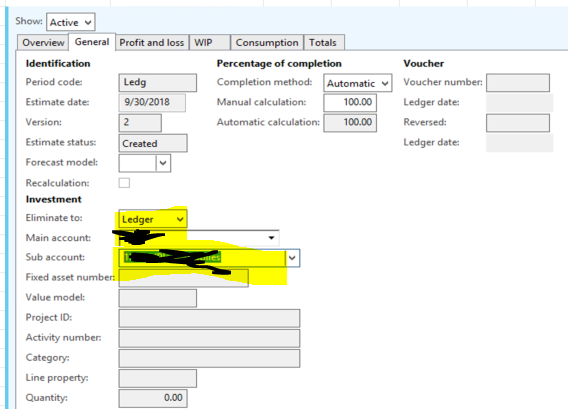
6175.Capture2.PNG

and post it. it is good.

now i want to Eliminate it. and i hit button. it shows me error.
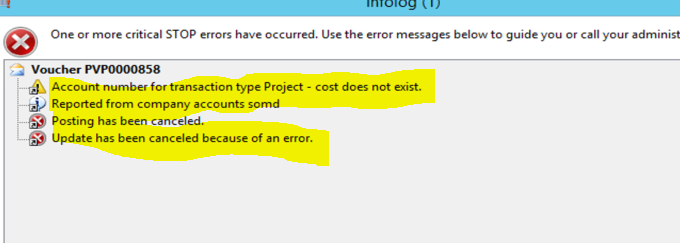
0880.Capture3.PNG

kindly help me. thanks

Hassan

*This post is locked for comments

I have the same question (0)
  • Suggested answer
    Ludwig Reinhard Profile Picture
    Microsoft Employee on at

    Hello Hassan,

    Have you checked your project posting setup that a project cost account has been setup in the posting profile section?

    Best regards,

    Ludwig

  • Community Member Profile Picture
    on at

    Hello Ludwig,

    to be honest, its first time i am working project management and accounting, so i do't know how to check and what to check in posting profile?

    can you tell me ?

  • Community Member Profile Picture
    on at

    311746.Capture.PNGBy the way, its in posting profile.

  • Community Member Profile Picture
    on at

    It is confusing because it only works correctly if I use main account 59000 and sub account 000002. If I use a different main account and sub account I get the error message again. I need to be able to use any combination main account/sub account on the chart of accounts not just 59000

  • Suggested answer
    Ludwig Reinhard Profile Picture
    Microsoft Employee on at

    Hello Hassan Ghauri,

    The ledger account 16000 that you setup in the project cost section should overcome the error message.

    If the account is not suspended or inactive then you should no longer receive the error message.

    What about your account 59000 and 000002?

    How are they related to this issue?

    Best regards,

    Ludwig

  • Community Member Profile Picture
    on at

    Hello Ludwig,

    16000 account is active and working very good.

    i just try to Eliminate an other project with same main account and 54600 and 0000002 combination which is working good. i do't understand why for that project it is not working?

    actually on Eliminate form i want to use any account and subaccount combination. i hope you got it

  • Ludwig Reinhard Profile Picture
    Microsoft Employee on at

    Hi,

    Unfortunately I do not fully understand.

    Is it possible that you make a couple f screenshots and enter some supporting comments for each?

    Many thanks and best regards

    Ludwig

  • Community Member Profile Picture
    on at

    Yeah,

    here i am sending you images as well.

    step one. Select any compnay/Project management and accounting/Common/Projects/All projects and then select one project.

    08732.2.PNG

    after selecting it, Go to MANAGE tab-----> Estimate and new form will open. select new line and go to General tab. enter details about account as shown this image.

    08732.2.PNG

    and post it. it is posted now. but when i try to Eliminate it, it gives me error as shown last pic.

    1462.3.PNG

  • Community Member Profile Picture
    on at

    Error number 2:

    previously i sent you images for error number 1. now i am sharing error #2.

    same types but when i try to Eliminate any project, it gives me error .

    4152.4.PNG

    i really did't understand why i am getting these two errors.

    even in same company, some projects are Eliminated and in Finished status.

  • Suggested answer
    Ludwig Reinhard Profile Picture
    Microsoft Employee on at

    Hi,

    Can you replicate this issue in a demo/test environment?

    What AX2012 version do you operate?

    If you run an older AX2012 version then please take a look at the following LCS site where a number of hotfixes related to issues with the project estimate have been released.

    https://fix.lcs.dynamics.com/Issue/Results?q=project+estimate+eliminate+account+number+for+posting+type&dm=0&v=5_7_4&i=2_1_3_4&ct=1_3_5_4_2_6&ft=1_2_3&cu=&pi=&pm=&pc=&rd=&d=&envId=&permission=&x=0&y=0

    Best regards,

    Ludwig

Under review

Thank you for your reply! To ensure a great experience for everyone, your content is awaiting approval by our Community Managers. Please check back later.

Helpful resources

Quick Links

Responsible AI policies

As AI tools become more common, we’re introducing a Responsible AI Use…

Neeraj Kumar – Community Spotlight

We are honored to recognize Neeraj Kumar as our Community Spotlight honoree for…

Leaderboard > 🔒一 Microsoft Dynamics AX (Archived)

#1
Priya_K Profile Picture

Priya_K 4

#1
Martin Dráb Profile Picture

Martin Dráb 4 Most Valuable Professional

#3
Ali Zaidi Profile Picture

Ali Zaidi 2

Last 30 days Overall leaderboard

Featured topics

Product updates

Dynamics 365 release plans
