web
You’re offline. This is a read only version of the page.
close
Skip to main content

Notifications

Announcements

No record found.

Community site session details

Community site session details

Session Id :
Microsoft Dynamics CRM (Archived)

Create Dynamic URL/Hyperlink in SSRS report

(0) ShareShare
ReportReport
Posted on by 5,237

We can dynamically define a value as a hyperlink Action in an SSRS report. 

  1. In report design view, right-click the text box, image, or chart to which you want to add a link and then click Properties.
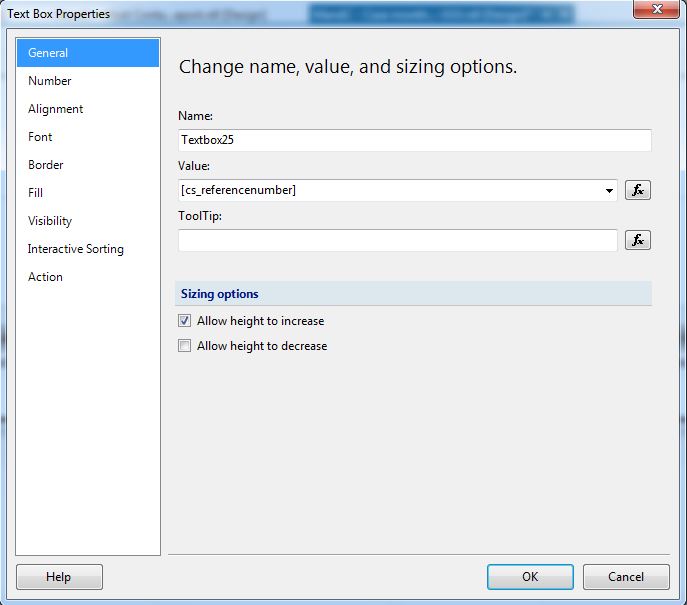
0334.Capture-4.JPG

2. In the Properties dialog box, click the Action tab and select URL.

Capture-5.JPG

3. In the Expression window set the expression as

=Parameters!CRM_URL.Value & "?ID={"&Fields!guidFieldName.Value.ToString()&"}&LogicalName=entitySchemaName"

Capture-6.JPG


Upload the report in CRM and run it.
Clicking on URL in SSRS report value would take us to the actual record within CRM.

Hope this help.!

*This post is locked for comments

I have the same question (0)
  • Community Member Profile Picture
    on at
    [quote user="Pravin Pawar"]=Parameters!CRM_URL.Value & "?ID={"&Fields!guidFieldName.Value.ToString()&"}&LogicalName=entitySchemaName"[/quote]

    Can you explain the break down of this link? How do I make the link go to Service Orders under the Account Tab for example? Where do I find the path name for each CRM window?

    Parameters!CRM_URL.Value  I am guessing is the URL of our GP/Cogsdale interface?,   
    ?ID={"&Fields!guidFieldName.Value.ToString()  I am guessing is the field like account number I would put in there and bring value to string to make it part of the path?

    &"}&LogicalName=entitySchemaName"  - lost here, what is this part?  is this the window or view in CRM?  If so how do I find that?   Is there a list or a way to get it inside GP?

    Thanks, Tina
  • Suggested answer
    Pawar Pravin  Profile Picture
    5,237 on at

    You can find Schema name in entity attribute properties.

  • Community Member Profile Picture
    on at

    Where can I find the "entity attribute properties?"  I am not seeing that.

    Thank you.

  • Suggested answer
    Pawar Pravin  Profile Picture
    5,237 on at

    You can check it as mentioned in below sanpshot.

    pastedimage1624427289011v1.png

Under review

Thank you for your reply! To ensure a great experience for everyone, your content is awaiting approval by our Community Managers. Please check back later.

Helpful resources

Quick Links

Responsible AI policies

As AI tools become more common, we’re introducing a Responsible AI Use…

Neeraj Kumar – Community Spotlight

We are honored to recognize Neeraj Kumar as our Community Spotlight honoree for…

Leaderboard > 🔒一 Microsoft Dynamics CRM (Archived)

#1
SA-08121319-0 Profile Picture

SA-08121319-0 4

#1
Calum MacFarlane Profile Picture

Calum MacFarlane 4

#3
Alex Fun Wei Jie Profile Picture

Alex Fun Wei Jie 2

Last 30 days Overall leaderboard

Featured topics

Product updates

Dynamics 365 release plans
