web
You’re offline. This is a read only version of the page.
close
Skip to main content

Notifications

Announcements

No record found.

Community site session details

Community site session details

Session Id :
Supply chain | Supply Chain Management, Commerce
Suggested Answer

Limit production quantity in RAF

(0) ShareShare
ReportReport
Posted on by

Hello,

Do you have any ideas on how to limit reporting as finished quantity in production orders?


We are using a WMS in our company and sometimes there are human errors and in a production order with a quantity of 100 pieces, employees report 1234567 pieces in RAF because they scan for example the number plate instead of entering a number less than or equal to 100.


Is there any way to limit the excessive quantity in the RAF? As in the case of under-delivery and over-delivery in purchase orders?

I have the same question (0)
  • Suggested answer
    saurabh bharti Profile Picture
    15,039 Moderator on at

    Hi,

    Can you please chcek this option on released product?

    pastedimage1674744077490v1.png

  • Guy Terry Profile Picture
    28,924 Moderator on at

    Hi Andriej,

    Have a look at the parameters at Production control > Setup > Manufacturing execution > Production order defaults

    OverRAF.jpg

    I thought that Maximum report quantity had an effect when the RAF is done by the Warehouse mobile device, but in a quick test I did, it did not. Maybe you will have better luck!

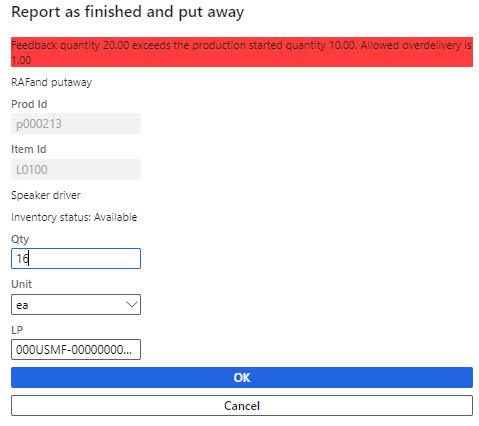
    However, the Accepted surplus in production is considered by the mobile device:
    OverRAF2.jpg

    It allows you to specify a maximum over-RAF percentage. Even if you put in 100% (double the production order quantity), I'm sure it would block your example 1234567 quantity.

  • Guy Terry Profile Picture
    28,924 Moderator on at

    Hi Saurabh,

    Can you please check this blog post to understand what those options do:

    https://timsaxblog.wordpress.com/2015/09/30/max-report-as-finished-in-ax-2012/

    They are in no way relevant to the question asked by the original poster. Quality not Quantity, dude!

  • Andriej Profile Picture
    on at

    Hi, thank you!

    Max report as finished - I see that this function is not what i need.

    But setup at 'Production control > Setup > Manufacturing execution > Production order defaults' works on mobile devices!

    "The reported quantity of 3,028.00 does not match to the planned production quantity of 100.00. The allowed overdelivery production is 50.00." or something like that - I translate message myself.

    Thank you!

Under review

Thank you for your reply! To ensure a great experience for everyone, your content is awaiting approval by our Community Managers. Please check back later.

Helpful resources

Quick Links

Responsible AI policies

As AI tools become more common, we’re introducing a Responsible AI Use…

Neeraj Kumar – Community Spotlight

We are honored to recognize Neeraj Kumar as our Community Spotlight honoree for…

Leaderboard > Supply chain | Supply Chain Management, Commerce

#1
Laurens vd Tang Profile Picture

Laurens vd Tang 301 Super User 2025 Season 2

#2
André Arnaud de Calavon Profile Picture

André Arnaud de Cal... 120 Super User 2025 Season 2

#3
Siv Sagar Profile Picture

Siv Sagar 105 Super User 2025 Season 2

Last 30 days Overall leaderboard

Product updates

Dynamics 365 release plans
