web
You’re offline. This is a read only version of the page.
close
Skip to main content

Notifications

Announcements

No record found.

Community site session details

Community site session details

Session Id :
Microsoft Dynamics CRM (Archived)

How to setup TypeScript in my Visual Studio project using CRM

(0) ShareShare
ReportReport
Posted on by 1,532

Hi,

I am trying to figure out how to setup Typescript in my VS CRM project.  I have not seen anything explaining the best practice.  Would some one please let me what is the best direction to go.

Here's my questions:

1) What's Nuget should I use

2) Once setting up the Nuget.  How does the js and ts file get deployed into CRM

3) I use XrmToolBox.  Is good practice to use the XrmToolBox Typescript for the entities.

My project looks like this
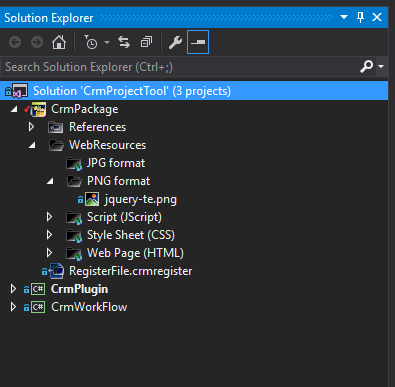
crmvs.PNG

*This post is locked for comments

I have the same question (0)
  • Raviteja Reddy Profile Picture
    280 on at

    Hope this might help you www.youtube.com/watch

  • rthompson Profile Picture
    1,532 on at

    Thanks.  I am aware of this video.  I am looking for direction and best practice.

  • Suggested answer
    Adrian Begovich Profile Picture
    1,027 Moderator on at

    Hi rthompson,

    These blog posts by Scott Durrow will teach you how to setup a TypeScript project, update a project to allow JavaScript to compile as TypeScript, deploy web resources, test TypeScript and debug TypeScript.

  • Verified answer
    rthompson Profile Picture
    1,532 on at

    I used to following 2 video to setup my vs solution to use TypeScript.

    I installed the following 2 nugets

    1) TypeScript.DefinitelyTyped

    TypeScript-Solution.PNG

    2) Spkl 

    spkl.PNG

    My vs folder now looks like this.  I am using the Spkl to do the deploying for typescript.

    VsSetup.PNG

    Some setup that I had to :

    TypeScript-Solution.PNG

    Execute the deploy-webresources.bat to do the deploy the webresources

    spkl-login.PNG

Under review

Thank you for your reply! To ensure a great experience for everyone, your content is awaiting approval by our Community Managers. Please check back later.

Helpful resources

Quick Links

Responsible AI policies

As AI tools become more common, we’re introducing a Responsible AI Use…

Neeraj Kumar – Community Spotlight

We are honored to recognize Neeraj Kumar as our Community Spotlight honoree for…

Leaderboard > 🔒一 Microsoft Dynamics CRM (Archived)

#1
SA-08121319-0 Profile Picture

SA-08121319-0 4

#1
Calum MacFarlane Profile Picture

Calum MacFarlane 4

#3
Alex Fun Wei Jie Profile Picture

Alex Fun Wei Jie 2

Last 30 days Overall leaderboard

Featured topics

Product updates

Dynamics 365 release plans



