web
You’re offline. This is a read only version of the page.
close
Skip to main content

Notifications

Announcements

No record found.

Community site session details

Community site session details

Session Id :
Microsoft Dynamics CRM (Archived)

Unified Interface / Entity became read-only

(0) ShareShare
ReportReport
Posted on by 22

Hi,

I have a custom entity called 'Event' and I'm able to create/write/delete/update all the related forms and views using classic interface.  However,  when I added the entity to the Model Driven App/Unified Interface then all the forms and views are now read only (screenshot below).  The issue only happens to this custom entity because other custom entities that were also added to the Model Driven App are editable.
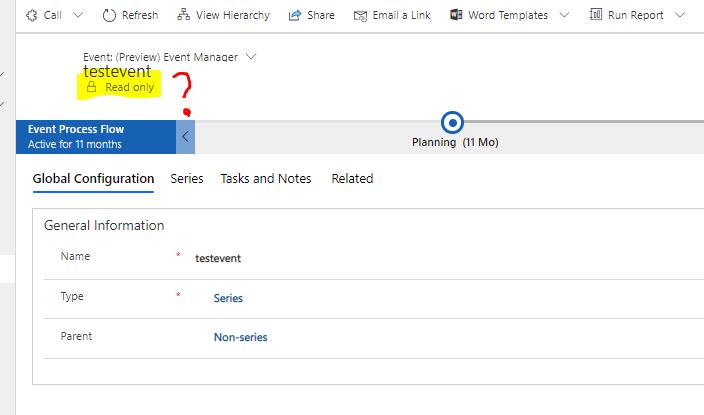
6201.Capture.JPG

I've checked security roles for each form and the app, and everything seems correct.  Not sure what I'm missing here and was wondering if someone could give me some guidance. Thank you.

*This post is locked for comments

I have the same question (0)
  • Verified answer
    Joseph McGregor Macdonald Profile Picture
    597 on at

    Hi Cole

    Perhaps check the settings "Enable for mobile" & "Read-only in mobile" for the entity. Despite these settings stating "Mobile" they also seem to sometimes affect the UCI. When I did an upgrade to UCI I had to ensure "Enable for mobile" was set for entities to be editable in the Customer Service Hub, and "Read-only in mobile" also causes entities to be read only there

    4111.Untitled.png

  • Verified answer
    Kalpavruksh D365 CoE Profile Picture
    2,545 on at

    Hi Kole,

    Kindly refer this blog by one of our team member.

    mihirkadam.wordpress.com/.../d365-v9-x-why-custom-entities-appeared-read-only-in-the-uci-model-driven-form

  • Suggested answer
    Kole Huang Profile Picture
    22 on at

    Hi Joseph, this is exactly what I'm looking for.  Good to know that those mobile settings affect the UCI.  Thank you.

Under review

Thank you for your reply! To ensure a great experience for everyone, your content is awaiting approval by our Community Managers. Please check back later.

Helpful resources

Quick Links

Responsible AI policies

As AI tools become more common, we’re introducing a Responsible AI Use…

Neeraj Kumar – Community Spotlight

We are honored to recognize Neeraj Kumar as our Community Spotlight honoree for…

Leaderboard > 🔒一 Microsoft Dynamics CRM (Archived)

#1
SA-08121319-0 Profile Picture

SA-08121319-0 4

#1
Calum MacFarlane Profile Picture

Calum MacFarlane 4

#3
Alex Fun Wei Jie Profile Picture

Alex Fun Wei Jie 2

Last 30 days Overall leaderboard

Featured topics

Product updates

Dynamics 365 release plans



