web
You’re offline. This is a read only version of the page.
close
Skip to main content

Notifications

Announcements

No record found.

Community site session details

Community site session details

Session Id :
Microsoft Dynamics CRM (Archived)

Dynamics Portals: Globally disable/hide content editor

(0) ShareShare
ReportReport
Posted on by

Hello everyone,

we're desperately trying to globally disable or hide the small content editor window within our Dynamics customer portal:
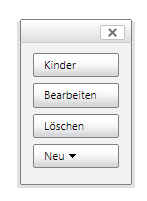
content_2D00_editor.png

So far we've only found some hints about using web roles and website access permissions, but no detailed documentation on how exactly this could be achieved. Maybe we got it all wrong, but why would any portal user or administrator edit static portal content in the first place? Shouldn't this be done entirely within the backend system (Dynamics 365)?

But even if there are reasons for displaying the content editor within the portal: this should obviously be restricted to a very limited number of users. As of now, all our users can see and use the editor, no matter which role they're assigned to.

I'll provide more information if needed, thanks in advance,

Tobi

*This post is locked for comments

I have the same question (0)
  • Suggested answer
    Craig P. Fleming Profile Picture
    950 on at

    You will want to inspect your Web Page Access Control Rules (advanced find or there is a link in the Portals area. I expect you will find that you have rule defined with Grant Change that has the Authenticated Users webrole associated to it.  Simply delete the rule or modify the web roles to administrators or some other select roles of your choosing.

    You will also want to check the Website Access Permissions, again reviewing the associated web roles. 

  • Suggested answer
    Charles Abi Khirs Profile Picture
    3,569 on at

    Hello Tobi,

    This content editor is displayed only to the contacts' portal who have assigned the "Portal Administrator" Web Role.

    Create new web role for the normal users and assign it to them (docs.microsoft.com/.../create-web-roles).

    Hope this helps!

    If found helpful, please mark the asnwer as verifies to help other community members.

    Charles Abi Khirs.

  • Suggested answer
    Jharana Baliyar Singh Profile Picture
    2,667 on at

    Hi Tobi,

    We can disable this content editor using web roles.Just create a separate web role then set authenticated User role as No & you can configure this web role to your particular users.

    Screenshot_5F00_9.jpg

    Thanks,

    Jharana

  • oliver.rodrigues Profile Picture
    4,052 on at

    additionally to this answer, the name of the Web Page Access Control Rule record is "Grant Change to Administrators"

    just deactivate that.. thanks Craig, that was useful to me as well

  • Community Member Profile Picture
    on at

    Thanks for all the answers; unfortunately, nothing we've tried has worked. The editor is always available for everyone, regardless of his or her assigned role. Due to other important topics we've put this issue on hold; I'll get back here once we continue working on it.

  • fran2105 Profile Picture
    416 on at

    Did you resolve this issue? Currently having the same problem. We tried everything including the above suggestions  but it somehow still sneaks back up. Any ideas/solution?

  • Suggested answer
    oliver.rodrigues Profile Picture
    4,052 on at

    We highly recommend users to migrate to PowerUsers community for new Portal questions:

    powerusers.microsoft.com/.../PowerAppsPortals

    ------------

    deactivating the web page control access should do the trick

    if this doesn't work for you, please post a question in the Power Users forum, thanks

  • DynamicsUser1 Profile Picture
    10 on at

    Disabling "Grant Change to Administrators" "Web Page Access Control Rule" worked for me

Under review

Thank you for your reply! To ensure a great experience for everyone, your content is awaiting approval by our Community Managers. Please check back later.

Helpful resources

Quick Links

Responsible AI policies

As AI tools become more common, we’re introducing a Responsible AI Use…

Neeraj Kumar – Community Spotlight

We are honored to recognize Neeraj Kumar as our Community Spotlight honoree for…

Leaderboard > 🔒一 Microsoft Dynamics CRM (Archived)

#1
SA-08121319-0 Profile Picture

SA-08121319-0 4

#1
Calum MacFarlane Profile Picture

Calum MacFarlane 4

#3
Alex Fun Wei Jie Profile Picture

Alex Fun Wei Jie 2

Last 30 days Overall leaderboard

Featured topics

Product updates

Dynamics 365 release plans
