web
You’re offline. This is a read only version of the page.
close
Skip to main content

Announcements

No record found.

News and Announcements icon
Community site session details

Community site session details

Session Id :
Finance | Project Operations, Human Resources, ...
Answered

Management Report

(1) ShareShare
ReportReport
Posted on by 475

Hi,

I have setup a Report Group to generate all my reports via report schedule in the management report.

Can i setup when the report generated automatic stored into excel file format a file folder so that i can pick up the report from the file folder without login.

I have try but seem like it can do it. Wonder is there a way to do it?

I wonder what is the report designer file location highlighted below for? Is that use to setup the file location?

But i generate the MR report it doesn't store the generated report there. What is it for?
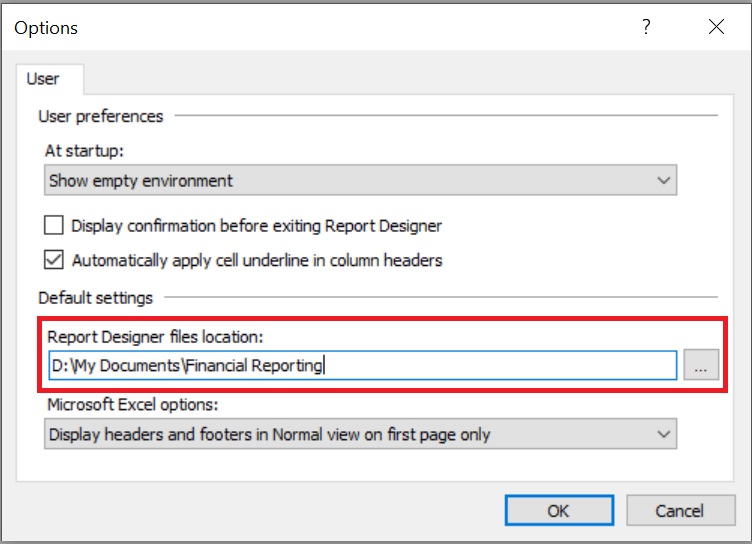
0714.MR.jpg

I have the same question (0)
  • Verified answer
    Ludwig Reinhard Profile Picture
    Microsoft Employee on at

    Hi Dexin,

    To my knowledge a direct excel based output of MR reports is currently not supported for D365FO.

    You would have to open the report, save/store it, create and excel extract and can then analyze the data in excel or distribute the report in excel form to your colleagues.

    Best regards,

    Ludwig

  • Dexin Profile Picture
    475 on at

    Ok, noted.

    Thank you so much

  • Suggested answer
    Rahul Mohta Profile Picture
    21,046 on at

    when reports are scheduled let it generate and one can always go back to Financial reports in D365FO and open the latest run

  • Verified answer
    Ludwig Reinhard Profile Picture
    Microsoft Employee on at

    Hi Dexin,

    This short video might help in addition: dynamicsax-fico.com/.../

    I am currently testing something else that might make things easier but it is not finished yet and not ready for publication. Can keep you updated.

    Best regards,

    Ludwig

  • Dexin Profile Picture
    475 on at

    Thank you so much.

  • RyanTheTemp Profile Picture
    15 on at

    Hi Dr. Reinhard, that is an excellent video. Do you know if a similar process can be used for AX2012 R3 with Management Reporter?  Thanks!

  • Suggested answer
    Ludwig Reinhard Profile Picture
    Microsoft Employee on at

    Hello RyanTheTemp,

    If I remember things correctly then AX2012 allows an automatic storage of Management Reporter reports on SharePoint. If you have the stuff on SharePoint you can then use Flow to distribute the reports.

    Please check this older blog post from MS

    blogs.msdn.microsoft.com/.../

    Best regards,

    Ludwig

  • Ludwig Reinhard Profile Picture
    Microsoft Employee on at

    Hello Ryan/Dexin,

    If there is nothing else open, please be so kind and verify the answers provided.

    Many thanks,

    Ludwig

Under review

Thank you for your reply! To ensure a great experience for everyone, your content is awaiting approval by our Community Managers. Please check back later.

Helpful resources

Quick Links

Introducing the 2026 Season 1 community Super Users

Congratulations to our 2026 Super Stars!

Meet the Microsoft Dynamics 365 Contact Center Champions

We are thrilled to have these Champions in our Community!

Congratulations to the April Top 10 Community Leaders

These are the community rock stars!

Leaderboard > Finance | Project Operations, Human Resources, AX, GP, SL

#1
Giorgio Bonacorsi Profile Picture

Giorgio Bonacorsi 620

#2
André Arnaud de Calavon Profile Picture

André Arnaud de Cal... 521 Super User 2026 Season 1

#3
CP04-islander Profile Picture

CP04-islander 430

Last 30 days Overall leaderboard

Product updates

Dynamics 365 release plans
