web
You’re offline. This is a read only version of the page.
close
Skip to main content

Notifications

Announcements

No record found.

Community site session details

Community site session details

Session Id :
Customer experience | Sales, Customer Insights,...
Answered

Is it possible to make view read only, but records inside view can not be accessible.

(0) ShareShare
ReportReport
Posted on by 458

I want to display a grid on a form including some records.

But I do not want the current user can open the records displayed in the view.
Is it possible?

I have the same question (0)
  • Verified answer
    Ram Prakash Duraisamy Profile Picture
    2,287 on at

    Hello Albert,

    As per our of the box behaviour we cannot avoid opening the Record Form.

    Based on your current situation, try writing a HTML page and populate the same by adding the HTML Page in Model Driven Apps

    Please mark as Answer if it is helpful and provide Kudos

    Subscribe : www.youtube.com/.../UCnGNN3hdlKBOr6PXotskNLA

    Blog : microsoftcrmtechie.blogspot.com

  • Verified answer
    Pradeep Rai Profile Picture
    5,489 Moderator on at

    Hi,

    Agreed with Ramprakash Duraisamy.

    And add on to above suggestion you can also, create reusable PCF Control using Fluent UI.

    sample:
    https://developer.microsoft.com/en-us/fluentui#/controls/web/detailslist

    PCF example:
    https://nebulaaitsolutions.com/pcf-control-with-fluent-ui-and-react-typescript/

    Thanks,
    Pradeep.


  • Suggested answer
    Yoshika Suzuki Profile Picture
    on at

    If the user have read privileges on the record, they should be able to see it in the view and access the record.

    However, it is possible not to edit the record.

  • Verified answer
    Kokulan Profile Picture
    18,054 on at

    Hi

    Like others mentioned, there is no straightforward way to achieve this using out of the box features but that does not mean its not possible.  You could consider one of the following options.

    No Code approach - Security Roles Enabled Form

    Create a form that only has the fields that are on the view and make that form as the fall-back form. This form will be accessible to all.

    Make all other forms accessible only certain security roles, this way you can control access via security roles.

    Downside to this approach is that users can still do advance find and get to the data if they really want to see the data

    Code based approach - Plugin on Retrieve Message

    You can create a plugin that triggers on Retrieve message on the entity and checks if the user is allowed to view the record, if not, it could throw an exception saying you do not have permissions to view this record. This approach will prevent user from viewing the record from any client not just the form.

    Please note users can create personal views add all the columns they need and still view all the data from a personal view View if you do not restrict them from creating personal views. If you want to prevent user from creating personal views, you could look into restricting view security role, by setting permissions on Saved View.
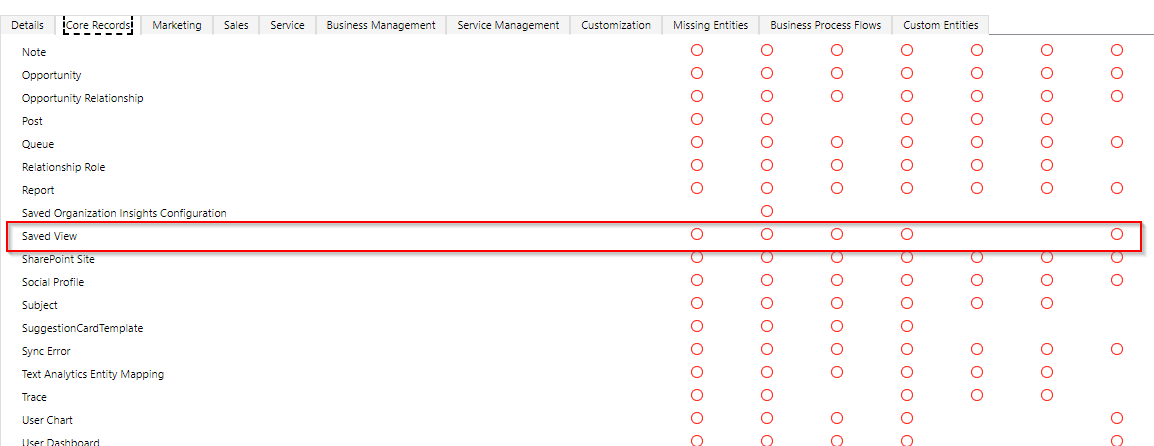
    pastedimage1634630530204v1.png


    Hope this helps

Under review

Thank you for your reply! To ensure a great experience for everyone, your content is awaiting approval by our Community Managers. Please check back later.

Helpful resources

Quick Links

Responsible AI policies

As AI tools become more common, we’re introducing a Responsible AI Use…

Neeraj Kumar – Community Spotlight

We are honored to recognize Neeraj Kumar as our Community Spotlight honoree for…

Leaderboard > Customer experience | Sales, Customer Insights, CRM

#1
Tom_Gioielli Profile Picture

Tom_Gioielli 171 Super User 2025 Season 2

#2
#ManoVerse Profile Picture

#ManoVerse 83

#3
Jimmy Passeti Profile Picture

Jimmy Passeti 50 Most Valuable Professional

Last 30 days Overall leaderboard

Product updates

Dynamics 365 release plans
