web
You’re offline. This is a read only version of the page.
close
Skip to main content

Notifications

Announcements

No record found.

Community site session details

Community site session details

Session Id :
Microsoft Dynamics 365 | Integration, Dataverse...
Suggested Answer

activity party

(0) ShareShare
ReportReport
Posted on by

Hi - 

I am having trouble with the Phone Call form.

I want the "From" Activity Party Field to auto populate with our Customer's name (account record) so when I save and Convert the Call to a Case the "Customer" field will automatically fill in with the Customer's name (account record).  This will prevent the Customer Service Rep from having to do double work by entering the account info on the Phone Call form only. 

My client requires that it be done without any special coding. 

Can this be done without writing any JavaScript? Anyone have any suggestions?

8308.pastedimage1594659234246v1.png                                                            1200.pastedimage1594659242752v2.png

I have the same question (0)
  • Suggested answer
    LuHao Profile Picture
    40,892 on at

    Hi partner,

    We can use workflow to achieve it.

    Go to Advanced Settings > Processes, new a workflow of Phone Call entity, uncheck Run this workflow in the background.

    3175.pastedimage1594720187968v1.png

    Select Sope to Organization, check Record is created and Record fields change, select Customer field.

    7433.pastedimage1594720320692v3.png

    1513.pastedimage1594720391894v4.png

    Add a step "Check Condition", set the filter as follow.

    3414.pastedimage1594720273228v2.png

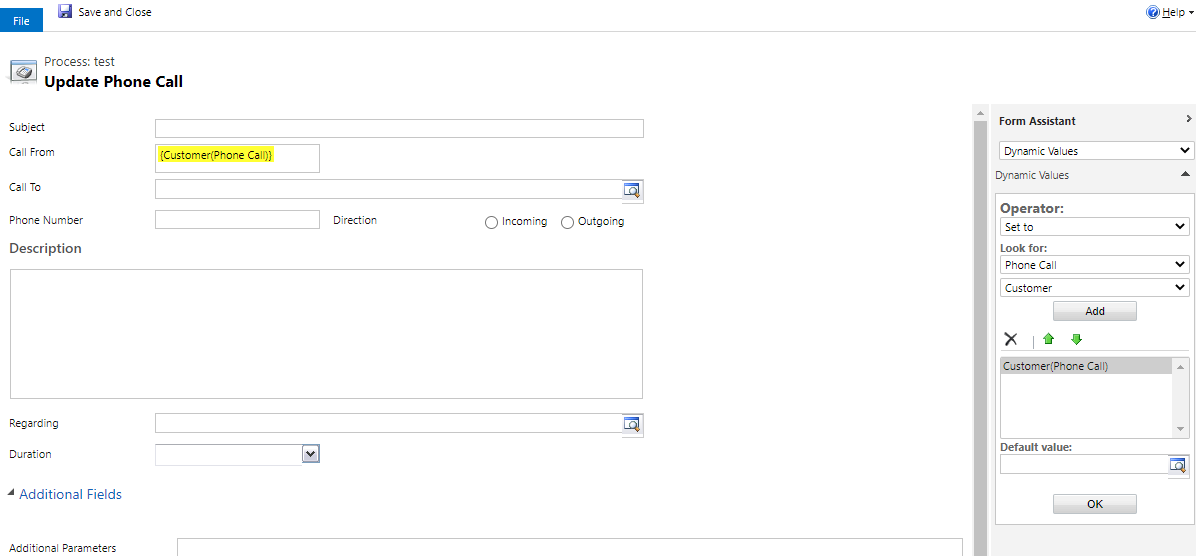
    Then add a step "Update Record", select Phone Call, set the update as follow.

    0677.pastedimage1594720487494v5.png

    2045.pastedimage1594720516263v6.png

    Actavite the workflow.

    In this way, when 1) a Phone Call is created and the Customer field contains data, 2) when a Phone Call is updated and the Customer field changes, the Form field will become Customer field value.

  • LuHao Profile Picture
    40,892 on at

    Hi partner,

    Has the problem been solved? Any updates?

    Please click Yes under "Did this answer your question?" to close this thread.

    pastedimage1595317022411v1.png

    Thanks.  : ) 

Under review

Thank you for your reply! To ensure a great experience for everyone, your content is awaiting approval by our Community Managers. Please check back later.

Helpful resources

Quick Links

Responsible AI policies

As AI tools become more common, we’re introducing a Responsible AI Use…

Neeraj Kumar – Community Spotlight

We are honored to recognize Neeraj Kumar as our Community Spotlight honoree for…

Leaderboard > Microsoft Dynamics 365 | Integration, Dataverse, and general topics

#1
Martin Dráb Profile Picture

Martin Dráb 51 Most Valuable Professional

#2
André Arnaud de Calavon Profile Picture

André Arnaud de Cal... 38 Super User 2025 Season 2

#3
#ManoVerse Profile Picture

#ManoVerse 31

Last 30 days Overall leaderboard

Product updates

Dynamics 365 release plans