web
You’re offline. This is a read only version of the page.
close
Skip to main content

Notifications

Announcements

Community site session details

Community site session details

Session Id :
Small and medium business | Business Central, N...
Answered

Vendor Overpayment Error Correction

(3) ShareShare
ReportReport
Posted on by 1,075
Hopefully, someone has some insight here.
 
One of my people was processing payments to one of our vendors -these are from the subscription module and the error is dated 3/1/25.
 
This is what the "Detailed Vendor Ledger Entries" of the bad transaction looks like.

 
I can't "Unapply Entries" because it's the "Initial Entry" or that's what BC tells me when I try.

I've tried applying credit memos, making another invoice to apply the credit to but somehow, I can't seem to apply to erroneous credit that is giving my vendor account a negative $131.52 balance.

Here is a Ledger View:
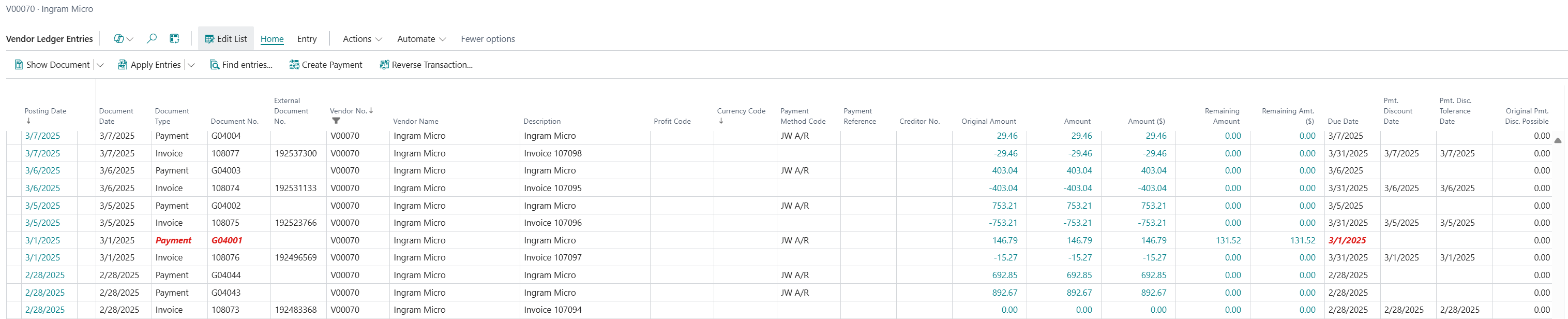
 
Thoughts?  I've wasted 3 hours on this already.  I'm still new to BC but not to accounting, this has me stumped.
 
Thank you in advance.
 
 
I have the same question (0)
  • KasparsSemjonovs Profile Picture
    4,796 Super User 2025 Season 2 on at
    You need to post an opposite entry via journal - With document Type = Invoice or Refund, as these types can be applied to Payment entries.
    Like in real life - if You actually paid Vendor more - either the amount stays and covers next invoices (like advance payment) or Vendor sends You the money back (Refund).
  • AXEON Man Profile Picture
    1,075 on at
    Thank you!  I had no idea that BC journals were so versatile!

    It seems like there should be some mechanism to apply these entries to each other.  No?
     
  • AXEON Man Profile Picture
    1,075 on at
    I thought I had it but it still shows this:

  • Verified answer
    KasparsSemjonovs Profile Picture
    4,796 Super User 2025 Season 2 on at
    Yes, while standing on this entry, there is Apply Entries function.
    Stand on one of the entries, and choose this.


    Then Select the opposite entry, you want to link on the one you were standing on, and press Set-Applies to ID, and then Post Application. 


    More detailed blog post I found through Google:
    How to apply or unapply entries in Business Central - Boyer & Associates
     
  • AXEON Man Profile Picture
    1,075 on at
    Thank you so much!  I could have sworn I tried that, but I must have made an error the first time around.  All good now and I'm a little smarter about BC.  I've got hundreds of hours on this ERP and I feel like I'm just scratching the surface.  Sure appreciate this community!

Under review

Thank you for your reply! To ensure a great experience for everyone, your content is awaiting approval by our Community Managers. Please check back later.

Helpful resources

News and Announcements

Season of Giving Solutions is Here!

Quick Links

Responsible AI policies

As AI tools become more common, we’re introducing a Responsible AI Use…

Neeraj Kumar – Community Spotlight

We are honored to recognize Neeraj Kumar as our Community Spotlight honoree for…

Leaderboard > Small and medium business | Business Central, NAV, RMS

#1
OussamaSabbouh Profile Picture

OussamaSabbouh 1,810

#2
Khushbu Rajvi. Profile Picture

Khushbu Rajvi. 810 Super User 2025 Season 2

#3
YUN ZHU Profile Picture

YUN ZHU 676 Super User 2025 Season 2

Last 30 days Overall leaderboard

Featured topics

Product updates

Dynamics 365 release plans



