web
You’re offline. This is a read only version of the page.
close
Skip to main content

Notifications

Announcements

No record found.

Community site session details

Community site session details

Session Id :
Finance | Project Operations, Human Resources, ...
Answered

Workflow - How to test for blank values?

(0) ShareShare
ReportReport
Posted on by 29

Hello,

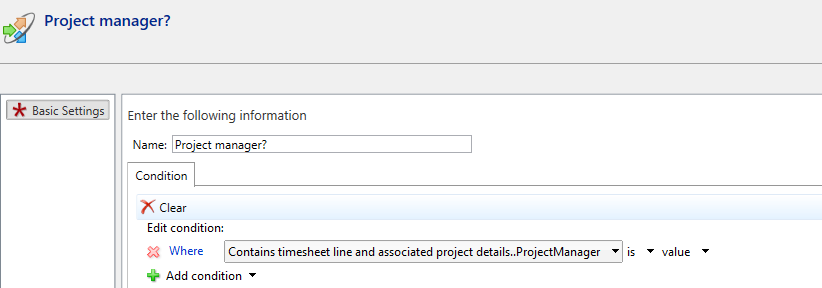
I'm setting up a timesheet workflow. In the workflow I'd like it to test for whether a project manager is specified or not (is the project manager field blank). I can't get the workflow to cooperate though.

The condition looks like this:
pastedimage1686041696544v2.png

And the project looks like this:

pastedimage1686041720070v3.png

Yet the workflow evaluates like this:
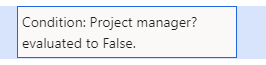
It's meant to evaluate as "True". Is there a way to make that happen?

Br Joachim

I have the same question (0)
  • Suggested answer
    GirishS Profile Picture
    27,827 Moderator on at

    Hi,

    As per the condition you have added condition as if the project manager is empty then the condition will be evaluated to false.

    If the project manager field is not empty, then the condition will be true.

    Try assigning the project manager field to value and then submit the workflow.

    Thanks,

    Girish S.

  • Suggested answer
    Mohit Rampal Profile Picture
    12,565 Moderator on at

    Hi, Your condition to check if value is empty looks fine. Is the Project Manager field returning String value or RecId.

    community.dynamics.com/.../wf-with-conditional-decision-check-for-blank-field

  • Joachimpwc Profile Picture
    29 on at

    Hello Mohit,

    I actually saw the replies in that link as well, which led me to where I am now. That link is also part of why I don't understand the issue.

    How do I check for whether it returns a RecId or String?

    @Girish, I'm pretty sure that the way the condition is now should be: If project manager field is blank = True

    Br Joachim

  • Verified answer
    Mohit Rampal Profile Picture
    12,565 Moderator on at

    If there is value in Project manager field, is the condition returns True or False. Also, instead of blank try adding zero in the value (If its RecId, then blank will not work).

  • GirishS Profile Picture
    27,827 Moderator on at

    Right click on that control and click on form name: FormName >> It will open the new dialog form >> In that form under Administration tab >> Under Form control type - See what the type is.

    Refer to the below screenshot.

    Thanks,

    Girish S.

  • Joachimpwc Profile Picture
    29 on at

    Hello,

    It doesn't seem to be string, not sure if it's RecId. Using 0 instead of blank seems to fix the issue. Will have to test it a bit more, but the test I'm running now works as intended.

    Br Joachim

  • Verified answer
    GirishS Profile Picture
    27,827 Moderator on at

    Then you need to provide 0 as the value. Seems it's a RecId field.

    Thanks,

    Girish S.

  • Joachimpwc Profile Picture
    29 on at

    Hello both,

    Thank you for your assistance.

    Br Joachim

Under review

Thank you for your reply! To ensure a great experience for everyone, your content is awaiting approval by our Community Managers. Please check back later.

Helpful resources

Quick Links

Responsible AI policies

As AI tools become more common, we’re introducing a Responsible AI Use…

Neeraj Kumar – Community Spotlight

We are honored to recognize Neeraj Kumar as our Community Spotlight honoree for…

Leaderboard > Finance | Project Operations, Human Resources, AX, GP, SL

#1
Martin Dráb Profile Picture

Martin Dráb 646 Most Valuable Professional

#2
André Arnaud de Calavon Profile Picture

André Arnaud de Cal... 529 Super User 2025 Season 2

#3
Sohaib Cheema Profile Picture

Sohaib Cheema 285 User Group Leader

Last 30 days Overall leaderboard

Product updates

Dynamics 365 release plans