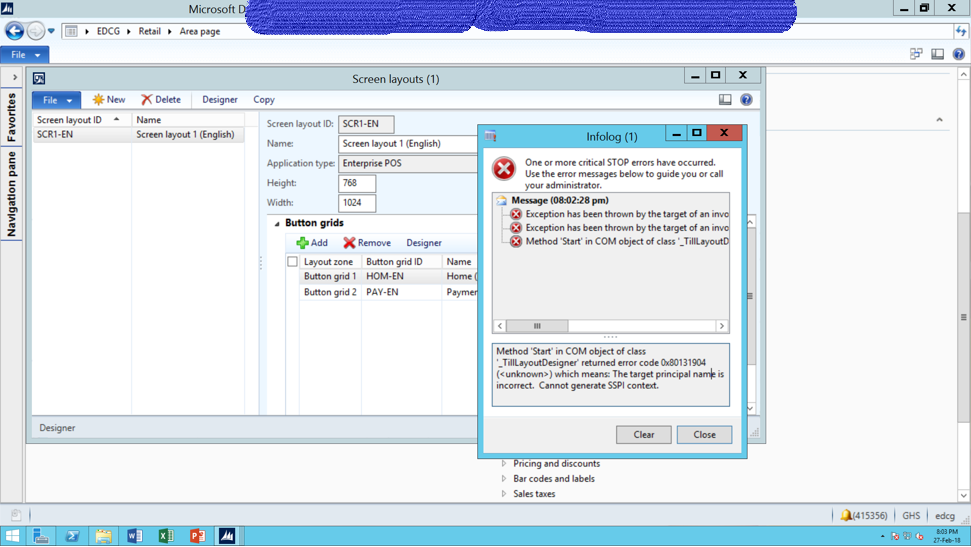
I cannot access the user options form from tool > options. I keep getting “The target principal name is incorrect. Cannot generate SSPI context”. I checked the event viewer log and it mentions some assemblies could not load. this is the message from the event log:
Microsoft Dynamics AX Business Connector Session 6.
Updating VSAssembly Client Cache (option = 3). VSAssembly Client Cache (count = 18, timestamp = 31-Aug-16 03:09:58 pm) 3 05-Apr-14 06:01:51 am \Visual Studio Projects\C Sharp Projects\Channels.Headquarters.PricingProxy\Microsoft.Dynamics.Commerce.Headquarters.PricingProxy.dll 3 05-Apr-14 06:02:11 am \Visual Studio Projects\C Sharp Projects\DigipoortServices_NL\Microsoft.Dynamics.Digipoortservices.dll 3 05-Apr-14 06:02:11 am \Visual Studio Projects\C Sharp Projects\DigipoortServices_NL\Microsoft.Dynamics.Digipoortservices.dll.config 3 05-Apr-14 06:02:12 am \Visual Studio Projects\C Sharp Projects\EInvoiceCFDI_MX\EInvoiceCFDI_MX.dll 3 05-Apr-14 06:02:12 am \Visual Studio Projects\C Sharp Projects\EInvoiceCFDI_MX\EInvoiceCFDI_MX.dll.config 3 05-Apr-14 06:02:12 am \Visual Studio Projects\C Sharp Projects\electronicfiscaldocument_br\ElectronicFiscalDocument_BR.dll 3 05-Apr-14 06:02:12 am \Visual Studio Projects\C Sharp Projects\electronicfiscaldocument_br\ElectronicFiscalDocument_BR.dll.config 2 05-Apr-14 06:02:16 am \Visual Studio Projects\C Sharp Projects\ElsterTransferHandler_DE\Microsoft.Dynamics.ElsterTransferHandler.dll 3 05-Apr-14 06:03:21 am \Visual Studio Projects\C Sharp Projects\exchangerateprovider\Microsoft.Dynamics.AX.Application.FinancialManagement.dll 3 05-Apr-14 06:03:31 am \Visual Studio Projects\C Sharp Projects\FBSintegra_BR\Microsoft.Dynamics.FiscalBooks.Sintegra.dll 1 17-Nov-14 05:40:15 am \Visual Studio Projects\C Sharp Projects\HcmFMLALeaveTaken.BusinessLogic\HcmFMLALeaveTaken.BusinessLogic.dll 3 05-Apr-14 06:04:22 am \Visual Studio Projects\C Sharp Projects\Microsoft.Dynamics.AX.Tms\Microsoft.Dynamics.Ax.Tms.dll 3 05-Apr-14 06:04:22 am \Visual Studio Projects\C Sharp Projects\Microsoft.Dynamics.AX.Tms\Microsoft.Dynamics.Ax.Tms.dll.config 3 05-Apr-14 06:05:04 am \Visual Studio Projects\C Sharp Projects\QRCode\QRCode.dll 2 05-Apr-14 06:05:36 am \Visual Studio Projects\C Sharp Projects\VendInvoiceDocumentReport.BusinessLogic\VendInvoiceDocumentReport.BusinessLogic.dll 3 05-Apr-14 06:05:50 am \Visual Studio Projects\C Sharp Projects\WHS.DeviceCom\Microsoft.Dynamics.AX.WHS.DeviceCom.dll 3 05-Apr-14 06:05:50 am \Visual Studio Projects\C Sharp Projects\WHS.Security\WHS.Security.dll 3 17-Nov-14 05:40:27 am \Visual Studio Projects\C Sharp Projects\XmlSign\Microsoft.Dynamics.XmlSign.Xades.dll
Could not load assembly 'RetailControls, Version=5.3.0.0, Culture=neutral, PublicKeyToken=null' or one of its dependencies.
Could not load assembly 'Microsoft.Dynamics.Retail.TillLayoutDesigner, Version=6.3.0.0, Culture=neutral, PublicKeyToken=31bf3856ad364e35' or one of its dependencies.
Could not load assembly 'Microsoft.Dynamics.Retail.StoreConnect.TransAutomClient, Version=0.0.0.0, Culture=neutral, PublicKeyToken=31bf3856ad364e35, processorArchitecture=AMD64' or one of its dependencies.
Could not load assembly 'Microsoft.Dynamics.Retail.StoreConnect.TransAutomClient, Version=0.0.0.0, Culture=neutral, PublicKeyToken=31bf3856ad364e35, processorArchitecture=x86' or one of its dependencies.
When debugging i realize the conn.open() line in hasValidCertificate of the SIGSigningProvider_SQLServer_Server fails and hence the error. This issue does not happen in our test server. (Works fine)
Also some of the retail module components throw “Method 'Start' in COM object of class '_ReportDesign' returned error code 0x80131904 (<unknown>) which means: The target principal name is incorrect. Cannot generate SSPI context” error. (See attached screenshot).