web
You’re offline. This is a read only version of the page.
close
Skip to main content

Announcements

No record found.

News and Announcements icon
Community site session details

Community site session details

Session Id :
Microsoft Dynamics AX (Archived)

PRINTER Name not listed while Printing report

(0) ShareShare
ReportReport
Posted on by 507

Dear All,

while trying to print a journal in AP, i Click on Print then it opens a list of printers available.

But my printer was not there in that list. Please help.

Please see attached image.
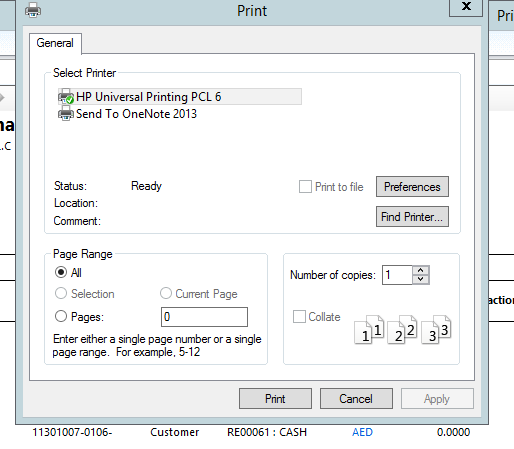
PRINTER-ERROR.PNG

*This post is locked for comments

I have the same question (0)
  • Safeer PS Profile Picture
    507 on at

    yes

  • Safeer PS Profile Picture
    507 on at

    Can u tell me in steps what i have to do with find printer option??

    1460.123345.PNG

  • Suggested answer
    Community Member Profile Picture
    on at

    Hi Safeer,

    Go to Devices and Printers (check if your printer is visible and set as active) if not -> right click Add Printer -> Add a network ,wireless ..printer -> go through the list , if you still can't find it - click "The printer that I want isn't listed" -> from menu select one of the search options by IP,Shared name,Directory ... if the printer is installed correctly and set as shared to one of your devices, click "Select a shared printer by name" -> Browse -> from the list select network device where the printer is installed on -> open it -> select the printer. Same steps you can carry out if you know your printers IP, therefore you need to select "Add a printer using TCP/IP address or hostname"

    Hope that helps.

    V

  • Safeer PS Profile Picture
    507 on at

    But printer setting in Local machine is ok and I can print from Local PC easily. Issue is with Ax . Whenever try to print from Ax printer not listed.

  • Suggested answer
    Vilmos Kintera Profile Picture
    46,149 on at

    If you are running AX from Citrix or as a RemoteApp, the printer must be mapped by your network administrators on those servers. You typically do not use local printers with AX, but they should be installed on your terminal server, or AX AOS. Preferably by using a Print server, and sharing them as network printers.

  • Safeer PS Profile Picture
    507 on at

    I am nto able to search and find my Printer I will check with Admin team

Under review

Thank you for your reply! To ensure a great experience for everyone, your content is awaiting approval by our Community Managers. Please check back later.

Helpful resources

Quick Links

Introducing the 2026 Season 1 community Super Users

Congratulations to our 2026 Super Stars!

Congratulations to our 2025 Community Spotlights

Thanks to all of our 2025 Community Spotlight stars!

Leaderboard > 🔒一 Microsoft Dynamics AX (Archived)

#1
Sagar Suman Profile Picture

Sagar Suman 2 Super User 2026 Season 1

#1
Alexey Lekanov Profile Picture

Alexey Lekanov 2

#1
Pratik Bhosle Profile Picture

Pratik Bhosle 2

Last 30 days Overall leaderboard

Featured topics

Product updates

Dynamics 365 release plans
