web
You’re offline. This is a read only version of the page.
close
Skip to main content

Announcements

No record found.

News and Announcements icon
Community site session details

Community site session details

Session Id :
Microsoft Dynamics AX (Archived)

How to fill parameter dialog from x++ when printing a report

(0) ShareShare
ReportReport
Posted on by 202

Hi Everyone,

I need help for finding a way to fill the parameter with record in the table.
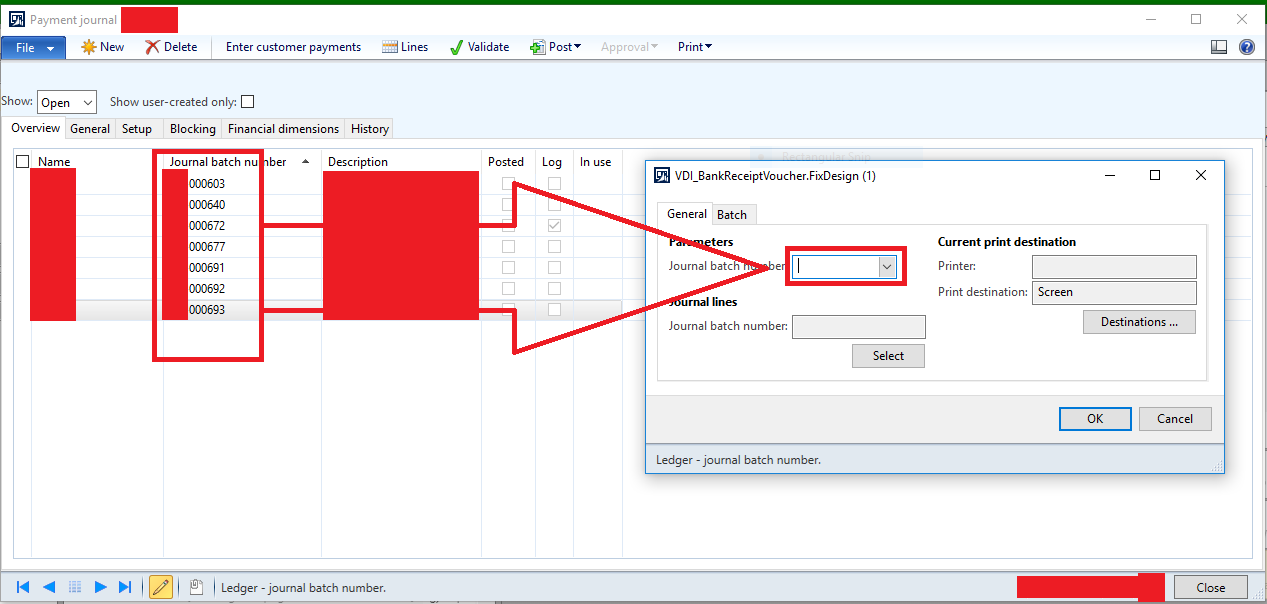
0647.Parameter.PNG

i have tried to make a button that get the data from the table, and pass that data to report run controller.

here's my code :

void clicked()
{
    SrsReportRunController          controller   = new SrsReportRunController();
    VDI_BankReceiptVoucherContract  rdpContract  = new VDI_BankReceiptVoucherContract();
    SRSPrintDestinationSettings     settings;

    super();

    rdpContract.parmLedgerJournalId(LedgerJournalTable.JournalNum); // the data that passed to the report run controller
    controller.parmReportName(ssrsReportStr(VDI_BankReceiptVoucher, FixDesign));
    controller.parmShowDialog(false);
    controller.parmShowReportViewerParameters(false);
    controller.parmReportContract().parmRdpContract(rdpContract);
    controller.startOperation();
}
but, when i click the button, the parameter field in the print dialog is blank.
what can i do to make the data fill the parameter field in the print dialog?

thank's for helping me, i appreciate it.

*This post is locked for comments

I have the same question (0)
  • Suggested answer
    Community Member Profile Picture
    on at

    Hi Chaidir,

    What specific table you want to use to fill that parameter ?

    Regards,

    Sci

  • Chaidir Ali Assegaf Profile Picture
    202 on at

    hi Sci,

    i want to fill the parameter with data from table LedgerJournalTable.

  • Nishant2408 Profile Picture
    705 on at

    Hi Chaidir

    I think a particular line of code is causing this issue -

    Please comment below line in your code and try.

    //controller.parmShowReportViewerParameters(false);

    Regards,

    Nishant

  • Chaidir Ali Assegaf Profile Picture
    202 on at

    hi Nishant,

    i have removed it, but the field is still blank. why this is happen? i search many tutorials and found exactly the same code. everybody tried it and had no problem.

  • Verified answer
    Nishant2408 Profile Picture
    705 on at

    You are also not setting up the parmArgs() method of the controller.

    Why don't you create your own controller class and use the action menu item button to open the report.

    You can use the prePromptModifyContract() method to set the initial parameters.

    Follow the link below for reference.

    axguruu.blogspot.in/.../ssrs-report-using-controller-contract.html

    Regards,

    Nishant

  • Chaidir Ali Assegaf Profile Picture
    202 on at

    Hi Nishant,

    Thanks, for the answer.

    i follow your suggestion and it works like a charm.

Under review

Thank you for your reply! To ensure a great experience for everyone, your content is awaiting approval by our Community Managers. Please check back later.

Helpful resources

Quick Links

Introducing the 2026 Season 1 community Super Users

Congratulations to our 2026 Super Stars!

Meet the Microsoft Dynamics 365 Contact Center Champions

We are thrilled to have these Champions in our Community!

Congratulations to the March Top 10 Community Leaders

These are the community rock stars!

Leaderboard > 🔒一 Microsoft Dynamics AX (Archived)

#1
Joris dG Profile Picture

Joris dG 5

#2
Alexey Lekanov Profile Picture

Alexey Lekanov 2

#2
Henrik Nordlöf Profile Picture

Henrik Nordlöf 2 User Group Leader

Last 30 days Overall leaderboard

Featured topics

Product updates

Dynamics 365 release plans
