web
You’re offline. This is a read only version of the page.
close
Skip to main content

Notifications

Announcements

No record found.

Community site session details

Community site session details

Session Id :
Small and medium business | Business Central, N...
Answered

Purchase Journal "Amount" Fields

(0) ShareShare
ReportReport
Posted on by 3,510

Hi:

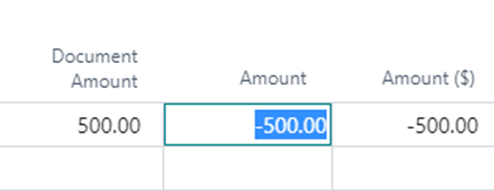
As shown below, I at first received a Posting Preview error in a Purchase Journal when I placed a positive amount of $500.00 within the "Amount" field.

The error stated that a negative amount is required.

This surprised me, because everyone knows that a debit to an expense account is a positive amount.

Anyway, after deleting the record, re-entering it, and placing a positive $500.00 instead into the "Document Amount" field, the negative amounts filled in automatically within the "Amount" and "Amount ($)" field.  This is shown, within the screenshot below.

Then, I was able to successfully post.

So, should I only concern myself with "Document Amount" when creating an invoice in the Purchase Journal?

Why would the Purchase Journal want a negative amount?

Thanks!

John
pastedimage1664554053054v1.png

I have the same question (0)
  • Suggested answer
    Amit Baru Profile Picture
    3,037 on at
  • Gavin Profile Picture
    2,508 on at

    Hi,

    I suspect the "Document Type" is Invoice and the "Account Type" is Vendor in your purchase journal. If this is the case the number you enter into the amount must be negative, as you will be crediting the Vendor account when entering an invoice. (and the payables G/L account). You then enter the Expense code in the "Bal. Account No" which is debited.

    You could turn this on its head and enter the GL code first and therefore have the "Document Type" as Invoice and the "Account Type" as G/L Account and enter your expense code. In this scenario you'd enter a positive in the amount, as you will debit the expense code when entering an invoice. You then enter the Vendor in the "Bal. Account No" which is credited

    I've tried to explain this in the image below:

    pastedimage1664557608153v1.png

    I also blogged about the issue here

    https://thedynamicsexplorer.com/2020/11/04/dynamics-365-business-central-how-troubleshooting-the-error-amount-must-be-positive-in-gen-journal-line-journal-took-me-on-a-journey-of-discovery-with-journals/

    Hope this helps

    Thanks

    Gavin

  • Suggested answer
    Dallefeld Profile Picture
    211 User Group Leader on at

    Amount sign requirements are determine by account type and document type.

    Account type of vendor with document type of invoice, amount must be negative while a document type of credit memo is positive. The exact opposite is true for customers.

    I never use document amount because I like to be sure of the amount and enter it myself.

Under review

Thank you for your reply! To ensure a great experience for everyone, your content is awaiting approval by our Community Managers. Please check back later.

Helpful resources

Quick Links

Responsible AI policies

As AI tools become more common, we’re introducing a Responsible AI Use…

Neeraj Kumar – Community Spotlight

We are honored to recognize Neeraj Kumar as our Community Spotlight honoree for…

Leaderboard > Small and medium business | Business Central, NAV, RMS

#1
OussamaSabbouh Profile Picture

OussamaSabbouh 3,226

#2
Jainam M. Kothari Profile Picture

Jainam M. Kothari 2,047 Super User 2025 Season 2

#3
YUN ZHU Profile Picture

YUN ZHU 1,257 Super User 2025 Season 2

Last 30 days Overall leaderboard

Featured topics

Product updates

Dynamics 365 release plans
