web
You’re offline. This is a read only version of the page.
close
Skip to main content
Community site session details

Community site session details

Session Id :
Microsoft Dynamics 365 | Integration, Dataverse...
Answered

Update Invoice Calculated Fields from Quote Calculated Fields

(0) ShareShare
ReportReport
Posted on by 90

Good Day. Thank you for your interest. 

We have a business requirement where a Invoice is created directly based on the Quote. When a quote is selected on a new invoice, all the products in the subgrid (quote product --> invoice product) are carried over. However for some reason, the calculated fields on Invoice (Detail Amount, Discount %, Discount Amount, Pre-Freight Amount, Total Tax, Total Discount Amount, Total Amount) are Not calculated for some reason. 

So this flow is intended to List the values from the Quote and populate them over onto the new Invoice calculated fields. I am running into an error where O data filter property is not correct. It worked exactly like this on an another flow but not sure why its not working on this flow. I have a lookup column on Invoice to the (Quote) table. 

Any help would be much appreciated! Best Regards, Sunny

Update-Invoice-pt.-1.PNG

Update-Invoice-pt.-2.PNG

Update-Invoice-pt.-3.PNG

Update-Invoice-pt.-4.PNG

I have the same question (0)
  • Suggested answer
    Community Member Profile Picture
    on at
    RE: Update Invoice Calculated Fields from Quote Calculated Fields

    Hi Sunny21,

    You flow failed at List rows step. Could you provide the screenshot about the setting of this step?

    According to the error message, I guess you want to get the quotes based on the value of your custom lookup field on the invoice entity.

    If so, the step should be like this(it should be quoteid not _quoteid_value):

    Snipaste_5F00_2022_2D00_02_2D00_21_5F00_09_2D00_38_2D00_09.png

    The expression is triggerOutputs()?['body/_cr2f9_quote_value'] at the above screenshot.

    It can work well:

    Snipaste_5F00_2022_2D00_02_2D00_21_5F00_09_2D00_37_2D00_15.png

    If your step isn't like this, please provide the screenshot.

  • Sunny21 Profile Picture
    90 on at
    RE: Update Invoice Calculated Fields from Quote Calculated Fields

    Hey Steve. Thank you for your message. Yes, you are correct, I am trying to retrieve values based on the lookup of Quote on the Invoice entity. Basically I have another flow which populates the Invoice Product sub-grid from the Quote Product sub-grid. Here however, even though the sub-grid populates successfully and the products by a newly created Invoice Product, The calculated fields on the Invoice Entity don't calculate the products and price based on quote lookup and associated quote products. So this flow is intended to populate the Calculated fields from Quote entity to the calculated fields on the Invoice entity.  

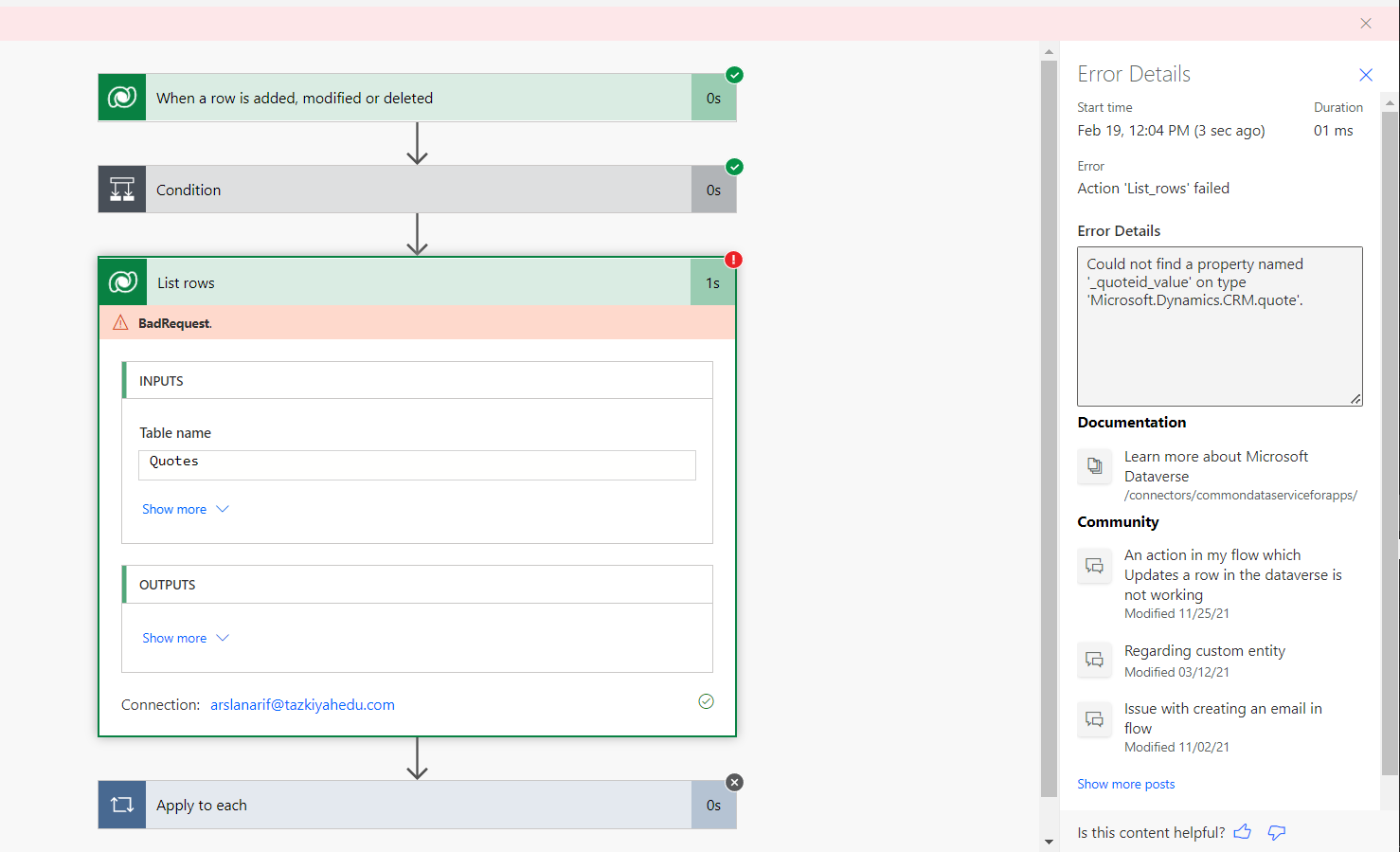
    The first picture shows the original setting on the List Rows step as you requested, and this is the one that I got the error on. In the second picture I tried the method that you shared, and I got the 'Expression expected at position 11 error' with a status reason of 400 as shown below. Any ideas why that might be?

    Thank you again and Best Regards, 

    Sunny

    List-Row-Step-21.PNG

    List-Row-Step-with-Expression.PNG

    Update-Invoice-Flow-21.PNG

  • Suggested answer
    Community Member Profile Picture
    on at
    RE: Update Invoice Calculated Fields from Quote Calculated Fields

    Hi Sunny21,

    _cr2f9_quote_value is my custom field, so you get this error. Please just change the _quoteid_value to quoteid  in your first screenshot to have a try.

  • Verified answer
    Bipin D365 Profile Picture
    28,983 Moderator on at
    RE: Update Invoice Calculated Fields from Quote Calculated Fields

    Hi,

    you don't need List rows for your requirement. You need Get Row by ID action to fetch Quote fields -

    CR31.PNG

    Please mark my answer verified if this is helpful!

    Regards,

    Bipin Kumar

    Follow my Blog: xrmdynamicscrm.wordpress.com/

  • Sunny21 Profile Picture
    90 on at
    RE: Update Invoice Calculated Fields from Quote Calculated Fields

    Hey Steve I think Bipin is right because he helped with the first half of the Flow. Nevertheless, very much appreciate all your help, I'm learning a lot quickly thanks to you guys! Best Regards,

  • Sunny21 Profile Picture
    90 on at
    RE: Update Invoice Calculated Fields from Quote Calculated Fields

    Thank you Bipin. The flow test ran successfully and the details show that the calculated values on the Quote entity transferred over to the Invoice calculated fields. However when I tried to verify the record in Dynamics 365, I didn't see the values reflected in the Invoice calculated fields. They still show 0 for all the calculated fields.

    I think it may because calculated fields are may be not supported to be overridden with values from a flow or manual entry. Any ideas?

    Best,

    Sunny

  • Sunny21 Profile Picture
    90 on at
    RE: Update Invoice Calculated Fields from Quote Calculated Fields

    Hey Steve, I was wondering whether you may be able to help me with the second half of the flow.  

    So as a work around to the issue above, I created calculated fields in the Invoice entity that copy the calculated field values over from Quote calculated field values. And then I created a new custom Invoice Document Template based on the new values pulled from data on the associated quote record. All the calculations are correctly displayed, However the 'productidname' is not dynamically displaying each product that was added in the Invoice Product sub-grid from the flow previously configured. Meaning the document template only shows one product instead of all the products associated with that Invoice. Maybe I am missing a relationship in the flow or maybe I need to edit the flow some other way so when I use the Export to PDF function, all of the products and their prices are added to the document template.

    export-pdf-1.PNG

    Export-pdf-subgrid.PNG

    In other considerations, The Export to PDF function is not really necessary, because all I really need is the actual details from the invoice such as (product name, number, unit price, Detail Amount, Total Line amount...etc), Alternatively I was wondering about continuing the flow to extract the details from the Invoice and Invoice Product and email to a specific inbox with an Instant flow or approval step continuing on this flow?

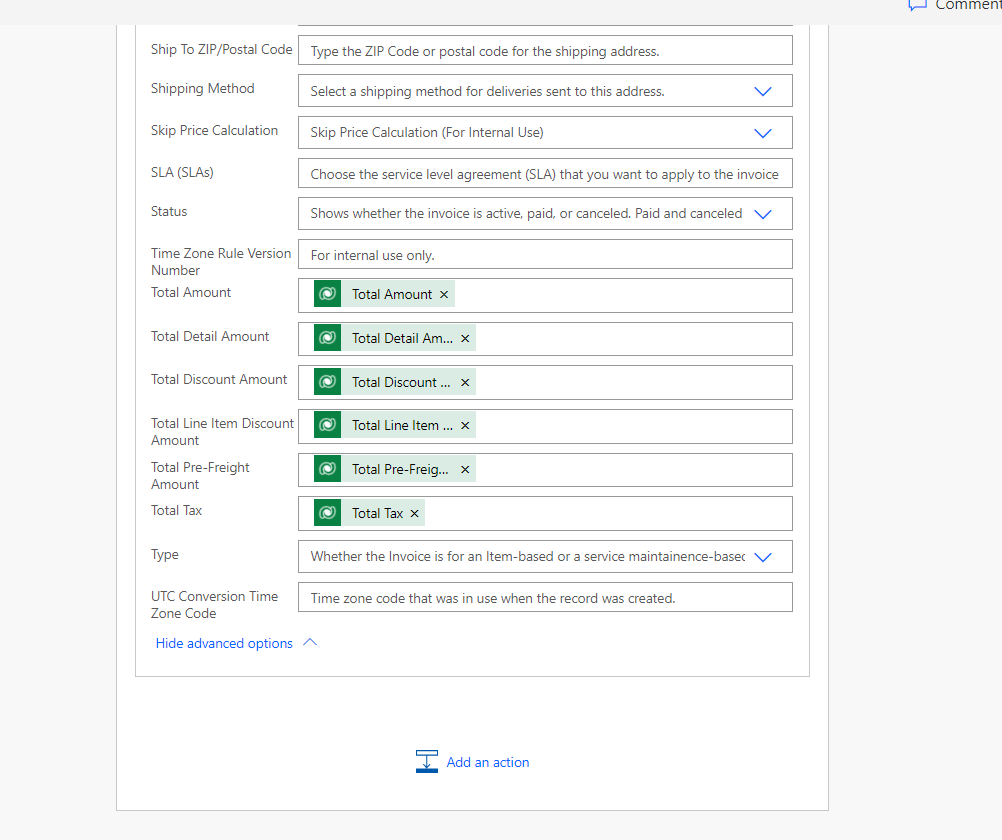
    So far this is what I have;

    Invoice-to-Product-pt.-2.PNG

    I would enormously appreciate any help that you may be able to provide. OfCourse no obligations.

    Best Regards,

    Sunny

Under review

Thank you for your reply! To ensure a great experience for everyone, your content is awaiting approval by our Community Managers. Please check back later.

Helpful resources

Quick Links

Responsible AI policies

As AI tools become more common, we’re introducing a Responsible AI Use…

Neeraj Kumar – Community Spotlight

We are honored to recognize Neeraj Kumar as our Community Spotlight honoree for…

Leaderboard > Microsoft Dynamics 365 | Integration, Dataverse, and general topics

#1
#ManoVerse Profile Picture

#ManoVerse 101

#2
Siv Sagar Profile Picture

Siv Sagar 93 Super User 2025 Season 2

#3
Martin Dráb Profile Picture

Martin Dráb 66 Most Valuable Professional

Last 30 days Overall leaderboard

Product updates

Dynamics 365 release plans