web
You’re offline. This is a read only version of the page.
close
Skip to main content

Announcements

No record found.

News and Announcements icon
Community site session details

Community site session details

Session Id :
Finance | Project Operations, Human Resources, ...
Answered

I can sent bank manually for processing payment

(0) ShareShare
ReportReport
Posted on by 245

hi, 

I can sent  bank manually for processing payment and automated integration bank and customization

And file layout, 

A 1st question of my bank who will sent the payment?

Can I say the bank that I'm the one will sent the manually processing payment? From D365 finance operation?

Thanks 

I have the same question (0)
  • Suggested answer
    mrsagansay Profile Picture
    245 on at

    Pls I need answer thanks

  • Suggested answer
    Ludwig Reinhard Profile Picture
    Microsoft Employee on at

    Hello Antonio,

    D365FO can create a payment file for you.

    How you transfer this file to your bank is something you need to define and design yourself.

    You can e.g. store the file on a file drive and use PowerAutomate to send it out to your bank officer. Alternatively, I have seen applications where people use a 3rd party banking software they use to upload and transfer those payment files.

    The way how you transfer the file depends on your process and what your bank requires.

    Can you share more details about this process and the bank you work with?

    Many thanks,

    Ludwig

  • Suggested answer
    mrsagansay Profile Picture
    245 on at

    Hi dr ludwig,

    Sound interesting to me the powerautomate! Because I upload this on my finance operation perhaps how I use it? Do have a link how to use powerautomate to sent the file? Or powerautomate has features on that already? I can use for a pdf? File drive just like usb? Or save google drive?

    Thanks

  • Verified answer
    Alireza Eshaghzadeh Profile Picture
    14,839 Super User 2026 Season 1 on at

    Hi Antonio,

    As Ludwig already mentioned, you can generate payment file from D365FO.

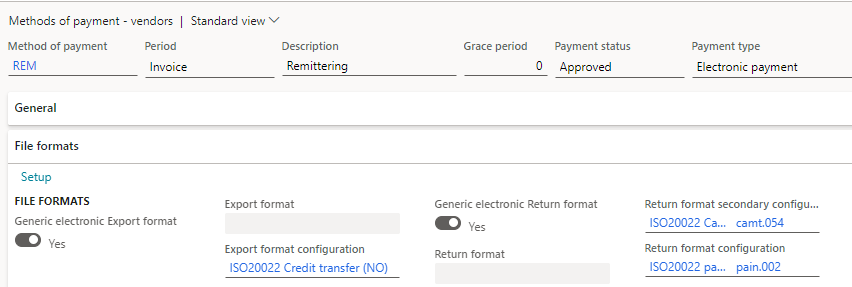
    You can use standard configuration on Electronic reporting (e.g. ISO20022 Credit transfer) and connect it to the vendor method of payment 

    PS. Electronic Reporting Configs can be imported via Workspaces > Electronic reporting > Microsoft Repositories > Global
    pastedimage1629723848777v1.png

    When payment file has been created (e.g. Pain.001), you can upload it manually on net bank or FTP server (i.e. If you have already integration to the bank to send and get file). Then you will  to get the reception file (Pain.002) and you can import it into D365FO. It will change the payment status from "Sent" to "Received"

    When the invoices has been paid, you can get return file (i.e. Camt054D) from net bank or FTP server and import in D365FO. It will change the payment status from "Received" to "Approved"

    For automating this process you can evaluate using ISV.

    Regards,

    Alireza

Under review

Thank you for your reply! To ensure a great experience for everyone, your content is awaiting approval by our Community Managers. Please check back later.

Helpful resources

Quick Links

Introducing the 2026 Season 1 community Super Users

Congratulations to our 2026 Super Stars!

Congratulations to our 2025 Community Spotlights

Thanks to all of our 2025 Community Spotlight stars!

Leaderboard > Finance | Project Operations, Human Resources, AX, GP, SL

#1
Giorgio Bonacorsi Profile Picture

Giorgio Bonacorsi 617

#2
André Arnaud de Calavon Profile Picture

André Arnaud de Cal... 461 Super User 2026 Season 1

#3
Syed Haris Shah Profile Picture

Syed Haris Shah 298 Super User 2026 Season 1

Last 30 days Overall leaderboard

Product updates

Dynamics 365 release plans
