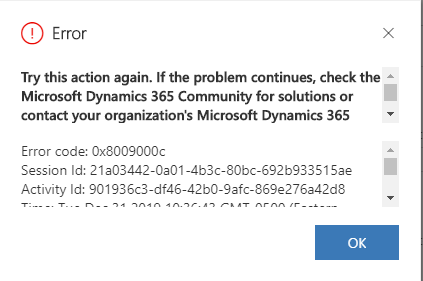
Can anyone help me make sense of this error message?
Trigger: Occurred when updating the Est. Close Date field on an Opportunity record.
Users effected: 1 single user so far. I could not replicate (I'm sys admin).
What I know:
- It is unique to this user, who shares the same setup as others
- note: I just provided him with Sys Admin privileges and the error was gone.
- It occurs randomly on some Opportunities and not others
- When navigating back to this record later he may be able to update without error (last time when reviewing it a day later it worked)
- The field has a custom plugin dependency which adds 'Posts' to the timeline (created before my time with this org). This should not be the cause, but I won't rule it out.
- The listed Error code "0x8009000C" represents "NTE_BAD_HASH_STATE Hash not valid for use in specified state".
- Google tells me: NTE_BAD_HASH_STATE. An attempt was made to add data to a hash object that is already marked "finished."
- Ok that kind of makes sense, but how is it that my user is causing this?
   at Microsoft.Crm.Extensibility.OrganizationSdkServiceInternal.Update(Entity entity, InvocationContext invocationContext, CallerOriginToken callerOriginToken, WebServiceType serviceType, Boolean checkAdminMode, Boolean checkForOptimisticConcurrency, Dictionary`2 optionalParameters)
   at Microsoft.Crm.Extensibility.OData.CrmODataExecutionContext.Update(Entity entity, UpdateOption updateOption)
   at Microsoft.Crm.Extensibility.OData.CrmODataServiceDataProvider.UpdateEdmEntity(CrmODataExecutionContext context, String edmEntityName, String entityKeyValue, EdmEntityObject entityObject)
   at Microsoft.Crm.Extensibility.OData.EntityController.PatchEntityImplementation(String& entityName, String key, EdmEntityObject entityDelta)
   at Microsoft.PowerApps.CoreFramework.ActivityLoggerExtensions.Execute[TResult](ILogger logger, EventId eventId, ActivityType activityType, Func`1 func, IEnumerable`1 additionalCustomProperties)
   at Microsoft.Xrm.Telemetry.XrmTelemetryExtensions.Execute[TResult](ILogger logger, XrmTelemetryActivityType activityType, Func`1 func)
   at lambda_method(Closure , Object , Object[] )
   at System.Web.Http.Controllers.ReflectedHttpActionDescriptor.ActionExecutor.<>c__DisplayClass10.<GetExecutor>b__9(Object instance, Object[] methodParameters)
   at System.Web.Http.Controllers.ReflectedHttpActionDescriptor.ExecuteAsync(HttpControllerContext controllerContext, IDictionary`2 arguments, CancellationToken cancellationToken)
--- End of stack trace from previous location where exception was thrown ---
   at System.Runtime.ExceptionServices.ExceptionDispatchInfo.Throw()
   at System.Runtime.CompilerServices.TaskAwaiter.HandleNonSuccessAndDebuggerNotification(Task task)
   at System.Web.Http.Controllers.ApiControllerActionInvoker.<InvokeActionAsyncCore>d__0.MoveNext()
--- End of stack trace from previous location where exception was thrown ---
   at System.Runtime.ExceptionServices.ExceptionDispatchInfo.Throw()
   at System.Runtime.CompilerServices.TaskAwaiter.HandleNonSuccessAndDebuggerNotification(Task task)
   at System.Web.Http.Controllers.ActionFilterResult.<ExecuteAsync>d__2.MoveNext()
--- End of stack trace from previous location where exception was thrown ---
   at System.Runtime.ExceptionServices.ExceptionDispatchInfo.Throw()
   at System.Runtime.CompilerServices.TaskAwaiter.HandleNonSuccessAndDebuggerNotification(Task task)
   at System.Web.Http.Dispatcher.HttpControllerDispatcher.<SendAsync>d__1.MoveNext()
Activity Id: 3b5d06b6-285b-42fb-94d8-0b7b1b1c0f06


