web
You’re offline. This is a read only version of the page.
close
Skip to main content

Notifications

Announcements

No record found.

Community site session details

Community site session details

Session Id :
Microsoft Dynamics AX (Archived)

Purchase Order Number Sequence Error:

(0) ShareShare
ReportReport
Posted on by 195

Hi guys,

One of our users is having the following issue in Production:

When creating a new PO under 91 - Procurement and Sourcing, it's pulling PO# 91-000194, which is an existing and Confirmed PO. When you finish the Header and hit Ok, it give the following error: "You are trying to create a purchase order with a purchase order number that already exists. Revise your number sequence setup for purchases and try again."

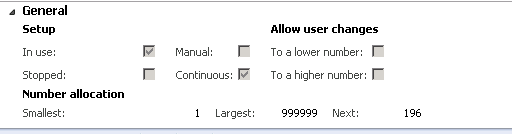
I've found the number sequence associated with POs for this company, and this shows it should be creating it as 196.

08076.capture.png

Next, I checked out the status list and it shows two free numbers:
Is there any other suggestions for trouble shooting this type of issue?

Thanks,

Kaleb

*This post is locked for comments

I have the same question (0)
  • Dick Wenning Profile Picture
    8,705 Moderator on at

    looks like, the numbersequence generated a number that is already used.

    you have to remove it from the tree list.

  • kmckelvey3 Profile Picture
    195 on at

    Could you please elaborate on the tree list? Not much experience on this piece of AX.

  • Suggested answer
    Community Member Profile Picture
    on at

    From the screenshot I can see that it is a continuous number sequence. Continuous number sequence would not let go of any number missing so it maintains a list of numbers that could not be used due to any sort of interruptions. Sometimes it runs into issues, however if the auto cleanup is setup, it should reduce it.

    Could you please go to the PO number sequence, then click on the "status list" in the action pane above and you should find the #194 there. Please post a screenshot of that if you could. Given that 194 is already existing as a PO, you could delete that line from the list and try again to create a PO.

Under review

Thank you for your reply! To ensure a great experience for everyone, your content is awaiting approval by our Community Managers. Please check back later.

Helpful resources

Quick Links

Responsible AI policies

As AI tools become more common, we’re introducing a Responsible AI Use…

Neeraj Kumar – Community Spotlight

We are honored to recognize Neeraj Kumar as our Community Spotlight honoree for…

Leaderboard > 🔒一 Microsoft Dynamics AX (Archived)

#1
Priya_K Profile Picture

Priya_K 4

#1
Martin Dráb Profile Picture

Martin Dráb 4 Most Valuable Professional

#3
Sukrut Parab Profile Picture

Sukrut Parab 2 Moderator

Last 30 days Overall leaderboard

Featured topics

Product updates

Dynamics 365 release plans
